Rest Assured
REST Assured is a Java library for validation of REST web services.
Benefits of REST Assured
-
REST Assured reduces the need for writing same section of code many times, which is required to set up an HTTP connection, send a request and receive and parse a response.
-
It supports for BDD (Behavior-Driven Development) by using test notation, Given, When and Then, which makes the tests human readable.
-
It provides interesting features such as,
a. Measuring Response Time
b. Validate Response Time
c. JSON Response Verification, etc
Configure rest-assured
In the pom.xml file add the rest assured dependency for maven
1 2 3 4 5 6 | |
Few interesting features of REST Assured
BDD supported syntax
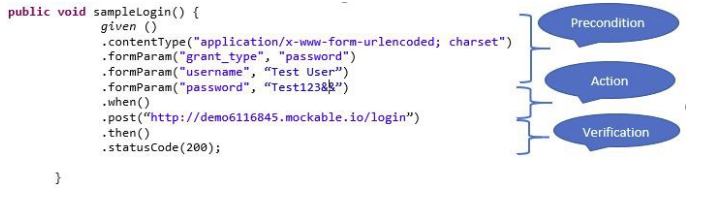
REST Assured provides BDD (Behavior Driven Development) supported format. It helps to write cleaner test codes which are human readable. In the request the pre-conditions are listed under the “Given” section. The action to perform is given under the “When” section. Finally, the verification is given under “Then” section
Handling parameters
Path Parameters
1 2 3 4 5 6 | |
Query Parameters
1 2 3 4 5 | |
Form Parameters
To send form parameter with the POST call
1 2 3 4 5 6 7 8 | |
Validate the status code
Let’s assume that we have to validate whether the status code is 200. You can simply achieve that
1 2 3 4 5 | |
Get the response time
If we have to measure the response time, we can achieve that using following code segment. You can get the response time in a specific time unit as desired.
1 2 3 4 5 6 7 8 9 10 11 12 | |
Validate the Response time
There can be situations where you want to validate the response time. You can simply validate whether the response time is below a predefined value using following method
1 2 3 4 5 6 | |
JSON response validation
Please refer the following JSON response
1 2 3 4 5 6 7 8 9 10 11 12 13 14 15 16 17 18 19 20 21 22 23 24 25 26 27 28 29 30 31 32 | |
1.Assume you are to validate whether the response contains all the books
1 2 3 4 5 6 7 8 | |
2. Assume you are to validate that the names of the books with a price greater than 500 correct
1 2 3 4 5 6 7 8 9 | |
Extract response data
WE can do that in two ways
1.Using built in REST Assured functionalities
2.Using JSON path
Using built in REST Assured functionalities
1.To extract the whole response as string
1 2 3 4 5 6 7 8 9 10 | |
- To extract a specific value, you can use the following code. Let’s assume that you are to extract the author of the first book
```` @Test public void extractSpecificValues(){ String author = given() .when() .get(“http://demoapplication/bookstore”) .then() .contentType(ContentType.JSON).extract(). path("mystore.book.author[0]"); System.out.println ("Here comes the Auther of the first book" + author); }
1 | |
@Test public void extractMultipleValues(){ Response response = given() .when() .get(“http://demoapplication/bookstore”) .then() .contentType(ContentType.JSON) .extract().response(); String firstAuthor= response.path("mystore.book.author[0]"); String secondAuthor= response.path("mystore.book.author[1]"); String thirdBookName= response.path("mystore.book.name[2]"); System.out.println ("Author of the first book is " + firstAuthor); System.out.println ("Author of the second book is " + secondAuthor); System.out.println ("Name of the third book is " + thirdBookName); } ```
Using JSON path
In order to use json-path functionalities you need to include the json-path maven dependency in the pom.xml file. The latest json-path maven dependency as of now
1 2 3 4 5 6 | |
1.Let’s assume that you are to extract the categories of the books.
``` @Test public void extractValueswithJsonPath (){ Response response = given() .when() .get(“http://demoapplication/bookstore”).andReturn(). then().contentType(ContentType.JSON).extract().response();
List
} ```