Using different gazetteers
Why?
● The standard gazetteer in ANNIE only performs exact
matching against the text
● An entry in a gazetteer list must match the word exactly in
the text (with the exception of capitalisation issues
depending on if the case-sensitive parameter is switched
on)
● But what if we want to match a plural word in the text with a
singular word in the gazetteer?
● Or different forms of a verb (says, saying, say, said etc.)
● It would be nice not to have to specify alternative forms of
each word in the lists
● Luckily, we have ways to do this
Advanced Gazetteers
There are several different gazetteers which let you do more
complex matching
● Flexible Gazetteer: enables matching against features on an
annotation (typically the Token's root feature)
● Feature Gazetteer: enables matching against features on an
annotation, but also enables adding/removing annotations and
features when a match is found
● Extended Gazetteer: as for the flexible gazetteer, but also
provides features for more powerful matching of partial words,
annotating prefixes and suffixes, and more versatile handling
of word boundaries and white space.
● BWP Gazetteer: approximate gazetteer based on
Levenshtein Edit Distance for strings, aiming to handle text
with noise and errors
Flexible Gazetteer
● Found in the Tools plugin
● Requires a regular gazetteer to be loaded - this should not be in
the pipeline, however
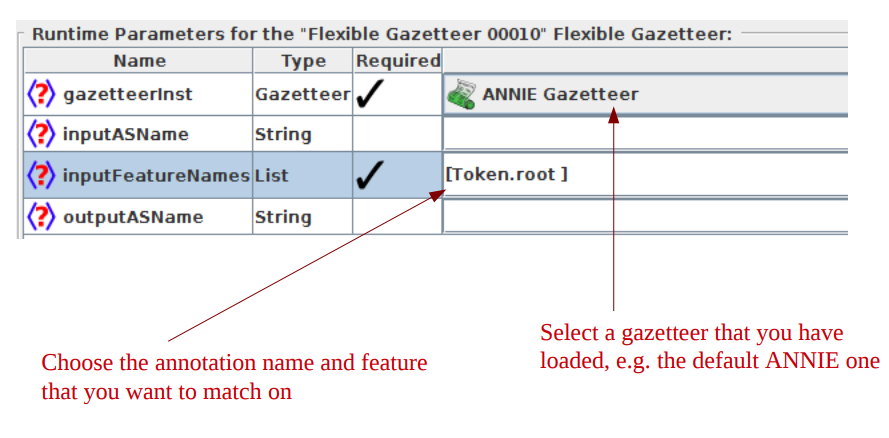
● Run-time parameters let you specify:
- ● the regular gazetteer to use
- ● the annotations and features to match on
- ● input and output annotation sets
● A typical use for this is to match against the root form of a word
(e.g. dogs -> dog; laughing -> laugh)
● To do this, you need to specify Token.root as the annotation and
feature to match. You also need to make sure you have run the
morphological analyser first, so you have root features on your
Tokens
Flexible gazetteer run-time parameters
Hands-on with flexible gazetteer
● Load ANNIE
● Load the Tools plugin
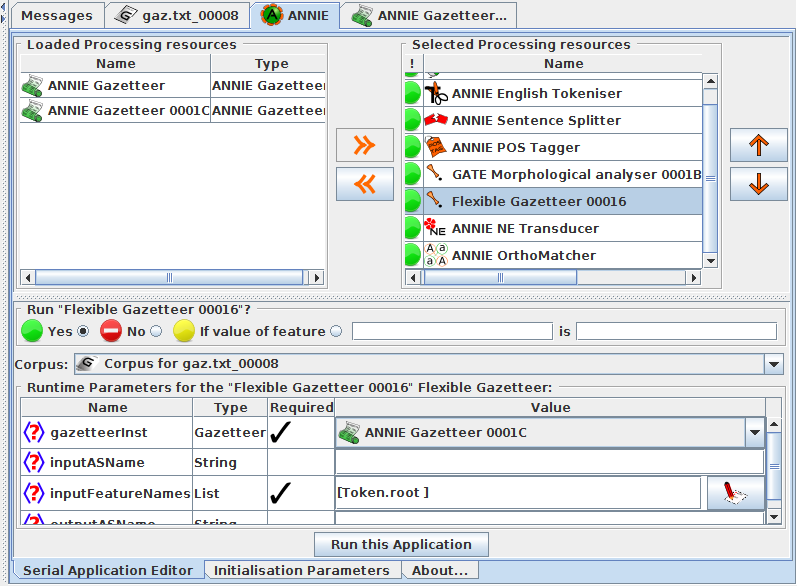
● Create a new Flexible Gazetteer, and select Token.root as the
input Feature name
● Create a new morphological analyser
● Go to the ANNIE application and add the morphological analyser
and flexible gazetteer to the pipeline after the POS tagger
● Select the ANNIE gazetteer which you have loaded into the gate by using your own def file as the gazetteer instance to use in
the Flexible Gazetteer
● Remove the ANNIE gazetteer from the application (but don't
remove it from GATE) or switch it off
● Try it on some text!
Inspecting Result
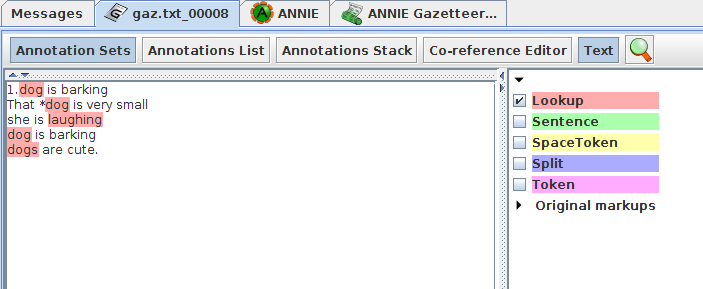
In our def file we have only the root words 'dog' and 'laugh' but by using flexible gazetter , the words 'dogs' and 'laughing' and word 'dog' coming immediately after * are also selected
Extended Gazetteer
● Found in the StringAnnotation plugin Plugin Repository
“Additional Plugins from the GATE Team”
● Faster loading, uses much less memory than regular gazetteer
● Needs annotations that identify words and whitespace
● Can limit matching to just within containing annotations
● This PR can be used for direct matching of document text or
indirect matching of feature values
● Can specify separately whether to match at the beginning and/or
the end of words
● Can use (gzip) compressed list files (.lst.gz)
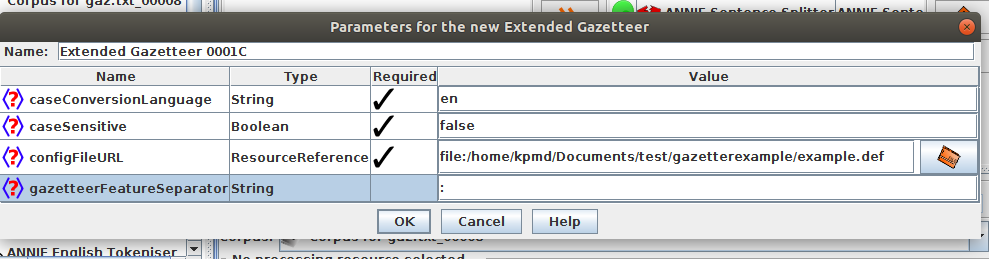
Init parameters
● caseSensitive: false if case should be ignored for matching
● configFile URL: specify the definition/config file – similar
to the “listsURL” parameter on the ANNIE gazetteer
● caseConversionLanguage: Specify the language to use
for converting characters to upper case when caseinsensitive
matching (e.g. ß→SS for de) . Default is en
(English)
● gazetteerFeatureSeparator: same as for the ANNIE
gazetteer (“\t” tab character is the default) but here we have used ":"
● => no encoding parameters, list files have to be UTF-8
encoded
Run-time parameters
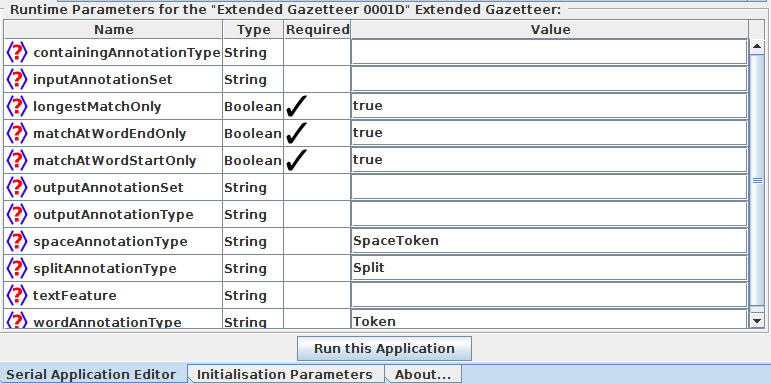
● containingAnnotationType: if an annotation type is given, then
matching is done only fully within the span of such annotations.
E.g. DocumentContent, Sentence.
● longestMatchOnly: if set to true, then only the longest match is
used and all shorter matches are ignored.
● matchAtWordEndOnly: if true, then the end of a match can only
occur at the end of a word annotation. Typically set to true.
● matchAtWordStartOnly: if true, then the start of a match can
only occur at the start of a word annotation. Typically set to true.
● textFeature: feature of the word annotation to match on (as for
FlexibleGazetteer). Typically left empty or set to root.
● outputAnnotationType: in case you want to change the name
of the annotation to be created on a match (instead of Lookup)
● spaceAnnotationType: the annotation type that identifies space
between words. Default is SpaceToken.
● splitAnnotationType: the annotation type that identifies
positions in the document that should not be crossed by
matches. Default is Split.
● wordAnnotationType: type of annotations that define the word
boundaries of the text that should be used for matching or if
matching by feature is used, the annotations containing the
feature. Default is Token.
Extended gazetteer cache files
● When a gazetteer is first loaded from a .def file, then the
ExtendedGazetteer will create a new gazetteer cache file.
● This cache file has the same name as the .def file but with
a file extension ".gazbin" instead of ".def".
● When the gazetteer gets loaded and such a cache file
exists, the cache file will be loaded instead of the original
files.
● NOTE: if a cache file exists, it will always be used, even if
the .def or any .lst file has been changed in the meantime.
If you update the gazetteer, make sure you select “Remove
cache and re-initialise” in the GUI
Inspecting Results:
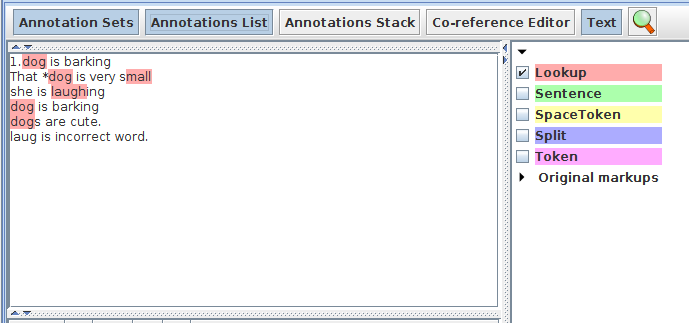
● Here we have set matchAtWordEndOnly and matchAtWordStartOnly to "false", it means it matches the words in the list file irrespective of ending and starting of the word ,that means it can have anything at the start and end position of the word .
- ● so it matches mall in the word small
- ● It matches laugh in the word laughing
Note: If these parameters are set to true then only the exact words are matched from the list.
● As longestMatchOnly is set to false it matches all the words in the list irrespective of longest match
Feature gazetteer
● Found in the StringAnnotation plugin
● Enables adding/removing annotations/features when a match is
found
- ● For example, if tokens have a root feature and there is a
gazetteer list that has as a feature the frequencies of English
word roots in some corpus, the "add features" action can be
used to enrich the token annotations with word frequencies.
- ● filter annotations: if there is a gazetteer of stopwords, the
string or root feature of existing token annotations can be
matched and the "remove annotation" action can be used to
remove these annotations if a stopword is matched.
Init parameters
● exactly the same as for the ExtendedGazetteer
● Note: this gazetteer uses the cache, .def and .lst files in
exactly the same way as the ExtendedGazetter. If the
ExtendedGazetteer and/or FeatureGazetteer load from the
same files using the same Init-parameters, only one shared
copy is used in memory.
Run-time parameters
● containingAnnotationType: If an annotation type is given, then
matching is done only within the span of such annotations.
● InputAnnotationSet: the set that contains the annotations to be
updated, if annotations are updated
● matchAtStartOnly: if true, then a match must be found at the
start of the value of the feature, if false, a match may start
anywhere.
● matchAtEndOnly: if true, then a match must be found that ends
at the end of the value of the feature, if false, a match may end
anywhere.
● outputAnnotationType: in case you want to change the name
of the annotation to be created on a match, if annotations are
created (instead of Lookup)
● wordAnnotationType: the annotation type that is used for
matching. For example Token or Lookup.
● textFeature: the name of a feature of the word annotation which is
used for matching, e.g. root or id
● processingMode: select an option from:
- ● AddFeatures: add all features from the def file or the gazetteer
entry which are not already present in the annotation
- ● OverwriteFeatures: overwrite all features (if any existing) from
the def file or the gazetteer entry with the new values
- ● RemoveAnnotation: delete the annotation from the input AS
- ● AddNewAnnotation: add a new annotation to the output AS
- ● KeepAnnotation: keep annotation if match, else remove
Inspecting results
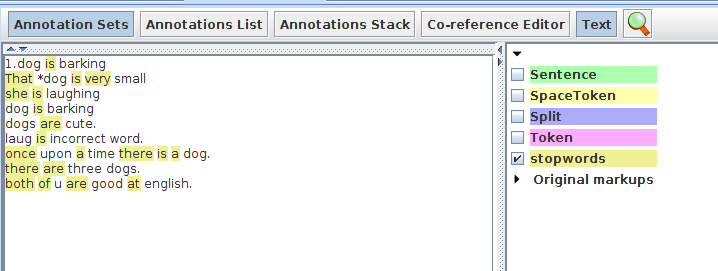
● Here we are creating new annotation "stopwords" from the words which are matched from the list file,here the annotation type that is used for matching is "token" and the feature which is used for matching is "string" of the Token annotation
● In the same way we can remove the "stopwords" annotation by selecting RemoveAnnotation in the processing mode
● we can add the all the features from the def file which are not present in the annotation by selecting AddFeatures option