Table-Valued-Parameters
Table-valued parameters provide an easy way to marshal multiple rows of data from a client application to SQL Server without requiring multiple round trips or special server-side logic for processing the data. You can use table-valued parameters to encapsulate rows of data in a client application and send the data to the server in a single parameterized command. The incoming data rows are stored in a table variable that can then be operated on by using Transact-SQL.
Column values in table-valued parameters can be accessed using standard Transact-SQL SELECT statements. Table-valued parameters are strongly typed and their structure is automatically validated. The size of table-valued parameters is limited only by server memory.
Table-valued parameters are declared using user-defined table types. To use a Table Valued Parameters we need follow steps shown below:
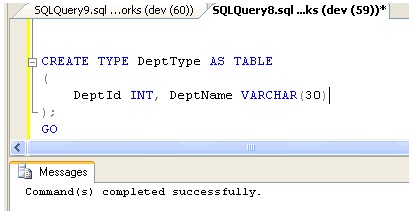
- Create a table type and define the table structure
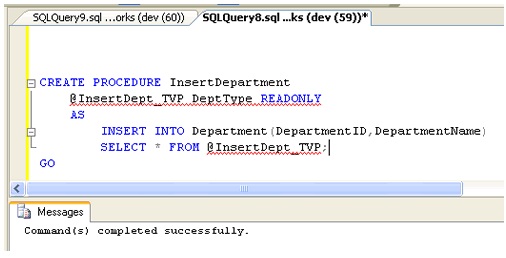
- Declare a stored procedure that has a parameter of table type.
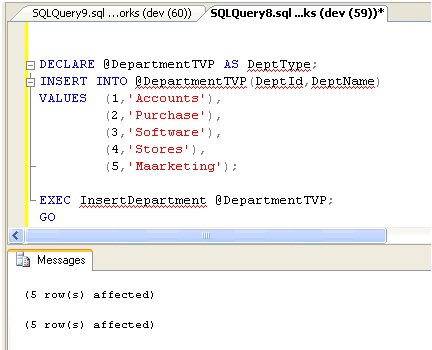
- Declare a table type variable and reference the table type.
- Using the INSERT statement and occupy the variable.
- We can now pass the variable to the procedure.
Example,
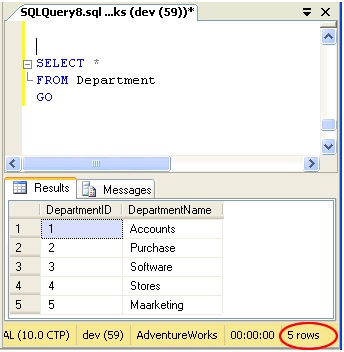
Let’s create a Department Table and pass the table variable to insert data using procedure. In our example we will create Department table and afterward we will query it and see that all the content of table value parameter is inserted into it.
Department:
1 2 3 4 5 6 | |
1. Create a TABLE TYPE and define the table structure:
1 2 3 4 5 | |
2. Declare a STORED PROCEDURE that has a parameter of table type:
1 2 3 4 5 6 7 | |
Important points to remember :
Table-valued parameters must be passed as READONLY parameters to SQL routines. You cannot perform DML operations like UPDATE, DELETE, or INSERT on a table-valued parameter in the body of a routine.
– You cannot use a table-valued parameter as target of a SELECT INTO or INSERT EXEC statement. A table-valued parameter can be in the FROM clause of SELECT INTO or in the INSERT EXEC string or stored-procedure.
3. Declare a table type variable and reference the table type.
1 | |
4. Using the INSERT statement and occupy the variable.
1 2 3 4 5 6 | |
5. We can now pass the variable to the procedure and Execute.
1 2 | |
Let’s see if the Data are inserted in the Department Table
Conclusion:
Table-Valued Parameters is a new parameter type in SQL SERVER 2008 that provides efficient way of passing the table type variable than using the temporary table or passing so many parameters. It helps in using complex business logic in single routine. They reduce Round Trips to the server making the performance better.