Developing IE for other languages
Finding available resources
• When creating an IE system for new languages, it's easiest to
start with ANNIE and then work out what needs adapting
• Check the resources in GATE for your language (if any)
- – Check the GATE plugin manager (hint: the language
plugins begin with “Language:”)
- – Check for things like POS taggers and
stemmers which have various language options
• Check which PRs you can reuse directly from ANNIE
- – Existing tokeniser and sentence splitter will work for
most European languages. Asian languages may require
special components.
• Collect any other resources for your language, e.g POS
taggers. These can be implemented as GATE plugins.
Which resources need modifying?
We can divide the PRs into 3 types depending on how much
modification they need to work with other languages:
• language-independent: work with different languages with
little or no modification
• easily modifiable: can be easily modified for a different
language with little programming skill
• language-dependent: these need to be replaced by an
entirely new PR
Language-independent resources
• ANNIE PRs which are totally language-independent are the
Document Reset and Annotation Set Transfer
• They can be seen as “language-agnostic” as they just make use of
existing annotations with no reference to the document itself or the
language used
• The tokeniser and sentence splitter are (more or less) languageindependent
and can be re-used for languages that have the same
notions of token and sentence as English (white space, full stops etc)
• Make sure you use the Unicode tokeniser, not the English tokeniser
(which is customised with some English abbreviations)
• Some tweaking could be necessary - these PRs have resources that
are easy to modify (with no Java skills needed)
Easily modifiable resources
• Gazetteers are normally language-dependent, but can
easily be translated or equivalent lists found or generated
- – Lists of numbers, days of the week etc. can be
translated
- – Lists of cities, countries, etc., can be found on the
web
• Gazetteer modification requires no programming or
linguistic skills
• The Orthomatcher will work for other languages where
similar rules apply, e.g. John Smith --> Mr Smith
• Might need modification in some cases: some basic Java
skills and linguistic knowledge are required
Language-dependent resources
• POS taggers and grammars are highly language-dependent
• If no POS tagger exists, a hack can be done by replacing the
English lexicon for the Hepple tagger with a language-specific
one
• Some grammar rules can be left intact, but many will need to
be rewritten
• Many rules may just need small modifications, e.g., component
order needs to be reversed in a rule
• Knowledge of some linguistic principles of the target language
is needed, e.g., agglutination, word order
• No substantial programming skills are required, but knowledge
of JAPE and basic Java are necessary
Conditional Processing
What is conditional processing?
• In GATE, you can set a processing resource in your
application to run or not depending on certain circumstances
• You can have several different PRs loaded, and let the
system automatically choose which one to run, for each
document.
• This is very helpful when you have texts in multiple
languages, or of different types, which might require different
kinds of processing
• For example, if you have a mixture of German and English
documents in your corpus, you might have some PRs which
are language-dependent and some which are not
• You can set up the application to run the relevant PRs on the
right documents automatically.
Conditional processing with different languages
● Suppose we have a corpus with documents in German and
English, and we only want to process the English texts.
● First we must distinguish between the two kinds of text, using
a language identification tool
● For this we can use TextCat, which has a GATE plugin
(Language Identification)
● We use this (in default mode) to add a feature on each
document, telling us which language the document is in
● Then we run a conditional processing pipeline, that only runs
the subsequent PRs if the value of the language feature on
the document is English
● The other documents will not be processed
Hands-on with multilingual corpora
● Create a new corpus in GATE and populate it with the two
documents in which one is in English language and the other is in German language.
● Select utf-8 as the encoding when you populate the corpus
● You should have one English and one German document loaded
● Load the Language Identification plugin and load the TextCat
Language Identification PR
● Create a new application
● Add TextCat to the end of the application and run it on the
corpus
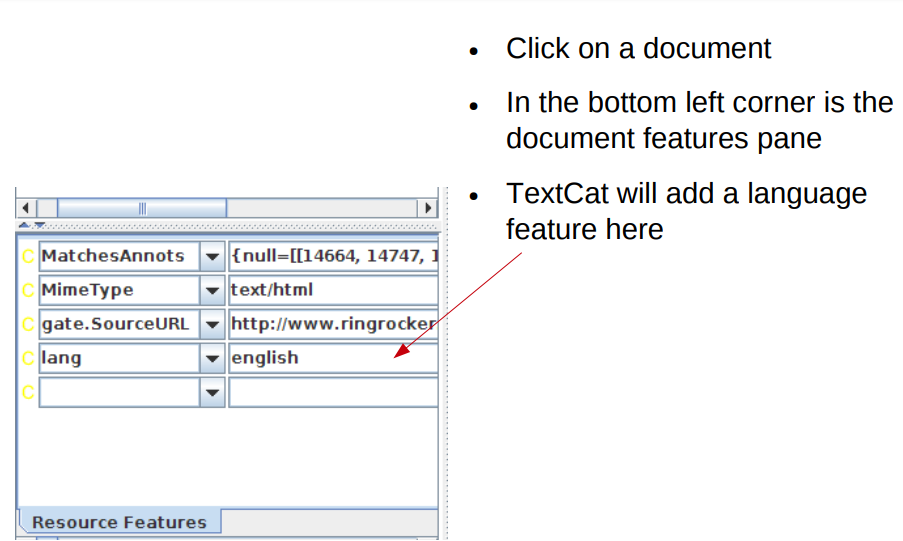
● Examine the document features for both documents
Check the language of the documents
What if we want to process the German and the English?
If we want to process both German and English documents with different resources, we have a couple of options
- 1. We can just call some language-specific PRs
conditionally, and use the language-neutral PRs on all
documents
- 2. We can call different applications from within the main
application
The following two hands-on exercises demonstrate the
difference between these
download the hands-on material for practising
Click Here
1. Hands-on with multilingual apps
● Load the application annie+german.gapp
● Look at the various PRs in the app: some are set to run on
English documents, some on German ones, and some on
all documents
● Run the application on your corpus
● The German document should now be annotated with
German NEs and the English document with English ones
● There will be some mistakes (we're not using a German
POS tagger here so results are weaker than usual)
2. Hands-on with multilingual apps
● Close recursively all applications you have loaded in GATE (keep
the corpus)
● Load ANNIE
● Load german-ie.gapp from the hands-on materials
● Create a new conditional corpus pipeline
● Create a TextCat PR and add it to the new pipeline created
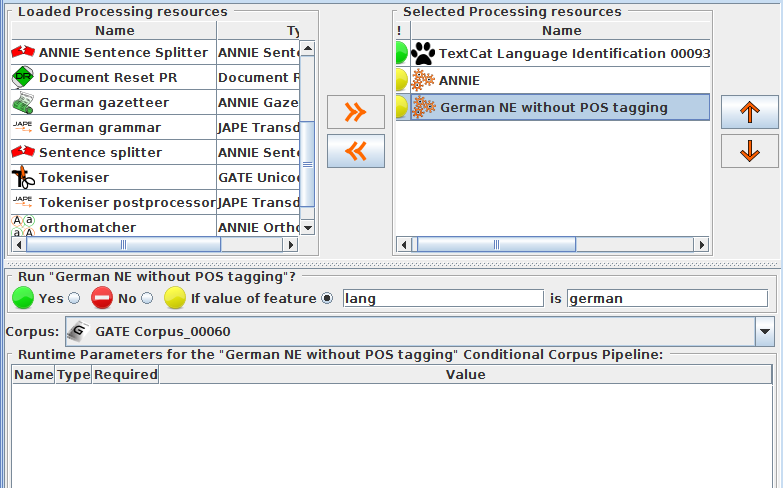
● Add the ANNIE and German applications to the pipeline (in either
order) after the TextCat
Set ANNIE to run on English documents and the German app to
run on German ones
● Save the main application and run it on your corpus
Your application should look like this:
Another example
● In one application we developed, we found a problem when
running the Orthomatcher (co-reference) on certain texts
where there were a lot of annotations of the same type.
● To solve this issue, we first checked to see how many
annotations of each were present in a document
● If more than a certain number were present, we added a
document feature indicating this
● We then set the orthomatcher to only run on a document
which did not contain this feature.
Grammar to check number of annotations
If there are more than 200 annotations of one type, don't run the orthomatcher
1 2 3 4 5 6 7 8 9 10 11 | |