CodeExtract User Manual
Index 1. CDI Smart Queue 2. Query Alerts 3. Admit Criteria 4. Compliance Audits 5. Core Measures 6. Question and Answering
CDI Smart Queue 
CDI Smart Queue facilitates work flow for different types of users like CDS,CDS Auditor,Super Auditors to do CDS Coding & Auditing.
Unassigned Queue
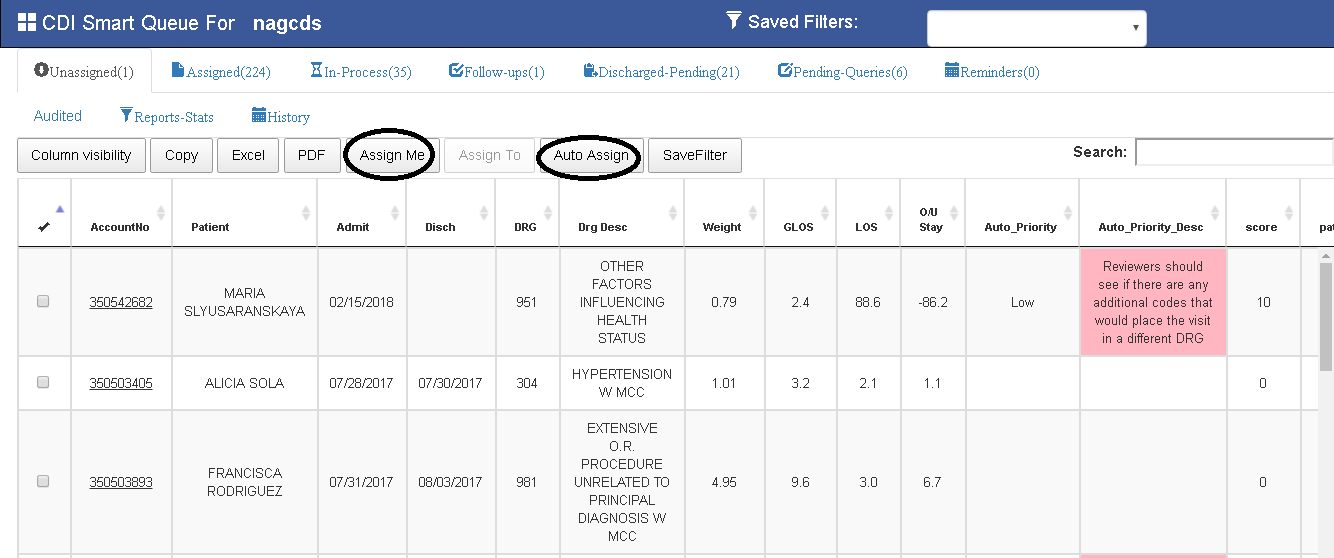
All the new patient Accounts will be listed in this Queue.
Assign Me:
CDS login's into application and selects accounts in queue and clicks on AssignMe Button to assign accounts for them.
Auto Assign:
CDS can also click on Auto Assign button , to get assigned with top 5 accounts(Accounts Auto Assignment count can be user defined from Admin settings).
Assigned Queue
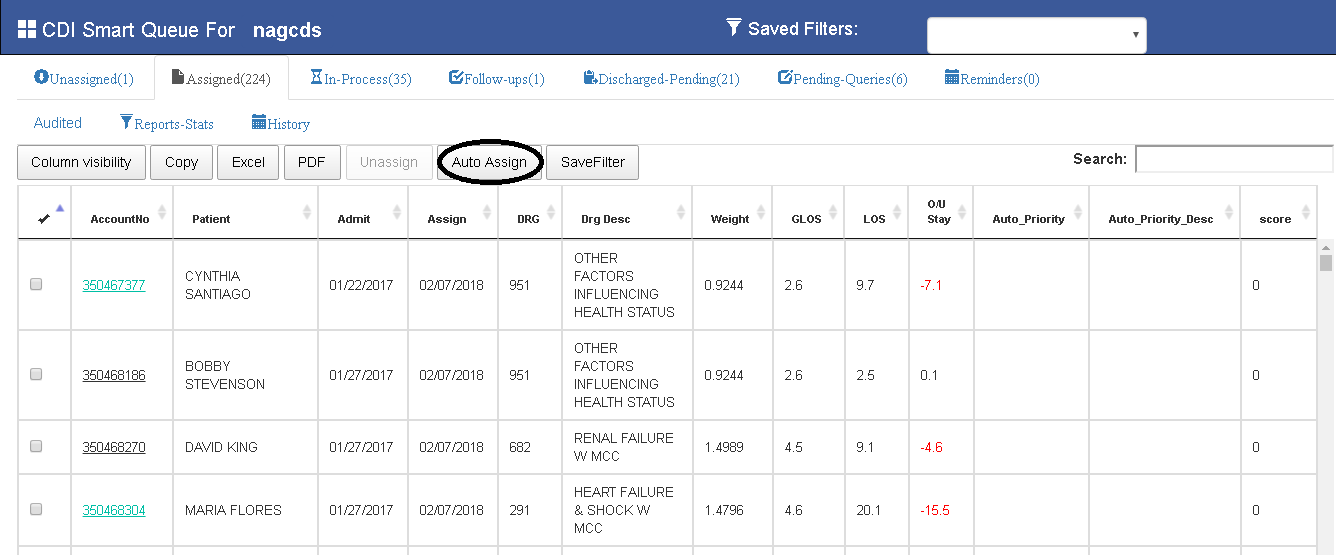
All Assigned Accounts by individual CDS will be listed in this queue.
- If user open account from this queue, immediately account will be moved to IN-Process Queue.
- If user opens account and it is discharged , account will be moved into Discharged-Pending Queue.
Auto Assign:
CDS can also click on Auto Assign button , to get assigned with top 5 accounts.
In-Process Queue
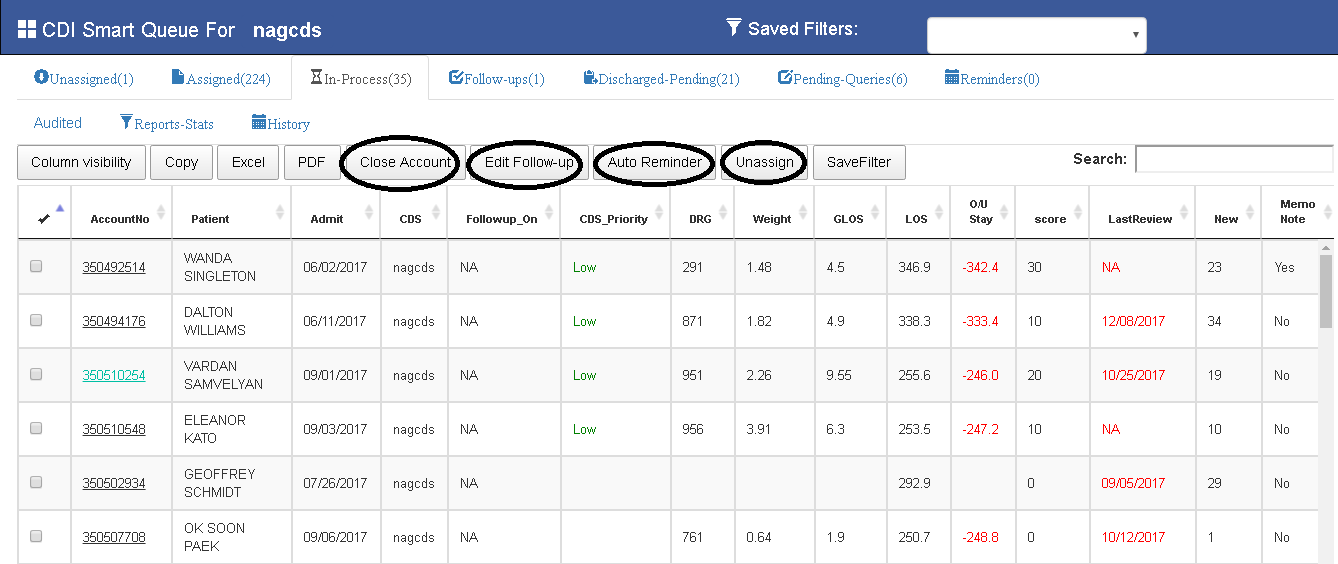
Accounts which are need to be worked/working by CDS will be listed in this Queue.
Close Account :
If CDS work is Done on that account , he selects account and Clicks on CloseAccount button.Then account will be moved from all CDS Queues.
Follow-Up(CDI DashBoard/View Documents) / Edit-FOllow-Up (CDI Smart Queue) :
If CDS wants to Follow-Up any condition triggered from KPAI like MCC,CC,Procedure,PDX.....etc.CDS can create follow-Up from CDI-DashBoard / View Documents / CDISmart Queue.
Add Remainder(CDI DashBoard/View Documents) / Auto Remainder (CDI Smart Queue) :
CDS can add remainders to remind on a provided factors on a particular date.CDS can Add Remainder from CDI-DashBoard / View Documents / CDISmart Queue.
Unassign :
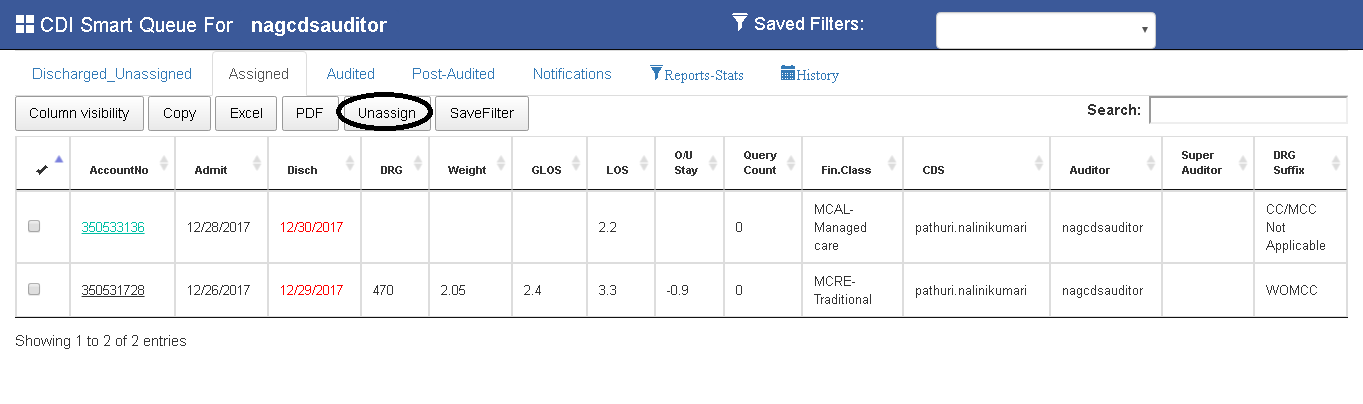
CDS can Unassign account, from In-Process Queue.Select account from queue and click on Unassign button.
Follow-Ups Queue
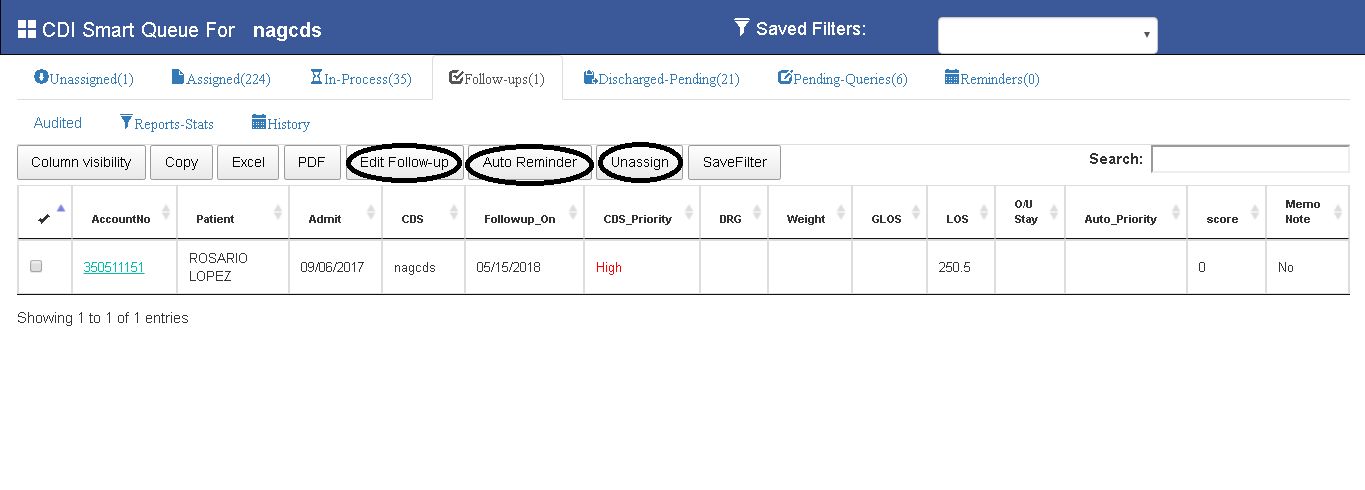
- CDS can set Follow-Ups on accounts on basis of different conditions like MCC,CC,Procedure,PDX,Query.....etc.
- Follow-Up's will be triggered on current date.CDS reviews triggered Follow-Up and closes followup.
- If Follow-Up is triggered,account in Un-Assigned / Discharged will be moved to Follow-Up Queue.
- If Cds clears followUps or if FollowUp date is greater than current date , then again Account will be listed in InProcess/Discharged-Pending Queues.
CDS can Edit FOllow-Up , Auto Remiander (Add Remainder),UnAssign accounts from Follow-Ups Queue.
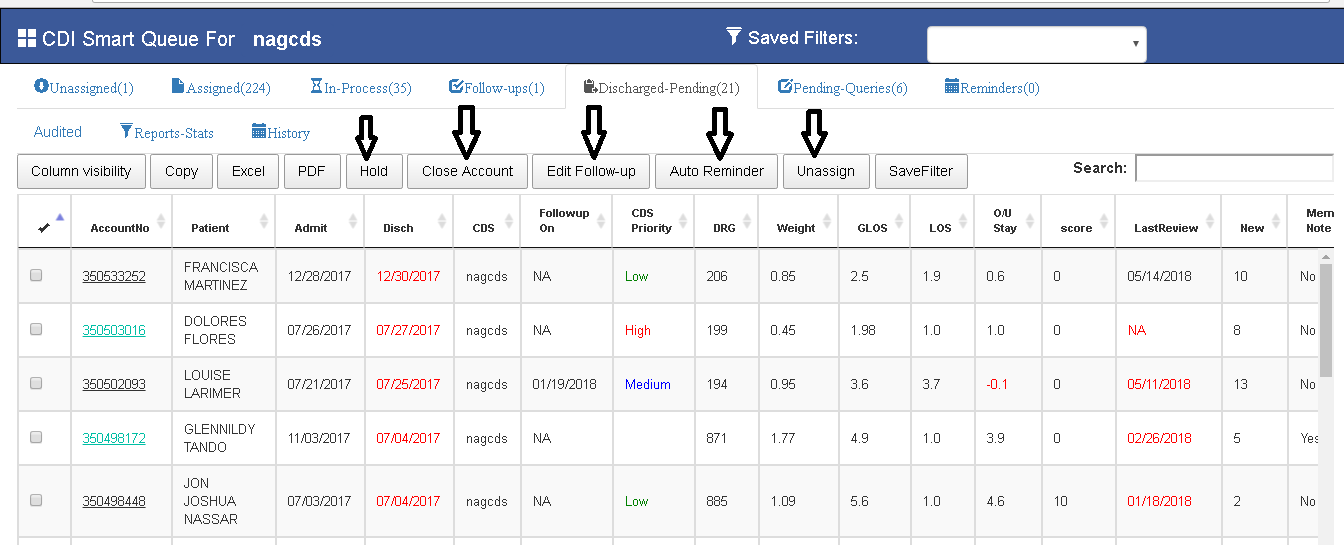
Discharged-Pending Queue
- All Discharged & unclosed accounts will be listed in this Queue.
- CDS can Edit Follow-Up , Auto Remainder (Add Remainder),UnAssign accounts from Follow-Ups Queue.
- CDS can Close Account from this queue, Select Account and click on CLose account.
- CDS needs to HOLD / CLOSE account if account is discharged for CDS-Coder Reconciliation(other module).
CDS can Edit FOllow-Up , Auto Remainder (Add Remainder),UnAssign accounts from Discharged-Pending Queue also.
Pending-Queries
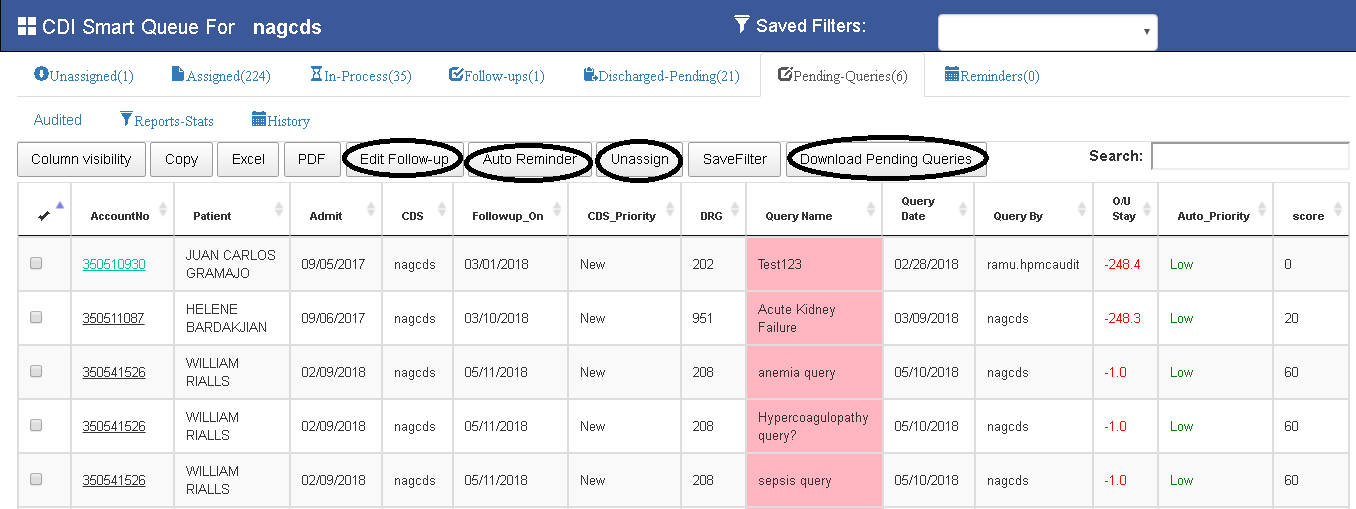
All queries done by CDS on accounts will be listed in this account. CDS can Edit FOllow-Up , Auto Remiander (Add Remainder),UnAssign accounts from Pending - Queries also.Need to clarify to maintain these features in this queue.
CDS can Download all queries by clicking on Download Pending Queries button.
Remainders
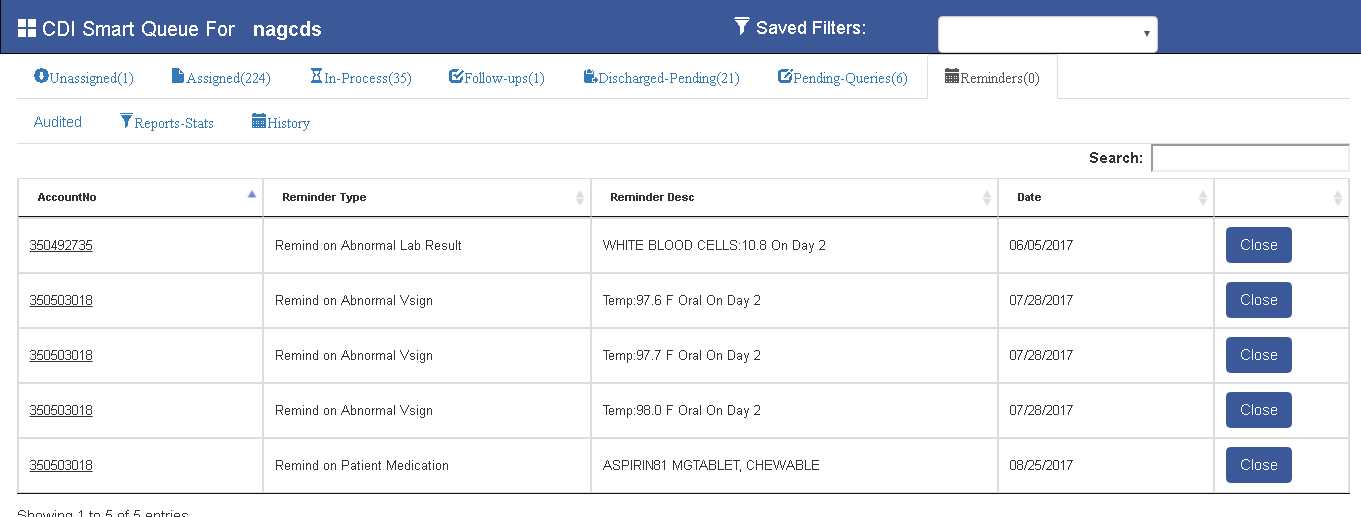
All remainders Triggered will be listed in this Queue. CDS review's remainders and should close these remainders by clicking on Close-Button.
CDS Auditor Specific Queues
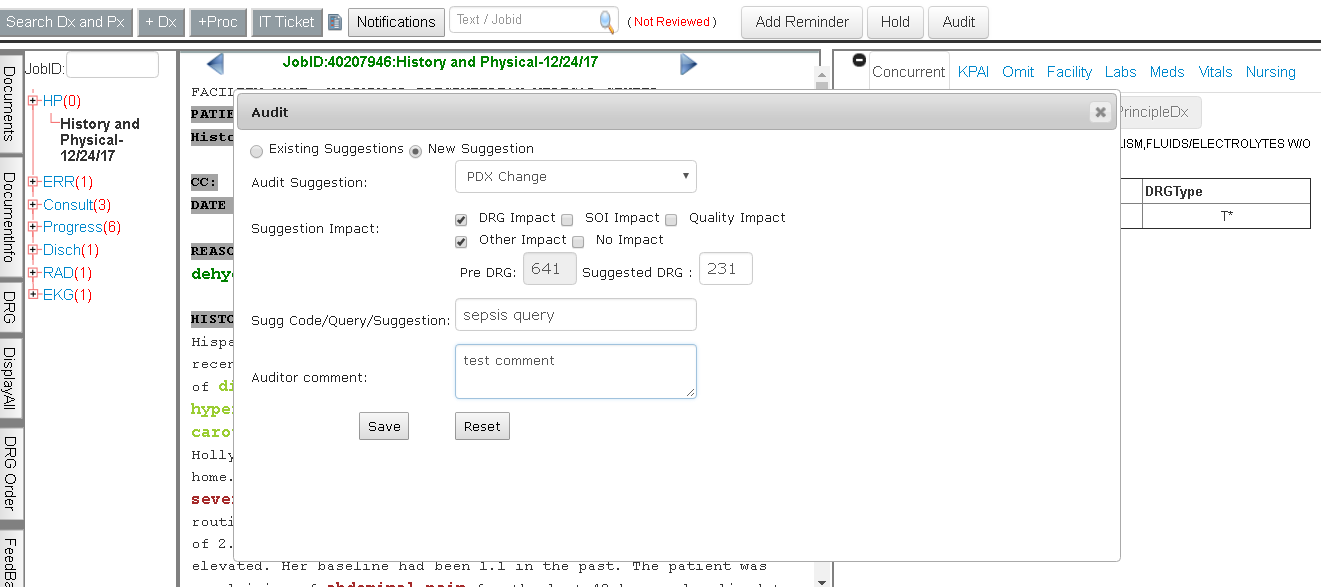
Cds auditor reviews cds coding and queries , if he find any issue with account , he adds suggestion from Audit Window present in View Documents to communicate with CDS.So Auditor keeps on adding suggestions till he feel accounts is completely coded.
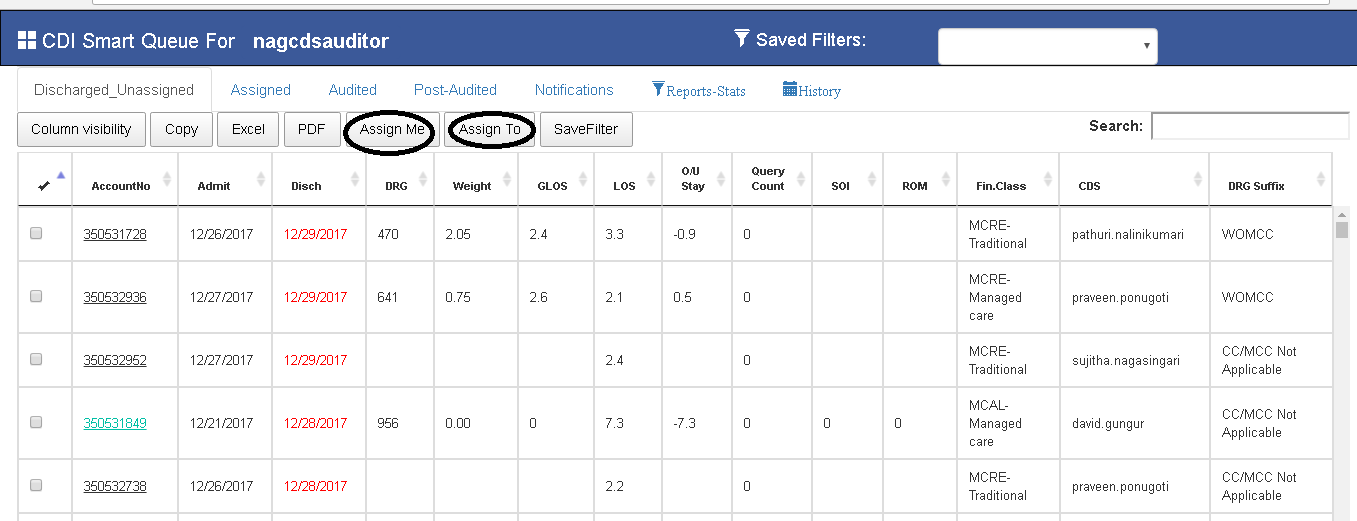
Discharged-UnAssigned (CDS-Auditor).
This is CDS-Auditor user specific queue. This queue contains all Discharged accounts . CDS-Auditor assigns account himself by clicking on AssignMe button or can assign to other auditors from AssignTo button.
Assigned (CDS-Auditor).
This queue contains CDS-Auditor assigned accounts to audit CDS work / CDS reviewed account. CDS Auditor has only add suggestions,CDS-Auditor opens account and adds Suggestion from Audit window in View Documents.
Add Suggestion
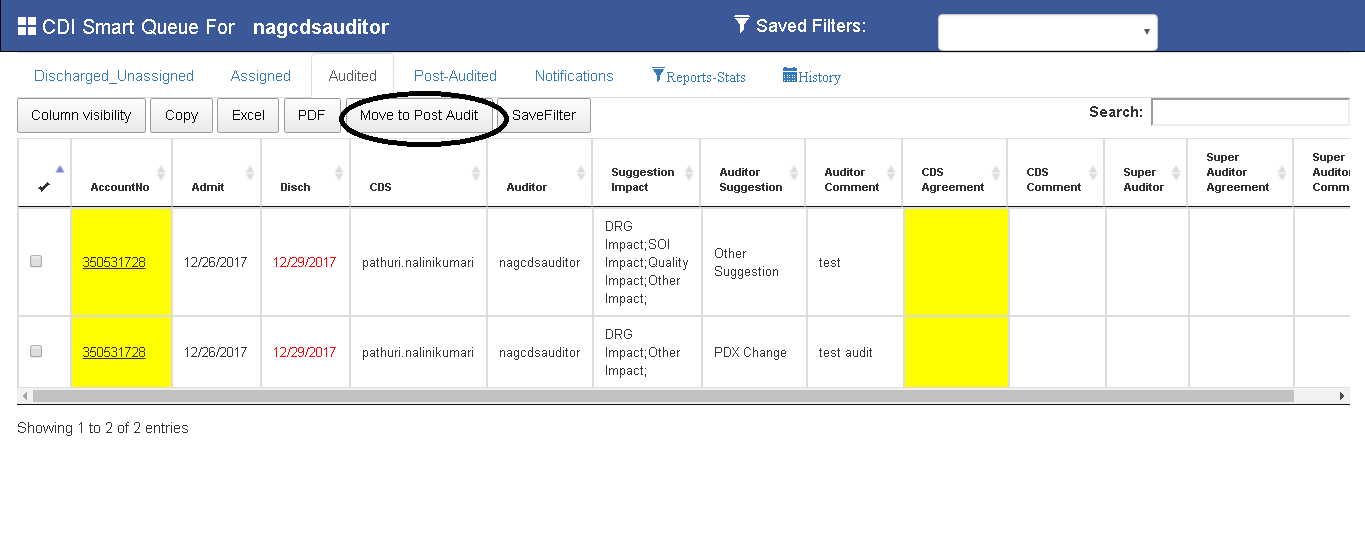
Audited (CDS & CDS-Auditor)
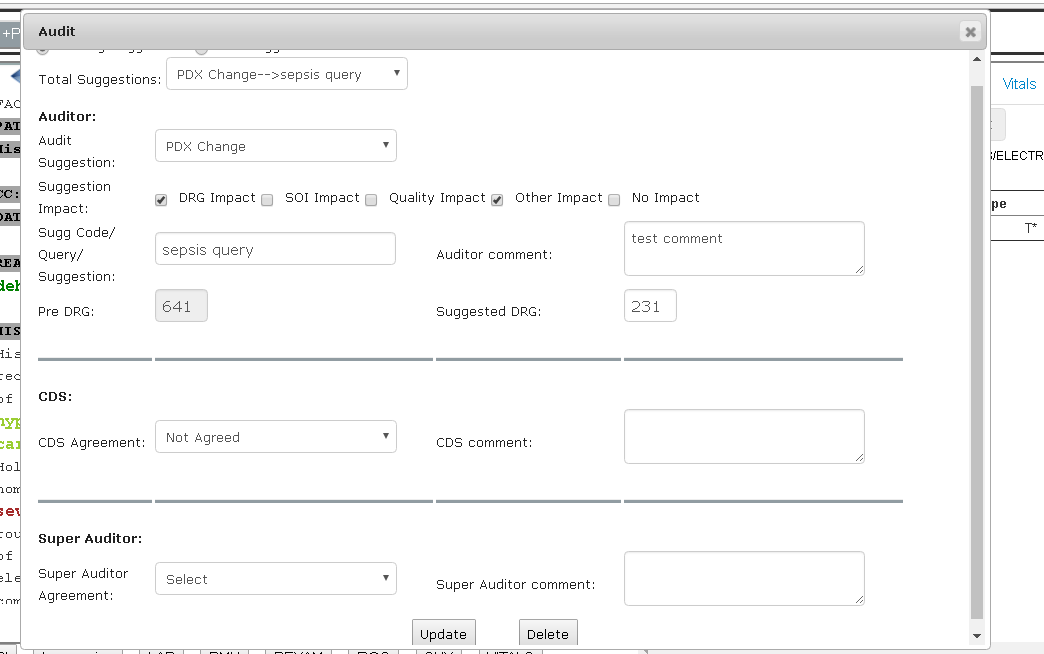
This is common queue in CDI Smart Queue for both CDS & CDS-Auditor. This queue contains Audit Suggestions added by CDS Auditor.
CDS gives replies to Existing Suggestions from AUDIT window of View-Documents.
CDS Auditor Checks CDS Agreement and Super Auditor Agreement(if needed) and moves record to Post-audited queue by clicking on Move To Post Audit button
Move To Post Audit:
On selecting Record in Audit queue and clicking on move to post audit button , moves record from Audited queue Post-Audited Queue.
POST-Audited(CDS-Auditor).
This Queue is to list all the audit Suggestions before Completing Audit.One Complete Audit is done on account account will be moved from all CDS queues.
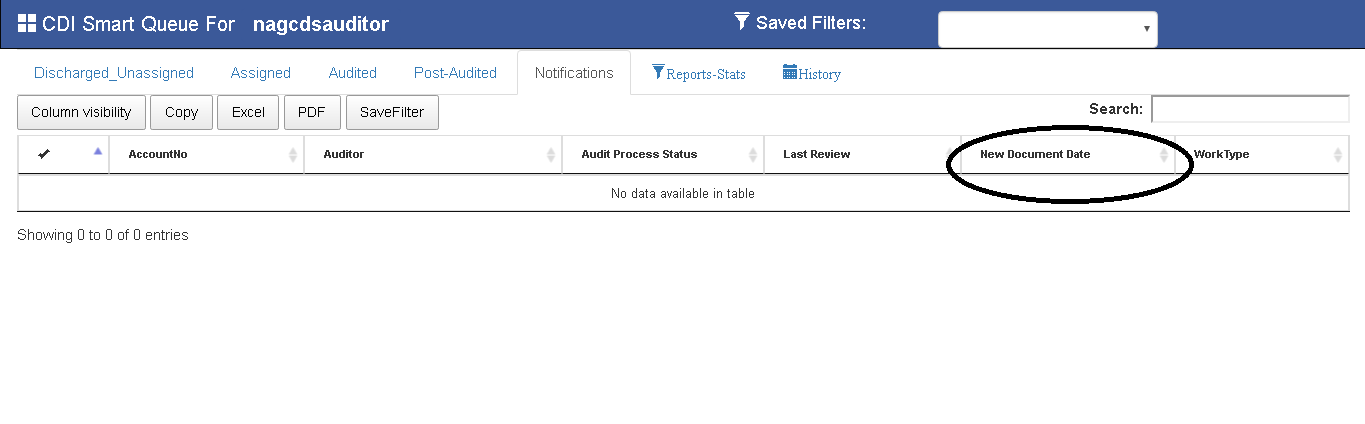
Notifications(CDS-Auditor).
Notifications are user defined requirements to display reminder for New document in cds-auditor assigned accounts.
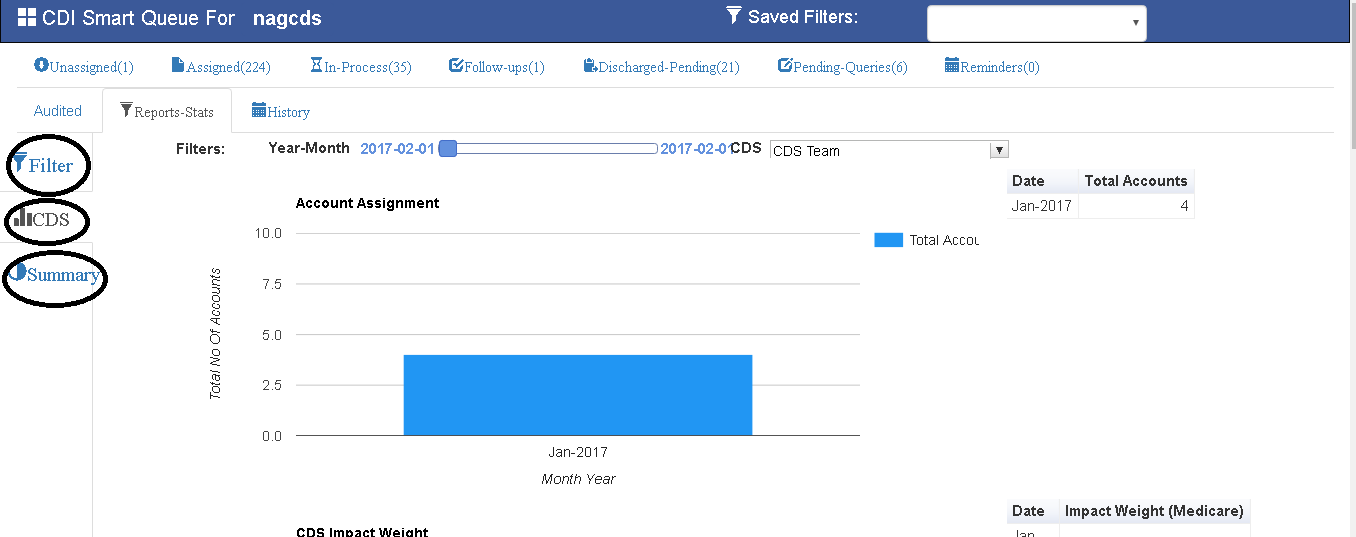
Reports - Stats(CDS & CDS-Auditor)
Filter:
Filter is to retrieve accounts on different user defined requirements.
CDS:
This Section shows bar graphs on basis on CDS Performance.
SUMMARY:
This Section shows Query related response rate & Query Impact.
CDI-DASHBOARD 
- CDI DASH BOARD shows all the patient crucial information in one screen to facilitate CDS to do coding and querying.
- CDS can view patient demographics (on top), Patient DRG and coding related info (on left panel), and Labs, medication and vital information (In central panel) and below that patient radiological impression information.
- KPAI showing this information by auto extracting from patient EMR documents using NLP tools.
- CDS can make query by selecting required criteria from this dashboard by just click on this labels.
- KPAI will also generate Query alerts automatically based on patient document, CDS can use these queries to generate final queries.
- Concurrent tab will have coding details by currently processed by CDS, on besides this tab there is KPAI tab, contains all coding details generated by the system.
- CDS can upvote or downvote the codes generated by KPAI tool, and upvoted codes will be added to the concurrent tab.
- On top of the coding details user can do DRG calculation using both MSDRG and APR DRG calculators.
-

### CDS Queries: On bottom of the CDS dashboard user can see manually generated queries (by cds), Alerts (generated by KPAI System) and responded queries.  ### View Patient Documents: On top of the Dashboard there is button (View Documents) to see all patient related documents and coding details. 
In View Documents,CDS can see documents on left side panel and all coding related information on right side panel.