ANNIE: A Nearly New Information Extraction System
Basic Introduction to NER
Traditionally, NER is the identification of proper names in texts, and their classification into a set of predefined categories of interest (Person,Organisation,Location,Date and time expressions)
Why is NE important? NE provides a foundation from which to build more complex IE systems
• Relations between NEs can provide tracking, ontological information and scenario building
• Tracking (co-reference): “Dr Smith”, “John Smith”, “John”, “he”
• Ontologies: “Athens, Georgia” vs “Athens, Greece”
Typical NE pipeline • Pre-processing (tokenisation, sentence splitting,morphological analysis, POS tagging)
• Entity finding (gazetteer lookup, NE grammars)
• Coreference (alias finding, orthographic coreference etc.)
• Exporting to database / XML / ontology
ANNIE
ANNIE is a ready made collection of PRs that performs IE on unstructured text. The ANNIE application contains a set of core PRs:
• Tokeniser
• Sentence Splitter
• POS tagger
• Gazetteers
• Named entity tagger (JAPE transducer)
• Orthomatcher (orthographic coreference)
There are also other useful PRs, which are not used in the default application, but can be added if necessary, e.g.
• NP chunker (in the Tagger:NP Chunking plugin)
• ANNIE VP Chunker (in the Tools plugin)
Core ANNIE components
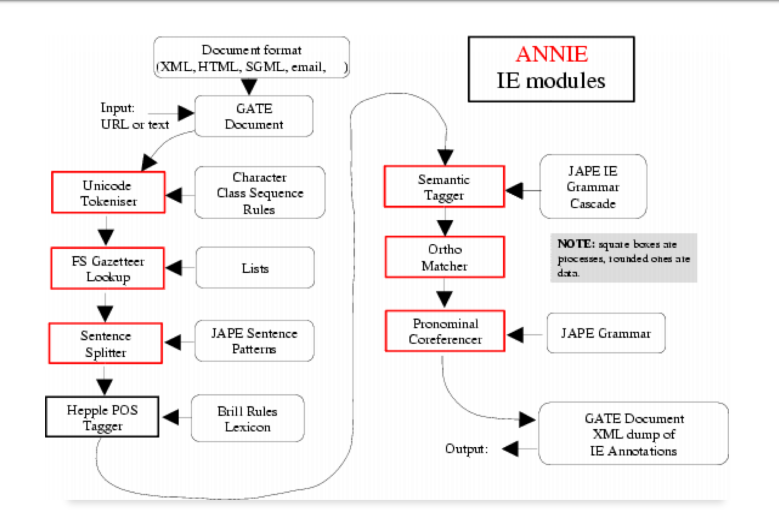
Because ANNIE is a ready-made application, we can just load it directly from the menu.
• Click the ANNIE icon from the top GATE menu. OR
File →Ready Made Applications →ANNIE →ANNIE. OR
right-click Applications →Ready Made Applications →ANNIE →ANNIE
• Load any corpus from your local directory.
• Run ANNIE and inspect the annotations.
• You should see a mixture of Named Entity annotations (Person,Location etc.) and some other linguistic annotations (Token, Sentence etc.).
Let's look at the PRs
Each PR in the ANNIE pipeline creates some new annotations, or modifies existing ones.
• Document Reset → removes annotations.
• Tokeniser → Token annotations.
• Gazetteer → Lookup annotations.
• Sentence Splitter → Sentence, Split annotations.
• POS tagger → adds category features to Token annotations.
• NE transducer → Date, Person, Location, Organisation, Money, Percent annotations.
• Orthomatcher → adds match features to NE annotations.
Document Reset
• This PR should go at the beginning of (almost) every application you create.
• It removes annotations created previously, to prevent duplication if you run an application more than once.
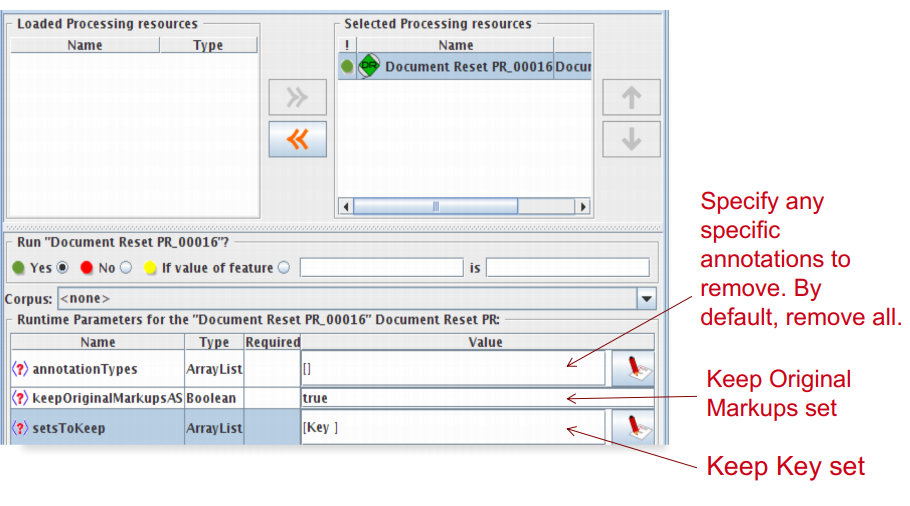
• It does not remove the Original markup set, by default.
• By default it also keeps the “Key” set (by convention the set used for evaluation).
• You can configure it to keep any other annotation sets you want, or to remove particular annotation types only.
Document Reset Parameters
Tokenisation and sentence splitting
Tokeniser
• Tokenisation based on Unicode classes.
• Declarative token specification language.
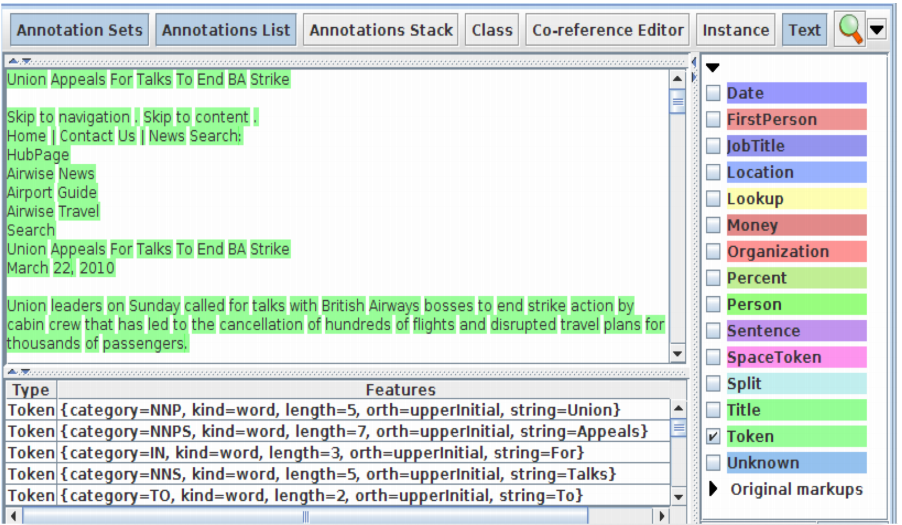
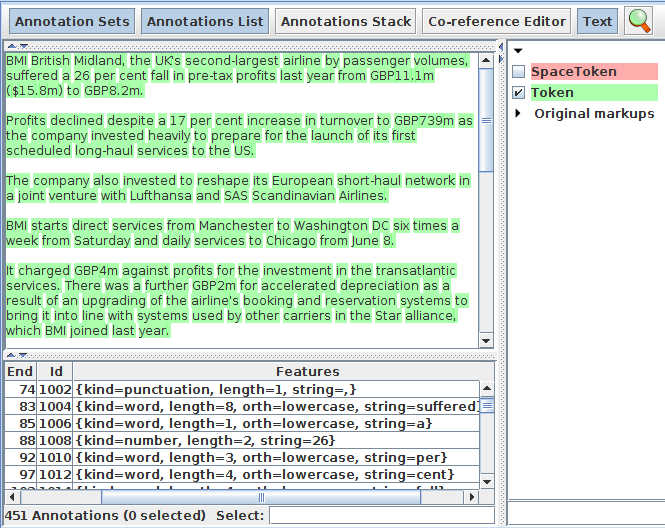
• Produces Token and SpaceToken annotations with features orthography and kind.
• length and string features are also produced
Document with Tokens
ANNIE English Tokeniser
• The English Tokeniser is a slightly enhanced version of the Unicode tokeniser.
• It comprises an additional JAPE transducer which adapts the generic tokeniser output for the POS tagger requirements.
• It converts constructs involving apostrophes into more sensible combinations.
don’t → do + n't
you've → you + 've
Looking at Tokens
• Tidy up GATE by removing all resources and applications (or just restart GATE)
• Load any corpus from your local directory.
• Create a new application (corpus pipeline)
• Load a Document Reset and an ANNIE English Tokeniser.
• Add them (in that order) to the application and run on the corpus
• View the Token and SpaceToken annotations.
• Observe the different values of the “kind” feature.
Sentence Splitter
• The default splitter finds sentences based on Tokens.
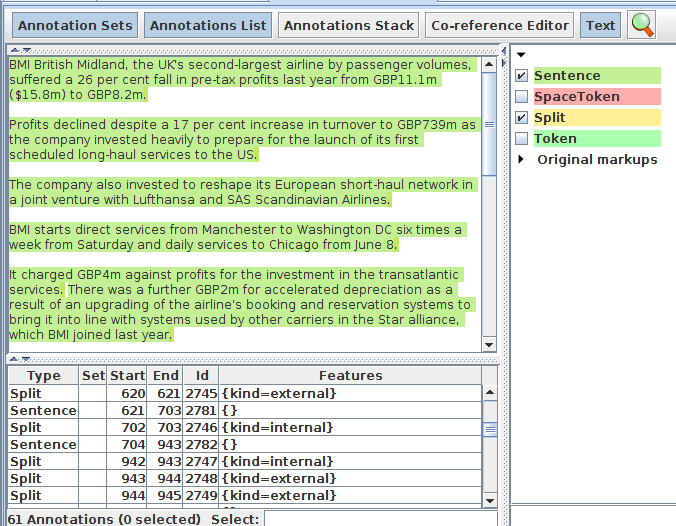
• Creates Sentence annotations and Split annotations on the sentence delimiters.
• Uses a gazetteer of abbreviations etc. and a set of JAPE grammars which find sentence delimiters and then annotate sentences and splits.
• Load an ANNIE Sentence Splitter PR and add it to your application (at the end)
• Run the application and view the results.
Shallow lexico-syntactic features
Part-of-Speech (POS) tagger
• ANNIE POS tagger is a Java implementation of Brill's transformation based tagger
• Previously known as Hepple Tagger (you may find references to this and to heptag)
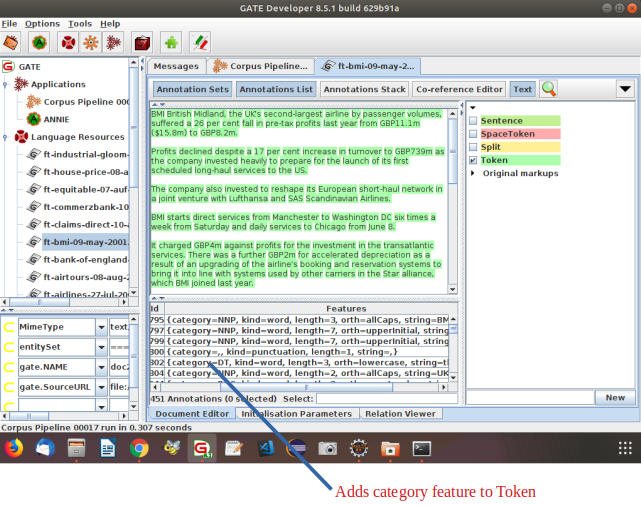
• Adds category feature to Token annotations
• Requires Tokeniser and Sentence Splitter to be run first
Parts-Of-Speech Tags
| Token category | Description |
|---|---|
| CC | coordinating conjunction: ‘and’, ‘but’, ‘nor’, ‘or’, ‘yet’, plus, minus, less, times (multiplication), over (division). Also ‘for’ (because) and ‘so’ (i.e., ‘so that’). |
| CD | cardinal number |
| DT | determiner: Articles including ‘a’, ‘an’, ‘every’, ‘no’, ‘the’, ‘another’, ‘any’, ‘some’, ‘those’. |
| EX | existential ‘there’: Unstressed ‘there’ that triggers inversion of the inflected verb and the logical subject; ‘There was a party in progress’. |
| FW | foreign word |
| IN | preposition or subordinating conjunction |
| JJ | adjective: Hyphenated compounds that are used as modifiers; happy-go-lucky. |
| JJR | adjective - comparative: Adjectives with the comparative ending ‘-er’ and a comparative meaning. Sometimes ‘more’ and ‘less’. |
| JJS | adjective - superlative: Adjectives with the superlative ending ‘-est’ (and ‘worst’). Sometimes ‘most’ and ‘least’. |
| JJSS | -unknown-, but probably a variant of JJS |
| -LRB- | -unknown- |
| LS | list item marker: Numbers and letters used as identifiers of items in a list. |
| MD | modal: All verbs that don’t take an ‘-s’ ending in the third person singular present: ‘can’, ‘could’, ‘dare’, ‘may’, ‘might’, ‘must’, ‘ought’, ‘shall’, ‘should’, ‘will’, ‘would’. |
| NN | noun - singular or mass |
| NNP | proper noun - singular: All words in names usually are capitalized but titles might not be. |
| NNPS | proper noun - plural: All words in names usually are capitalized but titles might not be. |
| NNS | noun - plural |
| NP | proper noun - singular |
| NPS | proper noun - plural |
| PDT | predeterminer: Determiner like elements preceding an article or possessive pronoun; ‘all/PDT his marbles’, ‘quite/PDT a mess’. |
| POS | possessive ending: Nouns ending in ‘’s’ or ‘’’. |
| PP | personal pronoun |
| PRPR$ | unknown-, but probably possessive pronoun |
| PRP | unknown-, but probably possessive pronoun |
| PRP$ | unknown, but probably possessive pronoun,such as ‘my’, ‘your’, ‘his’, ‘his’, ‘its’, ‘one’s’, ‘our’, and ‘their’. |
| RB | adverb: most words ending in ‘-ly’. Also ‘quite’, ‘too’, ‘very’, ‘enough’, ‘indeed’, ‘not’, ‘-n’t’, and ‘never’. |
| RBR | adverb - comparative: adverbs ending with ‘-er’ with a comparative meaning. |
| RBS | adverb - superlative |
| RP | particle: Mostly monosyllabic words that also double as directional adverbs. |
| STAART | start state marker (used internally) |
| SYM | symbol: technical symbols or expressions that aren’t English words. |
| TO | literal “to” |
| UH | interjection: Such as ‘my’, ‘oh’, ‘please’, ‘uh’, ‘well’, ‘yes’. |
| VBD | verb - past tense: includes conditional form of the verb ‘to be’; ‘If I were/VBD rich...’. |
| VBG | verb - gerund or present participle |
| VBN | verb - past participle |
| VBP | verb - non-3rd person singular present |
| VB | verb - base form: subsumes imperatives, infinitives and subjunctives. |
| VBZ | verb - 3rd person singular present |
| WDT | ‘wh’-determiner |
| WP$ | possessive ‘wh’-pronoun: includes ‘whose’ |
| WP | ‘wh’-pronoun: includes ‘what’, ‘who’, and ‘whom’. |
| WRB | ‘wh’-adverb: includes ‘how’, ‘where’, ‘why’. Includes ‘when’ when used in a temporal sense. |
Morphological analyser
• Not an integral part of ANNIE, but can be found in the Tools plugin as an “added extra”
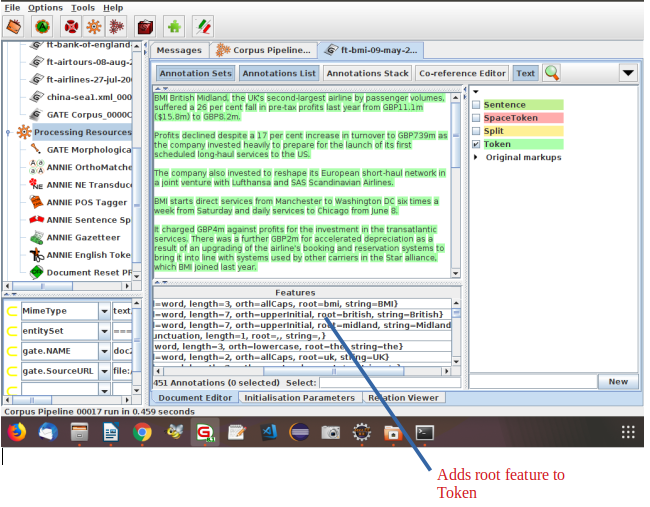
• Generates root feature on Token annotations
• Requires Tokeniser to be run first
• Requires POS tagger to be run first if the considerPOSTag parameter is set to true
Gazetteers
Gazetteers are plain text files containing lists of names(e.g. cities, rivers, people, …).
• The ANNIE gazetteer has about 60,000 entries arranged in 80 lists.
• Each list reflects a certain category, e.g. airports, cities, first names etc.
• List entries might be entities or parts of entities, or they may contain contextual information (e.g. job titles often indicate people).
• Each gazetteer has an index file listing all the lists, plus features of each list (majorType, minorType, and language).
• Lists can be modified either internally using the Gazetteer Editor, or externally in your favourite editor.
• Gazetteers generate Lookup annotations with relevant features corresponding to the list matched.
• Lookup annotations are used primarily by the NE transducer.
Running the ANNIE Gazetteer
Various different kinds of gazetteer are available. First we'll look at the default ANNIE gazetteer.
• Add the ANNIE Gazetteer PR to the end of your pipeline
• Re-run the pipeline
• Look for “Lookup” annotations and examine their features
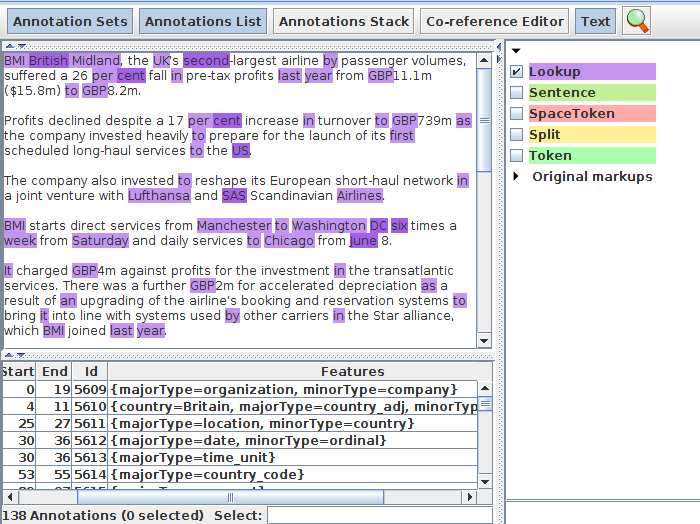
ANNIE gazetteer - contents
• Double click on the ANNIE Gazetteer PR (under Processing Resources in the left hand pane) to open it.
• Make sure “Gazetteer Editor” is selected from the bottom tab.
• In the left hand pane (linear definition) you see the index file containing all the lists.
• In the right hand pane you see the contents of the list selected in the left hand pane.
• The entries are read-only.
• To edit ANNIE resources, we first need to make a copy of them that we can change.
Editing ANNIE gazetteer contents
-
Close ANNIE Gazetteer from PRs.
-
If you didn’t download ANNIE before, go to the plugin manager and select Annie, click the download button , and save it to a local folder.
-
Right-click PR and select ANNIE Gazetteer.
-
Click the listsURL browse button
-
Select the file tab, go to the location you downloaded ANNIE, go to the gazetteer directory and select lists.def and click OK.
-
Double click ANNIE Gazetteer in PR.
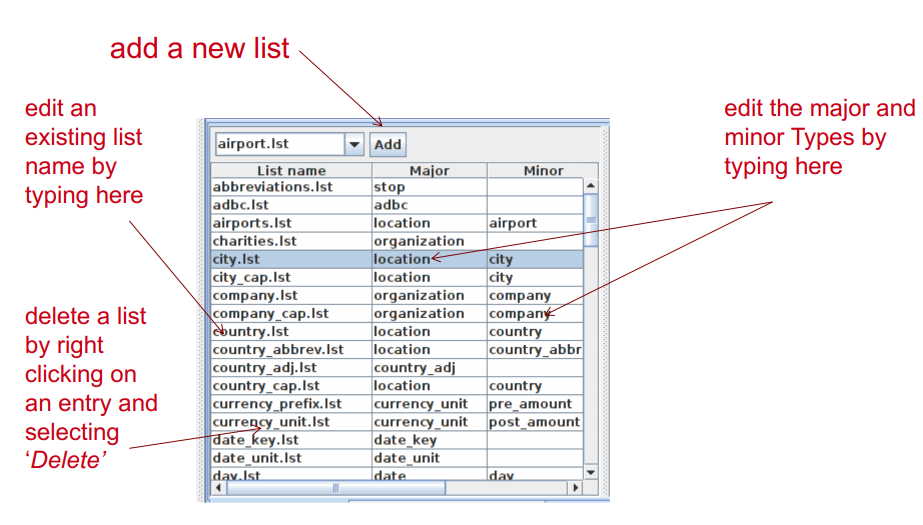
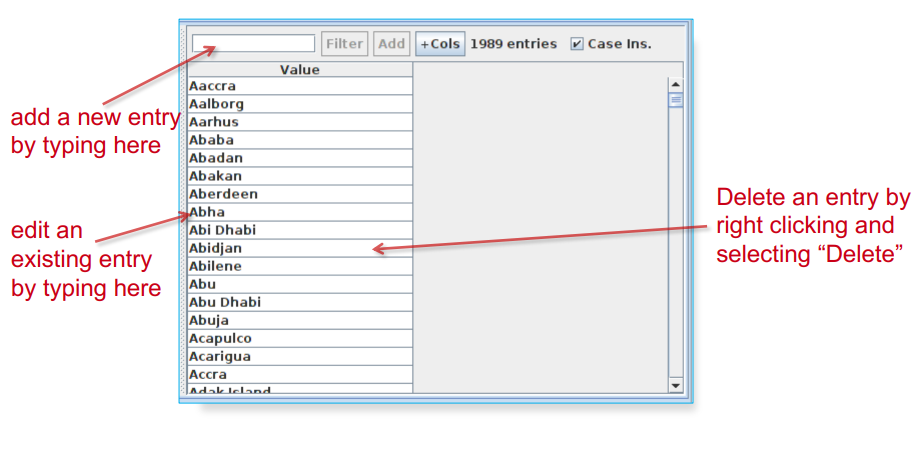
Now each entry can be edited by clicking in the box and typing.
New entries can be added by typing in the “New list” or “New entry” box respectively.
Gazetteer editor
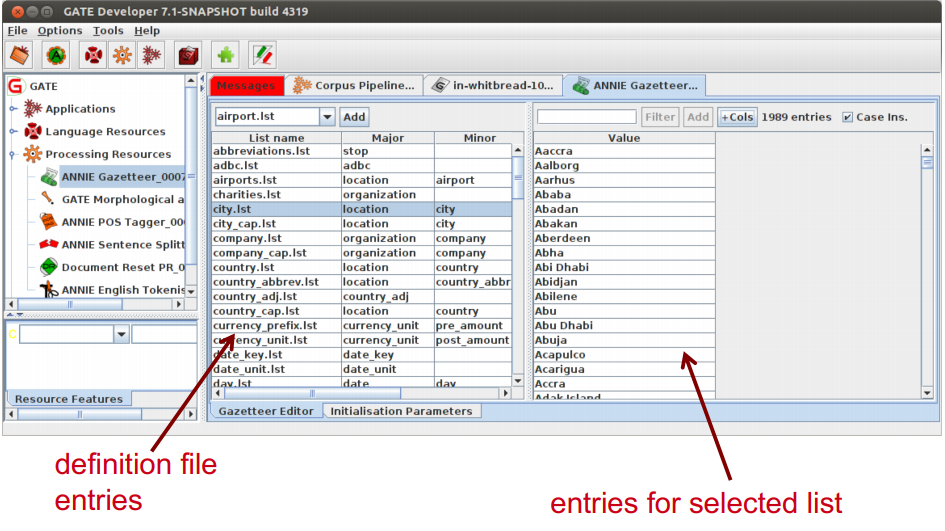
Modifying the definition file
Modifying a list
To save an edited gazetteer, use Ctrl-S shortcut or right click on the gazetteer name in the tabs at the top or in the resources pane on the right, and select “Save and Reinitialise” before running the gazetteer again.
Editing gazetteers outside GATE
• You can also edit both the definition file and the lists outside GATE, in a text editor
• If you choose this option, you will need to reinitialise the gazetteer in GATE before running it again
• To reinitialise any PR, right click on its name in the Resources pane and select “Reinitialise”
When something in the text matches a gazetteer entry, a Lookup annotation is created, with various features and values.
• The ANNIE gazetteer has the following default feature types: majorType, minorType, language.
• These features are used as a kind of classification of the lists: in the definition file features are separated by “:”
• For example, the “city” list has a majorType “location” and minorType “city”, while the “country” list has “location” and “country” as its types.
•eg: city.lst:location:city , this is the format we will use in the def file.
• Later, in the JAPE grammars, we can refer to all Lookups of type location, or we can be more specific and refer just to those of type “city” or type “country”.
NE transducers
• Gazetteers can be used to find terms that suggest entities.
• However, the entries can often be ambiguous. “May Jones” vs “May 2010” vs “May I be excused?”
• Hand-crafted grammars can be used to define patterns over the Lookups and other annotations.
• These patterns can help disambiguate, and they can combine different annotations, e.g. Dates can be comprised of day + number + month.
• NE transducer consists of a number of grammars written in the JAPE language.
ANNIE NE Transducer
• Load an ANNIE NE Transducer PR
• Add it to the end of the application
• Run the application
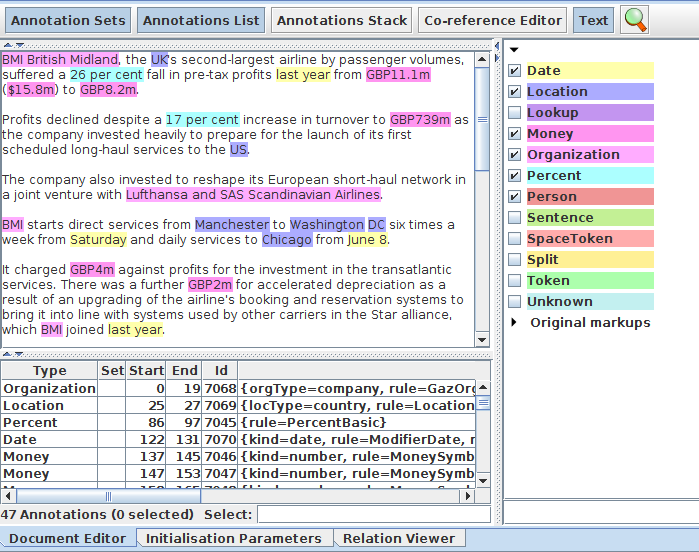
• Look at the annotations
• You should see some new annotations such as Person, Location, Date etc.
• These will have features showing more specific information (e.g. what kind of location it is) and the rules that were fired (for ease of debugging)
Co-reference
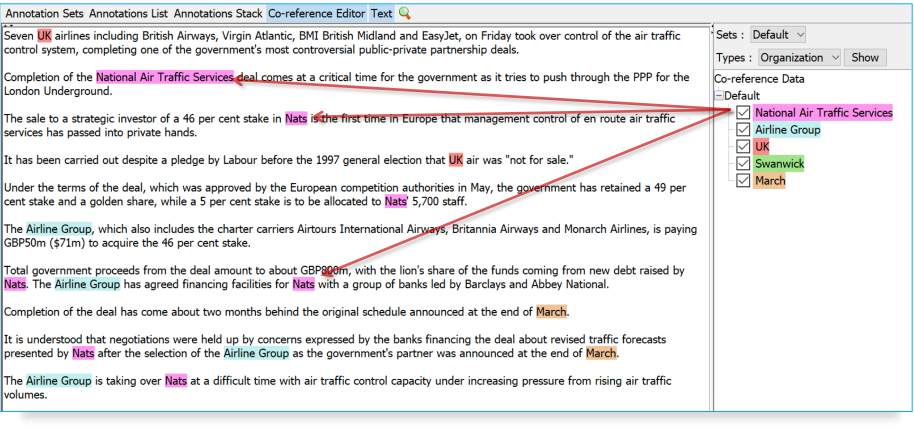
Using co-reference
• Different expressions may refer to the same entity.
• Orthographic co-reference module (orthomatcher) matches proper names and their variants in a document.
• [Mr Smith] and [John Smith] will be matched as the same person.
• [International Business Machines Ltd.] will match [IBM].
Orthomatcher PR
• Performs co-reference resolution based on orthographical information of entities
• Produces a list of annotation IDs that form a co-reference “chain”
• List of such lists stored as a document feature named “MatchesAnnots”
• Improves results by assigning entity type to previously unclassified names, based on relations with classified entities
• May not reclassify already classified entities
• Classification of unknown entities very useful for surnames which match a full name, or abbreviations,
e.g. “Bonfield”
Looking at co-reference
• Add a new PR: ANNIE OrthoMatcher.
• Add it to the end of the application.
• Run the application.
• In a document view, open the co-reference editor by clicking the button above the text.
Using Co-reference editor
• Select the annotation set you wish to view (Default)
• A list of all the co-reference chains that are based on annotations in the currently selected set is displayed
• Select an item in the list to highlight all the member annotations of that chain in the text (you can select more than one at once)
• Hovering over a highlighted annotation in the text enables you to delete an item from the co-reference chain