Scalar VS Tabular Function
Scalar Functions
Scalar functions (sometimes referred to as User-Defined Functions / UDFs) return a single value as a return value, not as a result set, and can be used in most places within a query or SET statement, except for the FROM clause (and maybe other places?). Also, scalar functions can be called via EXEC, just like Stored Procedures, though there are not many occasions to make use of this ability.
Table-Valued Functions
Table-Valued Functions (TVFs) return result sets, and can be used in a FROM clause, JOIN, or CROSS APPLY / OUTER APPLY of any query, but unlike simple Views, cannot be the target of any DML statements (INSERT / UPDATE / DELETE). These can also be created in both T-SQL and SQLCLR.
Introduction
Table-Valued Functions have been around since SQL Server version 2005. Basically a Table-Valued Function is a function that returns a table, thus it can be used as a table in a query.
First sounds like nothing new since a view has been an available mechanism for a much longer time. That’s true, partly. Function has the same benefits as a view when it comes to data protection enforced via privileges or simplifying a query. However, a Table-Valued Function has at least few advantages:
Parameterization, a function can receive parameters so the logic inside the function can be adjusted better than using traditional predicate pushing. Programmability, a view can have certain amount of logic (calculations, case-structures etc.) but it’s still quite column bound so more complex logic is hard or impossible to create.
Creating a Simple Table-Valued Function with (some kind of) Logic
First, let's create a small table to store some data:
1 2 3 4 5 6 | |
And then add few rows for test data:
1 2 3 4 | |
Now, if we would need a result set which would:
The Table-Valued Function could look like this:
1 2 3 4 5 6 7 8 9 10 11 12 13 14 15 16 17 18 19 20 21 | |
The function defines a new table called @trackingItems. This is a temporary table stored in the tempdb. The contents of this table will be return value for the function when the function exits.
First, the function inserts all the desired rows from the TrackingItem-table to the temporary table. After that, the contents of the temporary table are modified based on the specifications and then returned to the caller.
Using the Function
The next step is to use the function. If we want to select all the rows having Id equal to 2 or more, the query would look like:
1 | |
And the results:
1 2 3 4 5 | |
As the result is a table, it can be used like one. For example, if we want to query all the original tracking items that don’t exist in this subset, the query could be:
1 2 3 4 | |
An the results would be:
1 2 3 | |
Generating Data
So, Table-Valued Functions can be used to return modified data from one or more tables in the database. But since they are programmable functions, they can also generate data.
One quite common problem is to query all dates from a specified period and then have some results from a table which doesn’t have entries for all the dates. In our test data, there is a row for today and tomorrow but the next few dates are missing. So, if we want to get the amount of tracking items for each day for the next seven days, it wouldn’t be so simple. One typical solution is to create a table that contains all the necessary dates and then use that table in the query. Table-Valued Function can be used as an alternative. If we pass the date range to a function, we can create the necessary data on-the-fly with a simple loop.
1 2 3 4 5 6 7 8 9 10 11 12 13 | |
And the query for the TrackingItem amounts would be:
1 2 3 4 5 6 | |
So the results would be something like:
1 2 3 4 5 6 7 8 9 | |
What About Performance
Since this is a procedural approach. The performance won’t be as good as it would be using a good, set-based approach. However, since functions can provide more flexibility from the programming point of view, let’s have a look at larger amounts of data.
First, we’ll ensure that the statistics are fine and then see what happens if we take the same query but for a period of 50 years:
1 2 3 4 5 6 7 8 | |
The query plan looks like:
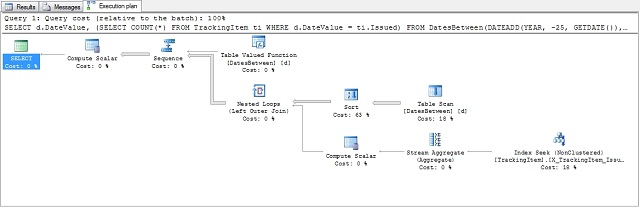
Not very good, we’re going to do scans to tracking items in a loop based on the days returned from the function. Execution statistics verify this:
1 2 3 4 5 6 7 8 9 | |
Now, if we add a clustered primary key index to the table (which is a great opportunity in certain situations), we will first re-create the function:
1 2 3 4 5 6 7 8 9 10 11 12 13 14 15 | |
So what happens with the exact same query:
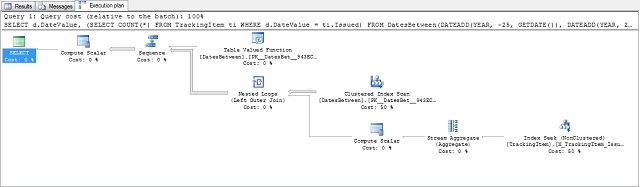
The plan has changed since the new index is taken into account, but the approach is still the same.
Statistics:
1 2 3 4 5 6 7 8 9 | |
It seems that the problem lies inside the function. Let’s separate the date generation and see how it goes:
1 2 | |
The plan:
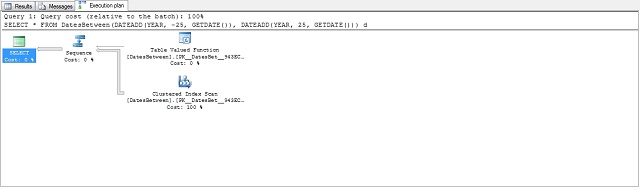
And the statistics:
1 2 3 4 5 6 | |
So what’s happening? Few things:
Having a look at the statistics for the Table-Valued Function access verifies this (note the Estimated Number of Rows):
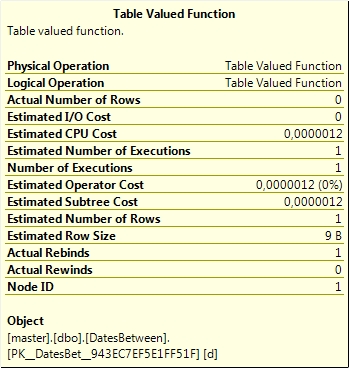
Unfortunately, there’s no way to tell the optimizer (during the optimization phase) an estimate for the row count. This feature would be a great thing to have in the future.
Let’s take a look other way round: Use small amounts of dates against a big table. First, let’s add a few rows to the TrackingItem-table. 100’000 rows randomly for the next 50 years:
1 2 3 4 5 6 7 8 9 10 | |
And now let’s update the statistics again and query for few days in the far future:
1 2 3 4 5 6 7 8 9 | |
Results (partial):
1 2 3 4 5 6 7 8 9 10 11 | |
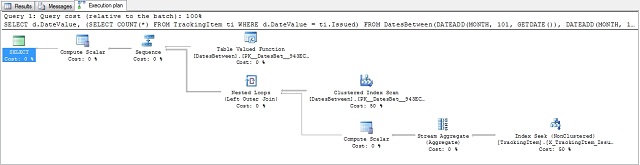
The plan:
And the statistics:
1 2 3 4 5 6 7 8 9 | |
So the plan was quite good when there were relatively small amounts of rows coming out of the function.
When Creating a Table Valued Function in Management Studio
The easiest way to start creating a table valued function (well, actually any function or procedure) is to use SQL Server Management Studio and start creating an anonymous T-SQL block. Let's take an example with the DatesBetween function. The following will create and fill a table with 10'000 dates:
1 2 3 4 5 6 7 8 9 10 11 12 | |
On my test machine, this takes roughly 5 seconds to complete. Not very good at all. The problem is that every time the insert is made, the database engine returns a message:
1 | |
Even worse, because I had both statistics time and io set on, every insert returns information about the statistics:
1 2 3 4 5 6 7 8 9 | |
So I'm getting 10'000 of these messages in the message tab and filling the messages takes time. So if I set both statistics off and use:
1 | |
in the beginning of the script, the execution is done in less than a second.
This is good to bear in mind when using anonymous blocks in the Management Studio. The same effect won't happen when the T-SQL block is inside a function and the function is called from the Management Studio since only the messages for the calling SQL statement will be returned, not from the inside of the function.
Conclusions
Table-Valued Function is a good alternative for a view or an extra table when parameterization is needed or complex logic is included and especially when the amount of data returning from the function is relatively small.
For example, if the date generator should be able to generate dates for different granularities (days, working days, weekends, etc.), we would possibly need several tables or tagged rows if the traditional approach is used.