SQL Trigers
Problem
I have a SQL Server table in which I need to see who changed what and when. Is there a simple way to create an audit trail in SQL Server to meet these needs?
Solution
In this tip, we show you how to write T-SQL statements that will create a trigger to populate an audit table to store changes to existing records and record when new records are added to the table. We are using SQL Server 2016 CTP 2.0, but this could be done in any version of SQL Server.
Create Example SQL Server Tables
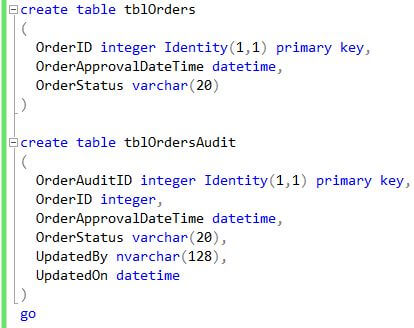
In the top portion of the image below we see where we create our example data table named tblOrders with a primary key column named OrderID, a date column named OrderApprovalDateTime and a varchar column named OrderStatus.
In the bottom portion of the image below we see where we create our table named tblOrdersAudit that will record changes to the data in the table tblOrders. The audit table has its own primary key column named OrderAuditID, all of the columns and their data types from tblOrders, plus columns named UpdatedBy and UpdatedOn. The data type for the UpdatedBy column is nvarchar(128) which is the data type returned by the SUSER_SNAME() function that will be used to get the Login name for the principal making the changes.
Create Example SQL Server Audit Trigger
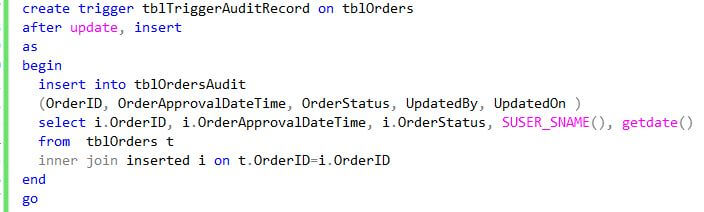
In this example, we want our trigger to insert a row into the tblOrdersAudit table any time a record is updated or inserted in tblOrders, essentially taking a snapshot of the new or changed record along with which principal affected the record and when it happened. The T-SQL for creating this trigger is shown below.
Test SQL Server Audit Trigger for Inserts
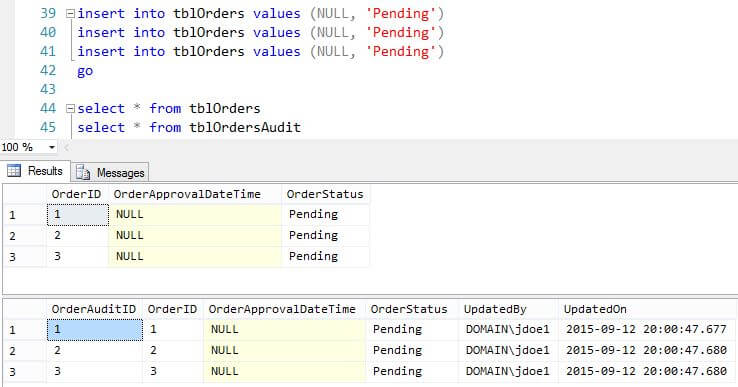
To test the trigger for its behavior on inserting new records, we populate the table with three test records with the OrderApprovalDateTime set to NULL and the OrderStatus set to "Pending". We then select from both tables and inspect the results as shown below. We can see that the new records are in the audit table.
Test SQL Server Audit Trigger for Updates
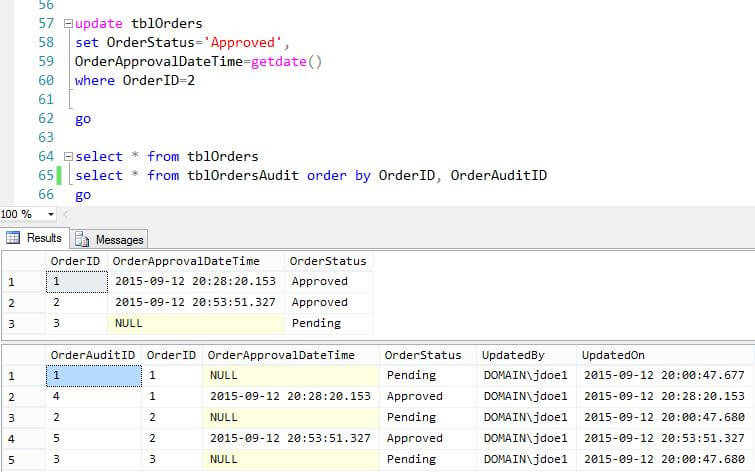
Next, we will test the trigger's behavior on an update. We will set the order status to approved and set the order approval date for the first record (OrderID=1). When we query both tables we can see how the changes to OrderID=1 are recorded in tblOrdersAudit.
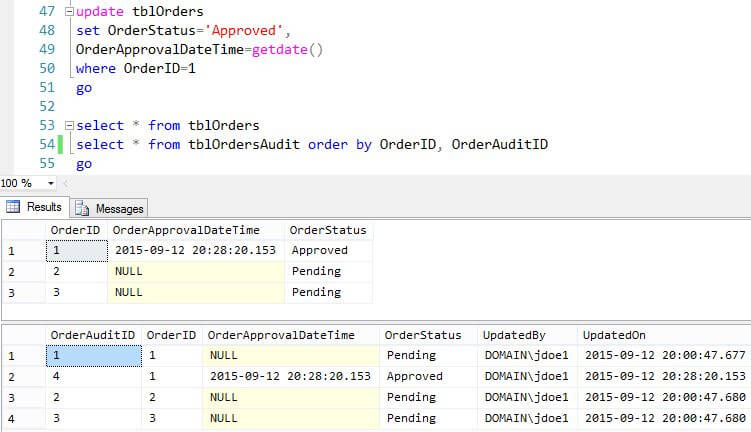
Let's test again, but this time let's update the record where OrderID=2. When we query both tables we can see how the changes to OrderID=2 are recorded in tblOrdersAudit.
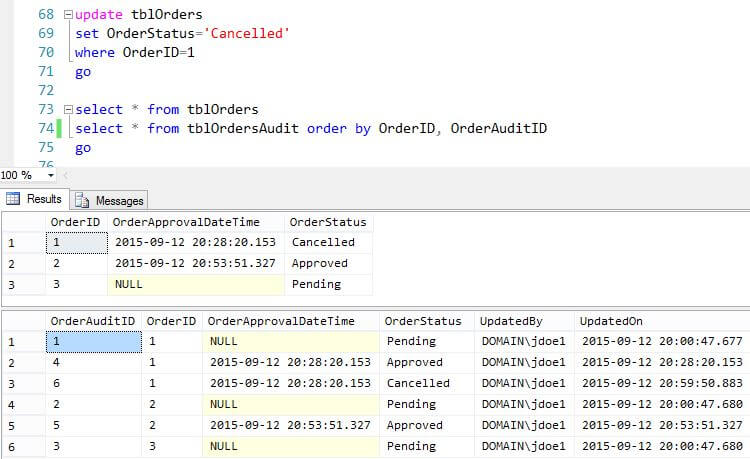
This time let's update the OrderStatus to Cancelled for the record where OrderID=1 . We can see in tblOrdersAudit where the order was approved and then cancelled.
Sample SQL Server Audit Trigger Code
1 2 3 4 5 6 7 8 9 10 11 12 13 14 15 16 17 18 19 20 21 22 23 24 25 26 27 28 29 30 31 32 33 34 35 36 37 38 39 40 41 42 43 44 45 46 47 48 49 50 51 52 53 54 55 56 57 58 59 60 61 62 63 64 65 66 67 68 69 70 | |