Angular Installation
Install Node.js and npm
| 1.curl -sL https://deb.nodesource.com/setup_10.x | sudo bash -
2.sudo apt-get install -y nodejs
|
Install Angular/cli
| npm install -g @angular/cli
|
Create Angular Project
| ng new kpai
cd kpai
ng serve
|
Install Angular Material, Angular CDK and Angular Animations
| npm install --save @angular/material @angular/cdk @angular/animations
|
Snapshot Build
| npm install --save angular/material2-builds angular/cdk-builds angular/animations-builds
|
| npm install jqwidgets-scripts --save
|
Open the angular.json file and inside the styles property add this line:
| "node_modules/jqwidgets-scripts/jqwidgets/styles/jqx.base.css"
|
It should look like this:

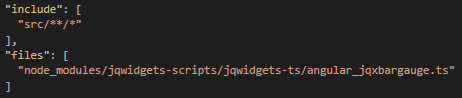
Now open the tsconfig.json file and add this at the bottom:
| "include": [
"src/**/*"
],
"files": [
"node_modules/jqwidgets-scripts/jqwidgets-ts/angular_jqxbargauge.ts"
]
|
It should look like this:
1
2
3
4
5
6
7
8
9
10
11
12
13
14
15
16
17
18
19
20
21
22
23
24
25
26 | {
"compileOnSave": false,
"compilerOptions": {
"baseUrl": "./",
"outDir": "./dist/out-tsc",
"sourceMap": true,
"declaration": false,
"moduleResolution": "node",
"emitDecoratorMetadata": true,
"experimentalDecorators": true,
"target": "es5",
"typeRoots": [
"node_modules/@types"
],
"lib": [
"es2017",
"dom"
]
},
"include": [
"src/**/*"
],
"files": [
"node_modules/jqwidgets-scripts/jqwidgets-ts/angular_jqxbargauge.ts"
]
}
|
For example here we are using jqxBarGauge so we have to import the jqxBarGaugeComponent in module
1
2
3
4
5
6
7
8
9
10
11
12
13
14
15
16
17
18 | app.module.ts
import { BrowserModule } from '@angular/platform-browser';
import { NgModule } from '@angular/core';
import { AppComponent } from './app.component';
import { jqxBarGaugeComponent } from 'jqwidgets-scripts/jqwidgets-ts/angular_jqxbargauge';//import jqBarGuageComponent
@NgModule({
declarations: [
AppComponent,
jqxBarGaugeComponent
],
imports: [
BrowserModule
],
providers: [],
bootstrap: [AppComponent]
})
export class AppModule { }
|
Note
Sometimes the CLI can output this error:

That can be resolved in two ways:
Add "src/app/app.module.ts", in the ‘files’ array in the tsconfig.json file":
"files": [
"src/app/app.module.ts",
"node_modules/jqwidgets-scripts/jqwidgets-ts/angular_jqxbargauge.ts"
]
The second way is: Go to src/app/app.module.ts, remove a random line, save the file, add back the line and run ng serve again.
Install jwt-decode
Install ng2-pdf-viewer
Install Primeng
| npm install primeng --save
npm install primeicons --save
|
Import Modules
for example :
module.ts
| import {AccordionModule} from 'primeng/accordion'; //accordion and accordion tab
import {MenuItem} from 'primeng/api';
|
Styles Configuration
| "styles": [
"node_modules/primeicons/primeicons.css",
"node_modules/primeng/resources/themes/nova-light/theme.css",
"node_modules/primeng/resources/primeng.min.css",
//...
],
|
Install Charts.js of primeng
| npm install chart.js --save
"scripts": [
"../node_modules/chart.js/dist/Chart.js",
//..others
],
import {ChartModule} from 'primeng/chart';
|
Install quill for editor styles in primeng
| npm install quill --save
add styles and scripts in angular.json file
"scripts": [... "../node_modules/quill/dist/quill.js"],
"styles": [ ... "../node_modules/quill/dist/quill.core.css", "../node_modules/quill/dist/quill.snow.css"],
|
Install stompjs
Install sockjs-client
Install angular/flex Layout
| npm i @angular/flex-layout
|
Update Angular Project to Angular 7
1
2
3
4
5
6
7
8
9
10
11
12
13
14
15 | sudo npm install -g @angular/cli@latest
sudo npm install @angular/cli@latest
sudo ng update @angular/cli
sudo ng update @angular/core
sudo npm install @angular/material@latest @angular/cdk@latest
sudo npm install --save @angular/flex-layout@latest
if we get any error regarding devkit/duild-angular or then run below command
sudo npm install --save-dev @angular-devkit/build-angular
sudo npm install @angular/compiler-cli
sudo npm install @angular/compiler
sudo npm install typescript@3.1.6
|
If already node-sass is avaliable
| sudo chmod -R 777 kpai(foldername)
sudo chmod a+rwx /var/szDirectoryName(node_modules)
sudo npm rebuild node-sass
sudo npm install node-sass -f
sudo npm audit fix -f
!!! NOTE
if your project is new, create that again and don't use ''sudo'' for project installation
|
install node-sass
| sudo npm install node-sass
|
Angular carousel
| sudo npm i ng2-carouselamos --save
|
particles