KPAI Technical Documentation
This document includes following topics
- Introduction
- Application Design and Architecture
- Data Integration Project
- Document Analysis Project
- CodeExtract / KPAI web Application project
Introduction
The main objective of the project is to retrieve clinical information from patient EMR (Electronic Medical Record) documents using NLP (Natural Language Processing) technology.
Unstructured EMR document contains crucial patient information which includes laboratory tests, vital signs, medications and patient current and past diagnosed conditions, procedures, treatment and plan. Retrieving above information will be helpful in many end user applications.
Sample Application Use Cases
- Computer Assisted Coding (CAC)
- Automatic Query Alerts (CDS process)
- System generated Admit Criteria forms
- Compliance Audits
- System generated Quality Indicators
- Evaluation and Management Coding
These are the some of end user requirement modules implemented based on clinical information retrieved from patient EMR documents.
Application Design and Architecture
Objective of the project has been achieved through following three higher level projects
- Data Integration Project
- Document Analysis Project (NLP and Core Java Application)
- CodeExtract Project (Web Application)
Data Integration Project
Objective of this project is to integrate and continuously transfer patient related documents and other useful patient information from hospital Health Information System (HIM) to KPAI application. Data interoperability is a big concern in health care related domain applications. To build secure, transparent and continuous message transfer, we are using following two communication channels.
- HL7 protocol channel (Health care Level Seven)
- FTP protocol channel
Data Transfer using HL7 protocol
What is HL7
Health Level Seven International (HL7) is a not-for-profit, ANSI-accredited standards developing organization dedicated to providing a comprehensive framework and related standards for the exchange, integration, sharing, and retrieval of electronic health information that supports clinical practice and the management, delivery and evaluation of health services.
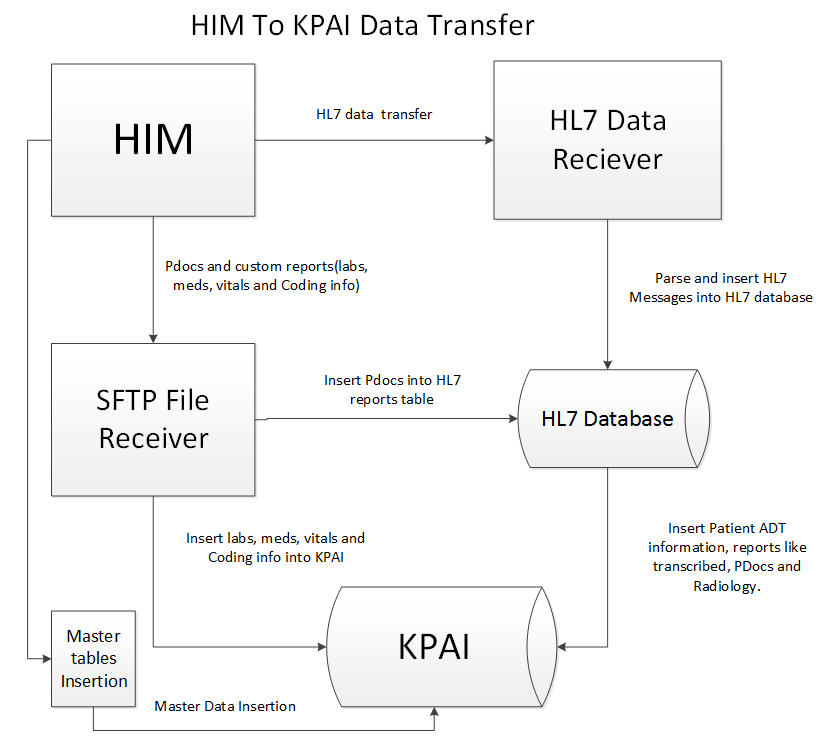
As part of new hospital configuration we will send required data specifications (Hl7 message specification) to facility, then facility support team will agree with the specifications and send information to KPAI through HL7 sender/receiver interfaces.
Currently we are using ** Mirt Software ** (open source implementation) for handling in bound and out bound HL7 messages.
Following is the work flow diagram for HIM to KPAI data transfer through HL7
Data Transfer using FTP protocol
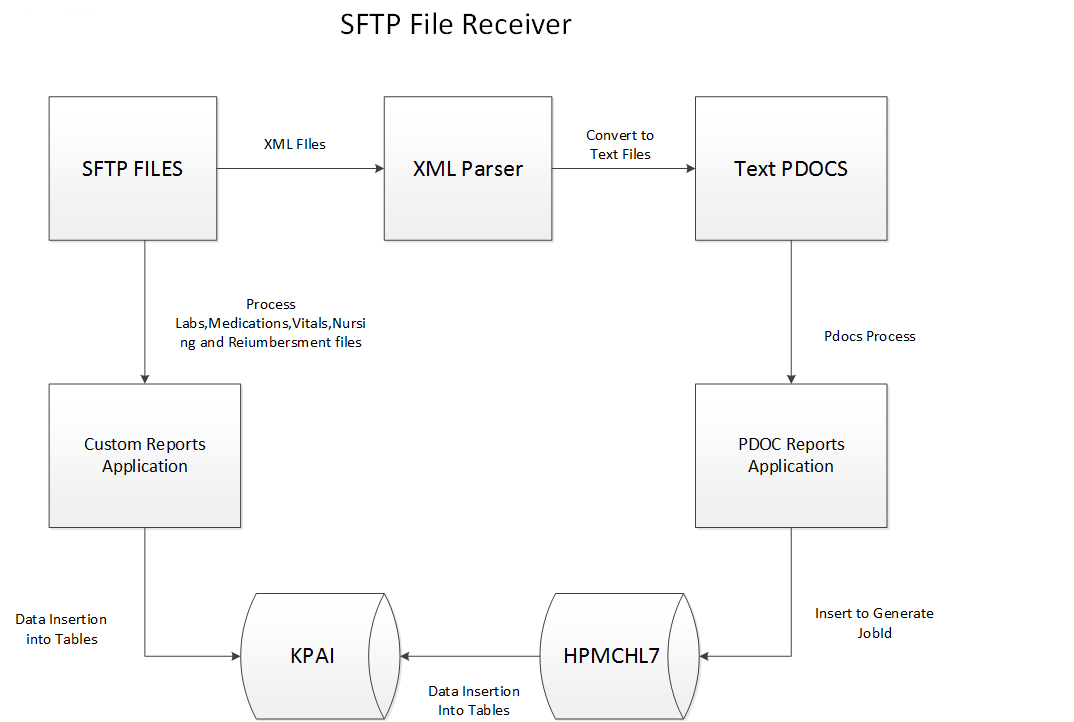
In some facilities they don't have HL7 specific message implementations for all patient related data segments. In general for Laboratory, Medicine, Vital signs and coding related information will be generated using vendor level scripts instead of generating through HL7 which is cost effective. To receive such reports to KPAI application, we implemented FTP protocol enabled channel between KPAI and Facility.
Following is the work flow diagram for HIM to KPAI data transfer through FTP
All Information will be saved in Microsoft SQL server 2008 R2 database server.
Technologies used in Data integration project
- HL7 interface Tool: Mirt Software
- FTP protocol: FTP, SFTP implemented softwares
- Database: Microsoft SQL server 2008 R2
Document Analysis Project
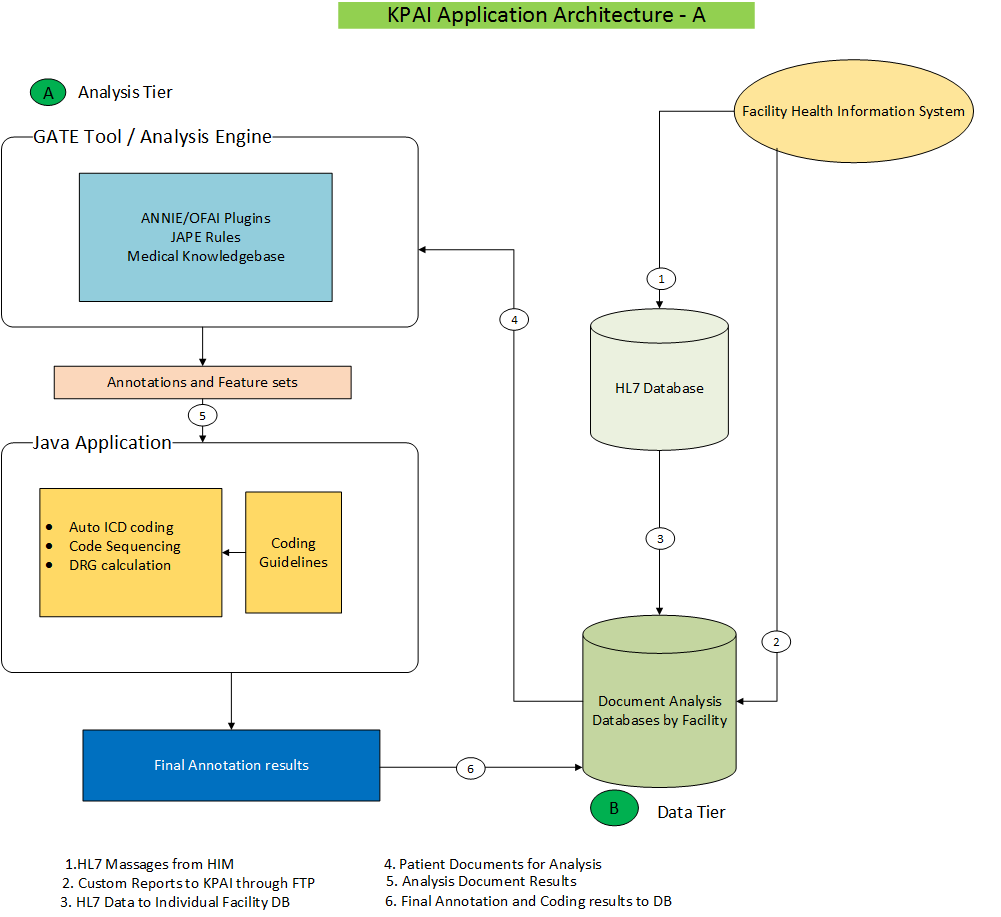
Document analysis is playing crucial role in the entire KPAI application. In this, application will analyze the patient reports and get health care information like diseases, procedures, labs, medications, vital signs and other clinical related information.
To process natural language (EMR documents) we are using ** GATE (General Architecture for Text Engineering) ** tool. It is a UK based open source tool implemented in Java.
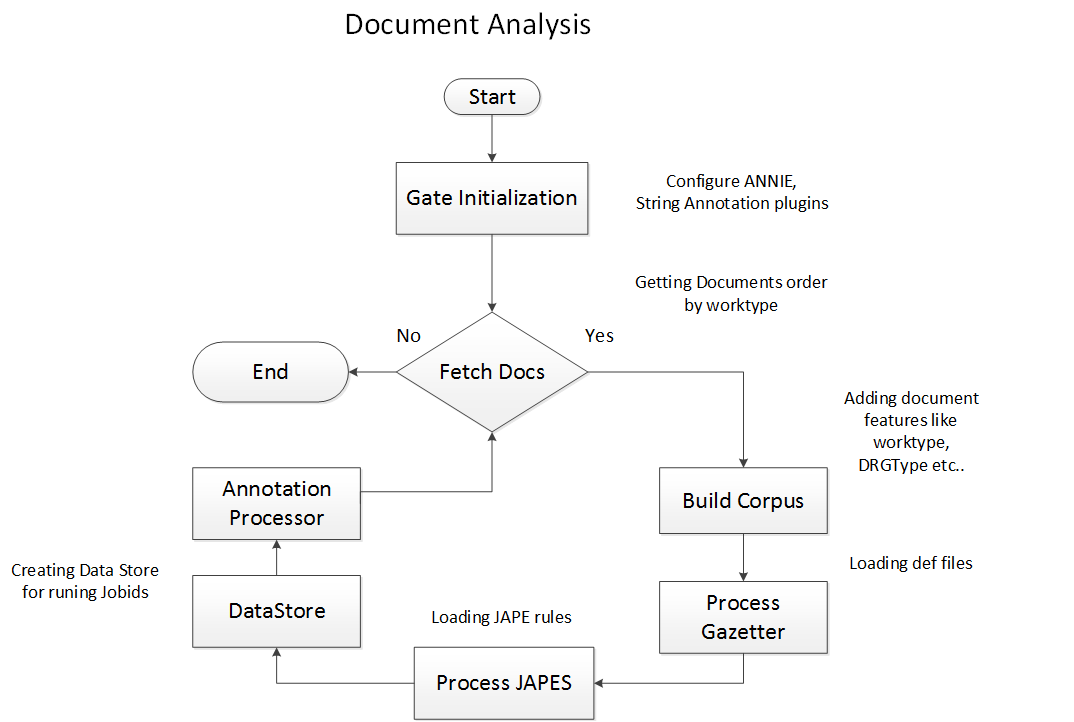
Technical Work flow
- Read new documents from database that are to be analyzed
- Build corpus for all pending documents, we can set limit for this corpus
- Load ANNIE plugin from GATE API, to perform basic NLP tasks like Tokenization, Sentence splitting, Gazetteer running etc
- Run corpus over custom domain knowledge list files to capture Named Entity Recognition (NER)
- Run corpus over JAPE rules, these are regular expression written based on required information patterns in documents
- Finally read the information from these annotation sets and save in database tables
Following is the work flow diagram for Document Analysis
Technologies and Resources used in Document Analysis Project
- GATE NLP Engine
- Medical domain keyword lists from UMLS, EMR Documents
- JAPE Rules
- JAVE 8
- Third Party Softwares (DRG) for DRG Grouping
- Microsoft SQL server 2008 R2
CodeExtract / KPAI web Application project
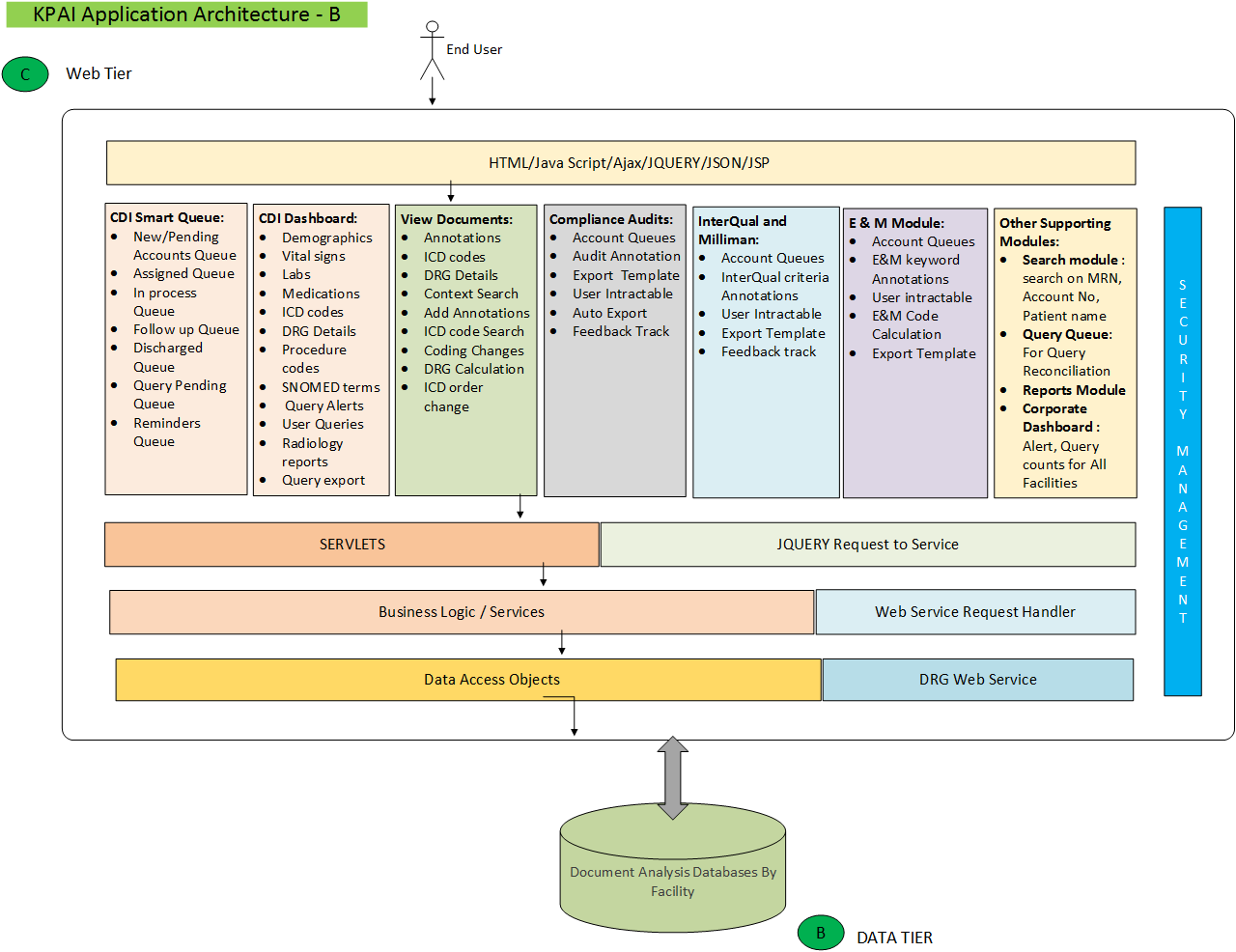
This is end user interactive web application, and there are multiple modules implemented based on user requirements. Following are the key modules
- CDS Smart Queue with CAC
- CDS Dash board
- Query Alerts
- Admit Criteria
Sample Use Cases
- CDS/Coder can login and assign cases from pending/new account list
- CDS/Coder can view pending and in process accounts from their account
- CDS/Coder can view CDS Dashboard, View Documents interfaces on selected Account number
- CDS/Coder can make reminders based on pending documents and laboratory results etc
- Users Can generate reports based on different filters like patient admit dates, discharge dates, patient class, DRG, Queried accounts etc.
- Users can view Admit criteria forms (Interqual) generated for particular account
- Users can view Quality Indicator forms (PSI, IQI, HAC) generated for particular account
Server Technology
The application should be usable with any Java EE web application container that is compatible with the Servlet 2.4 and JSP 2.0 specifications. Some of the deployment files provided are designed specifically for Apache Tomcat / TomEE. These files specify container-supplied connection-pooled data sources. It is not necessary to use these files. The application has been configured by default to use a data source without connection pooling to simplify usage. Configuration details are provided in the Developer Instructions section. The view technologies that are to be used for rendering the application are Java Server Pages (JSP) along with the Java Standard Tag Library (JSTL), and AngualrJS.
Database Technology
The application uses a relational database for data storage. All KPAI related applications are using Microsoft Sql Server 2008 R2 version as a production database server.
Development Environment
This application has been bundled with some of third party jar files and the developer will need to obtain the following tools externally, all of which are freely available:
- Java SDK 1.8.x
- Ant 1.7.x
- apache-tomee-webprofile-7.0.4
- Subversion Edge 5 (SVN)
- Jenkins (Continuous Integration Tool)
- Taiga (Project Management)
- Netbeans IDE
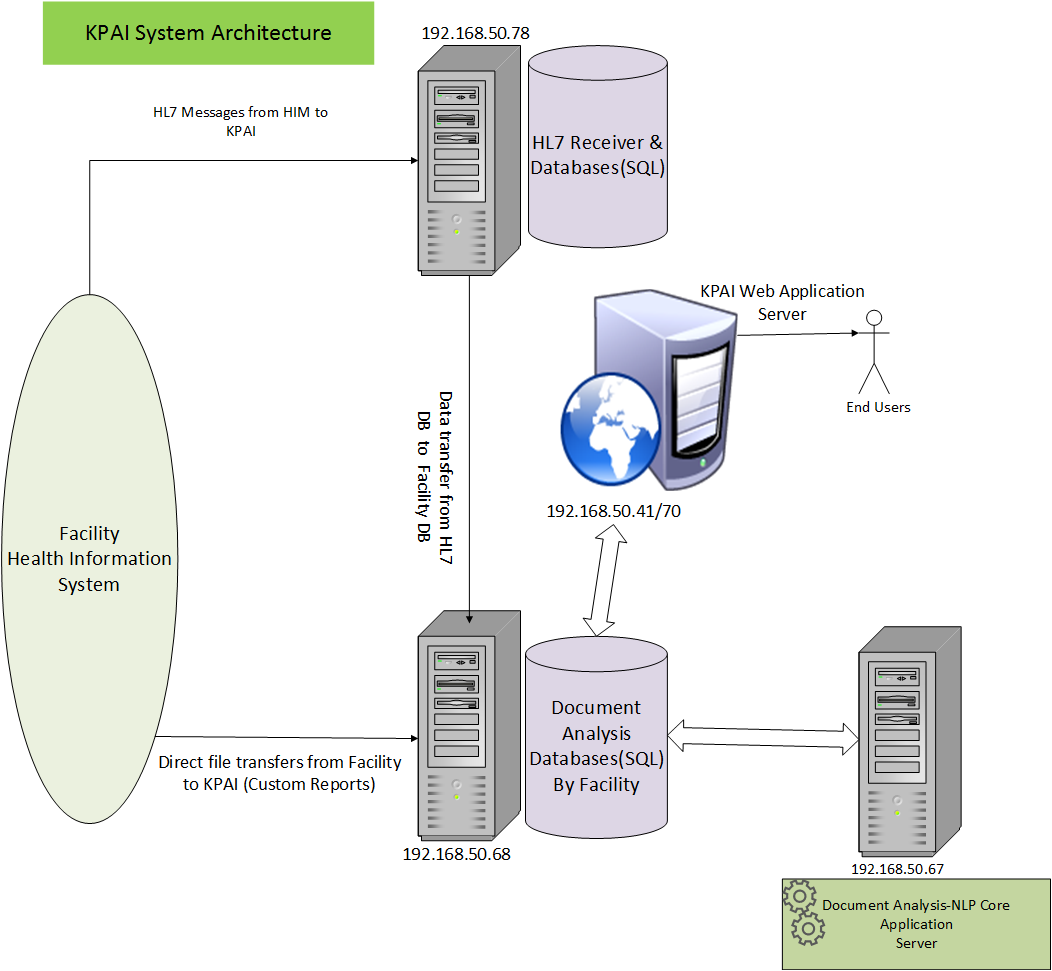
System and Application Architecture Diagrams
System Architecture
Application Architecture