The GATE Embedded API
Before We Start
Prerequisites
• Java 8 or later JDK (OpenJDK or Oracle)
• Java Development Environment such as Eclipse/NetBeans/IDEA (not compulsory but highly recommended!).
• Maven 3.5.2 or later
Your First GATE-Based Project
Libraries to include
• GATE Embedded is distributed via the Central Maven Repository
• Group ID uk.ac.gate, artifact gate-core
• pom.xml should have the right dependency
Exercise 1: Loading a Document
1 2 3 4 5 6 7 8 9 10 11 12 13 14 15 16 | |
Running your code without an IDE:
1 mvn compile
2 mvn exec:java -Dexec.mainClass=module8.part1.Main
Interacting with GATE
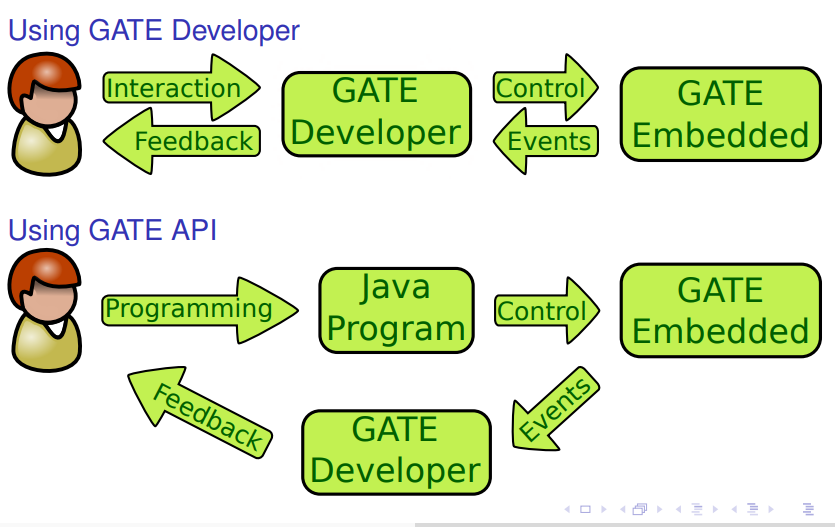
The CREOLE Model
CREOLE
The GATE component model is called CREOLE (Collection of REusable Objects for Language Engineering).
CREOLE uses the following terminology:
CREOLE Plugins: contain definitions for a set of resources.
CREOLE Resources: Java objects with associated configuration.
CREOLE Configuration: the metadata associated with Java classes that implement CREOLE resources.
CREOLE Plugins
CREOLE is organised as a set of plugins.
Each CREOLE plugin:
• is either
- • a directory on disk (or on a web server); with one or more .jar files of classes, or
- • a single .jar file published to a Maven repository
• contains the definitions for a set of CREOLE resources.
CREOLE Resources
A CREOLE resource is a Java Bean with some additional metadata
A CREOLE resource:
- • must implement the gate.Resource interface;
- • must provide accessor methods for its parameters;
- • must have associated CREOLE metadata.
The CREOLE metadata associated with a resource:
• is provided as special Java annotations inside the source code.
GATE Resource Types
There are three types of resources:
• Language Resources (LRs) used to encapsulate data (such as documents and corpora);
• Processing Resources (PRs) used to describe algorithms;
• Visual Resources (VRs) used to create user interfaces.
The different types of GATE resources relate to each other:
• PRs run over LRs,
• VRs display and edit LRs,
• VRs manage PRs, . . .
These associations are made via CREOLE configuration.
GATE Feature Maps
Feature Maps. . .
• are simply Java Maps, with added support for firing events.
• are used to provide parameter values when creating and configuring CREOLE resources.
• are used to store metadata on many GATE objects.
All GATE resources are feature bearers (they implement gate.util.FeatureBearer):
1 2 3 4 | |
Resource Parameters
The behaviour of GATE resources can be affected by the use of parameters.
Parameter values:
- • are provided as populated feature maps.
- • can be any Java Object;
- • This includes GATE resources!
Parameter Types
There are two types of parameters:
Init-time Parameters
- • Are used during the instantiating resources.
- • Are available for all resource types.
- • Once set, they cannot be changed.
Run-time Parameters
- • are only available for Processing Resources.
- • are set before executing the resource, and are used to affect the behaviour of the PR.
- • can be changed between consecutive runs.
Creating a GATE Resource
Always use the GATE Factory to create and delete GATE resources!
gate.Factory
1 2 3 4 5 6 7 | |
Only the first parameter is required; other variants of this method are available, which require fewer parameters.
You will need the following values:
• String resourceClassName: the class name for the resource you are trying to create. This should be a string with the fully-qualified class name, e.g. "gate.corpora.DocumentImpl".
• FeatureMap parameterValues: the values for the init-time parameters. Parameters that are not specified will get their default values (as described in the CREOLE configuration). It is an error for a required parameter not to receive a value(either explicit or default)!
• FeatureMap features: the initial values for the new resource’s features.
• String resourceName: the name for the new resource.
Load a Document
1 2 3 4 5 6 7 8 | |
TIP: Resource Parameters
The easiest way to find out what parameters resources take (and which ones are required, and what types of values they accept) is to use the GATE Developer UI and try to create the desired type of resource in the GUI!
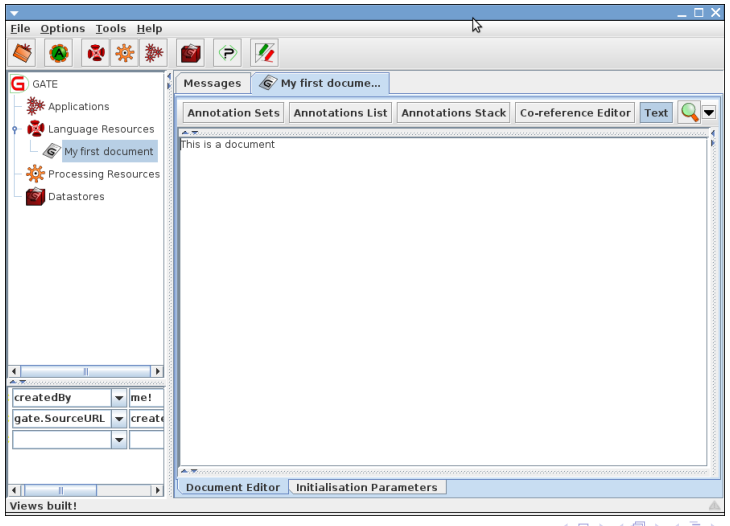
Shortcuts for Loading GATE Resources
Loading a GATE document
1 2 3 4 5 6 7 8 | |
Loading a GATE corpus
Corpus corpus = Factory.newCorpus("Corpus Name");
Simple Example
Load a document:
• using the GATE home page as a source;
• using the UTF-8 encoding;
• having the name “This is home”;
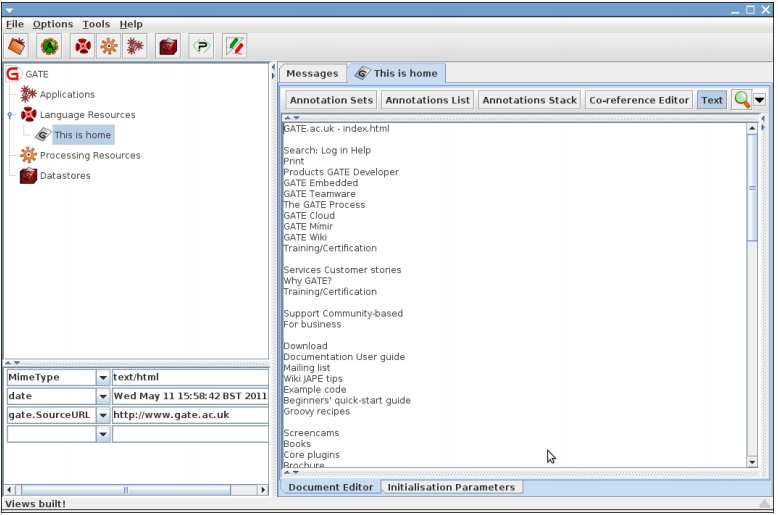
• having a feature named "date", with the value the current date.
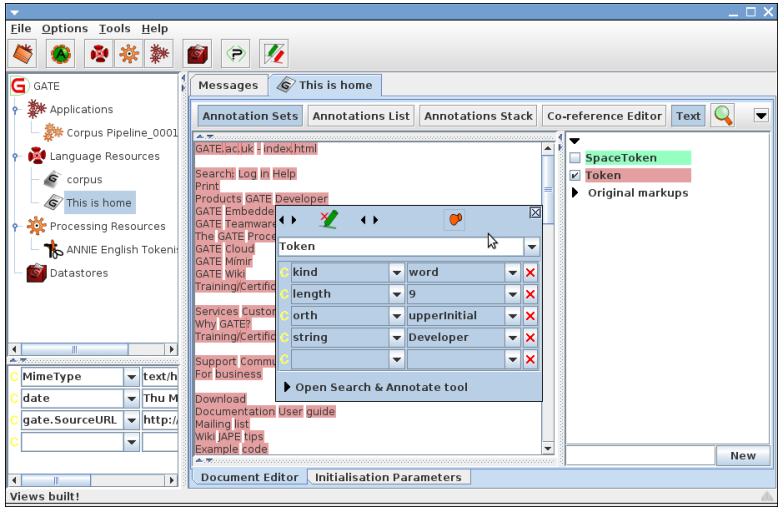
TIP: Make sure the GATE Developer main window is shown to test the results!
1 2 3 4 5 6 7 8 9 10 11 12 13 14 15 16 17 18 19 20 21 22 23 24 25 26 27 28 29 | |
GATE Processing Resources
Processing Resources (PRs) are java classes that can be executed
gate.Executable
1 2 3 4 5 | |
gate.ProcessingResource
1 2 3 4 5 6 | |
Language Analysers
Analysers are PRs that are designed to run over the documents in a corpus.
1 2 3 4 5 6 7 8 9 10 11 12 13 14 15 | |
Loading a CREOLE Plugin
• Documents and corpora are built in resource types.
• All other CREOLE resources are defined as plugins.
• Before instantiating a resource, you need to load its CREOLE plugin first!
• Use registerPlugin method on the CreoleRegister
• Standard GATE plugins are referenced by Maven coordinates, and downloaded automatically by GATE
Loading a CREOLE plugin
1 2 3 | |
Run a Tokeniser
• Load the “annie” plugin, version 8.5
• Instantiate a Language Analyser of type gate.creole.tokeniser.DefaultTokeniser (using the default values for all parameters);
• set the document of the tokeniser to the document created in above example;
• set the corpus of the tokeniser to null;
• call the execute() method of the tokeniser;
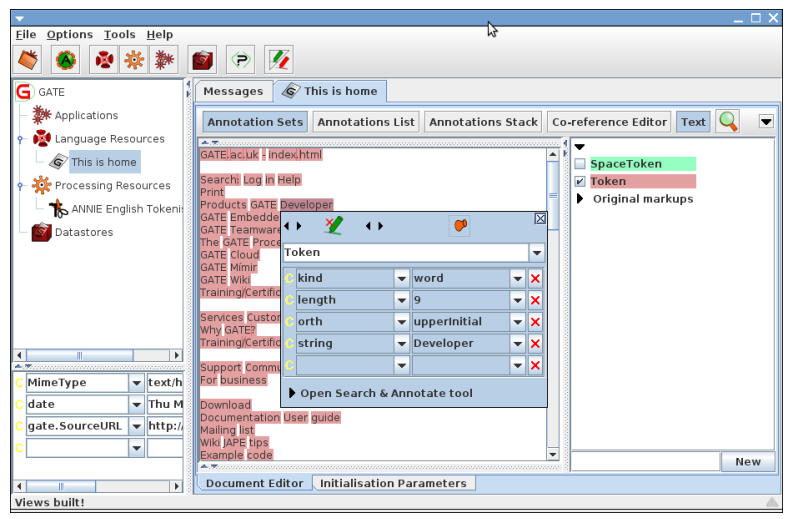
• inspect the document and see what the results were.
Additions to the solution of above example
1 2 3 4 5 6 7 8 9 10 11 12 13 14 15 16 | |
Gate Controllers
• Controllers provide the implementation for execution control in GATE.
• They are called applications in GATE Developer.
• The implementations provided by default implement a pipeline architecture (they run a set of PRs one after another).
• Other kind of implementations are also possible.
- e.g. the Groovy plugin provides a scriptable controller implementation
• A controller is a class that implements gate.Controller.
Implementation
gate.Controller
1 2 3 4 5 6 | |
• all default controller implementations also implement gate.ProcessingResource (so you can include controllers inside other controllers!);
• like all GATE resources, controllers are created using the Factory class;
• controllers have names, and features.
Default Controller Types
The following default controller implementations are provided (all in the gate.creole package):
- • SerialController: a pipeline of PRs.
- • ConditionalSerialController: a pipeline of PRs.
Each PR has an associated RunningStrategy value which
can be used to decide at runtime whether or not to run the PR.
- • SerialAnalyserController: a pipeline of
LanguageAnalysers, which runs all the PRs over all the
documents in a Corpus. The corpus and document
parameters for each PR are set by the controller.
- • RealtimeCorpusController: a version of
SerialAnalyserController that interrupts the execution
over a document when a specified timeout has lapsed.
SerialAnalyserController API
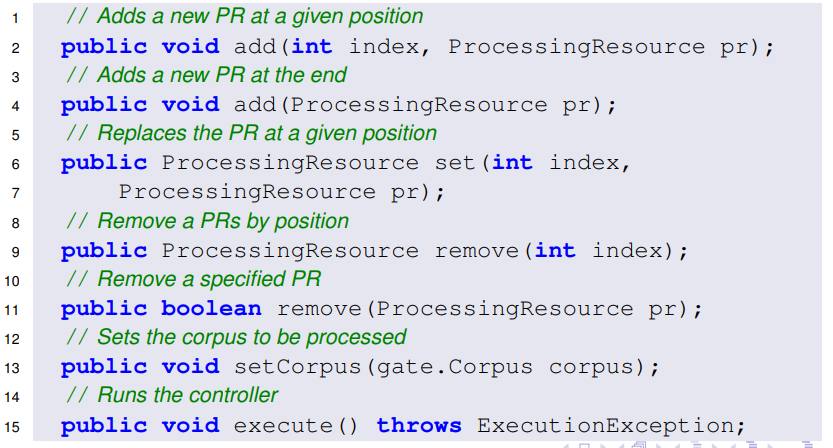
SerialAnalyserController is the most used type of Controller. Its most important methods are:
Run a Tokeniser (again!)
Implement the following:
- • Create a SerialAnalyserController, and add the tokeniser from
above example to it;
- • Create a corpus, and add the document from above example to it;
- • Set the corpus value of the controller to the newly created
corpus;
- • Execute the controller;
- • Inspect the results.
Additions to the solution to above example:
1 2 3 4 5 6 7 8 9 10 11 12 13 14 15 16 17 18 19 20 21 22 23 | |
Controller Persistency (or Saving Applications)
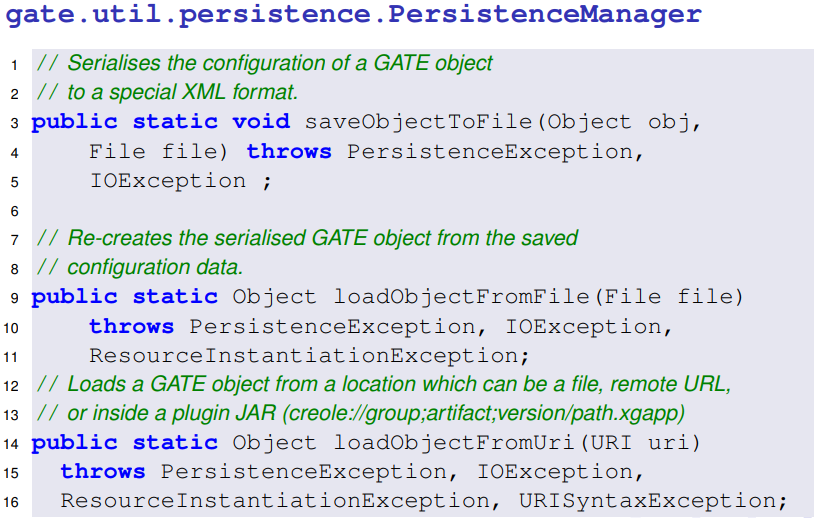
• The configuration of a controller (i.e. the list of PRs included, as
well as the features and parameter values for the controller and
its PRs) can be saved using a special type of XML serialisation.
• This is done using the
gate.util.persistence.PersistenceManager
class.
• This is what GATE Developer does when saving and loading
applications.
Implementation
Saving and loading a GATE application
1 2 3 4 5 6 7 8 9 10 11 12 13 14 15 16 | |