gapp file from Gate-cloud Export
During introduction we often came across a word gapp, which plays a key role in our application
What is gapp???
GATE saved application states often referred as gapp files are an XML representation of the state of a GATE application.
In our previous application(cirs) we used jape handler and gazbin handler classes to manually add our list of japes and list of def files to the corpus controller based on the work type of our document.
But in cirs-gapp application we are going to create a gapp file and gate-cloud export using our gate developer which incorporates all our jape files and def files
How to create Gapp file using Gate developer
We have JAPE and DEF files in predefined folders as per our Project namingspace ,which is under SVN control.Now we need to build GATE CLOUD Export ZIP file from GATE Developer GUI using these resources.
Open the Gate developer latest version ,first we need to load the annie with all the basic processing resources
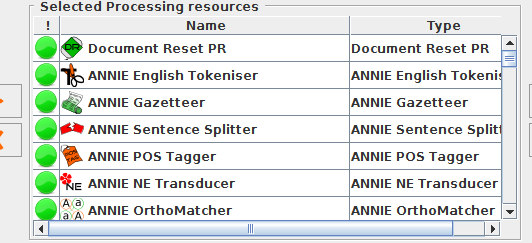
Later add the def files which consists of required list files by using Extended gazetter of stringAnnotation plugin
Here are the parameters of ExtendedGazetter which are need to be specified while adding a def file
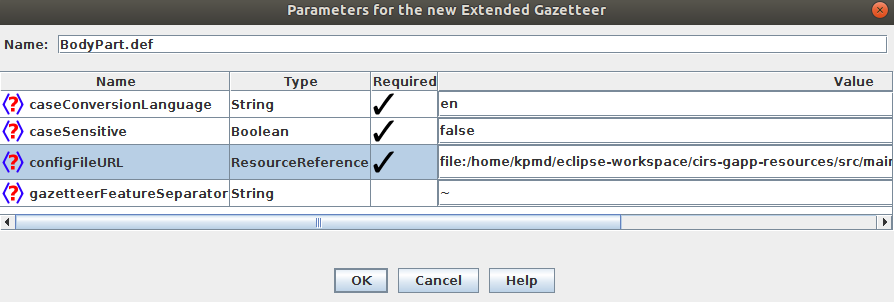
Here some def files are specific to certain features which are specified in the java application as dictionary running features.Gate documents are appended with these features based on the type of the document.
 1
 2
 3
 4
 5
 6
 7
 8
 9
10
11
12
13
14
15
16
17
18
19
20
21
22
23
24
25
26 | if(runPcs10.equals("yes")) {
featureMap.put("runPcs10def","yes");
}
if(runEmcode.equals("yes")) {
featureMap.put("runEmcodedef","yes");
}
if(runSnomed.equals("yes")) {
featureMap.put("runSnomeddef","yes");
}
if(runQueryAlert.equals("yes")) {
featureMap.put("runQueryAlertdef","yes");
}
if(runCompliance.equals("yes")) {
featureMap.put("runCompliancedef","yes");
}
if(runInterqual.equals("yes")) {
featureMap.put("runInterqualdef","yes");
}
if(runMilliman.equals("yes")) {
featureMap.put("runMillimandef","yes");
}
|
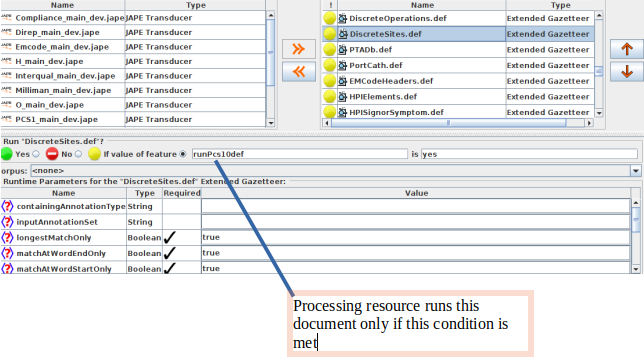
coming to jape files ,we have few main_jape files which consists of a list of japes.
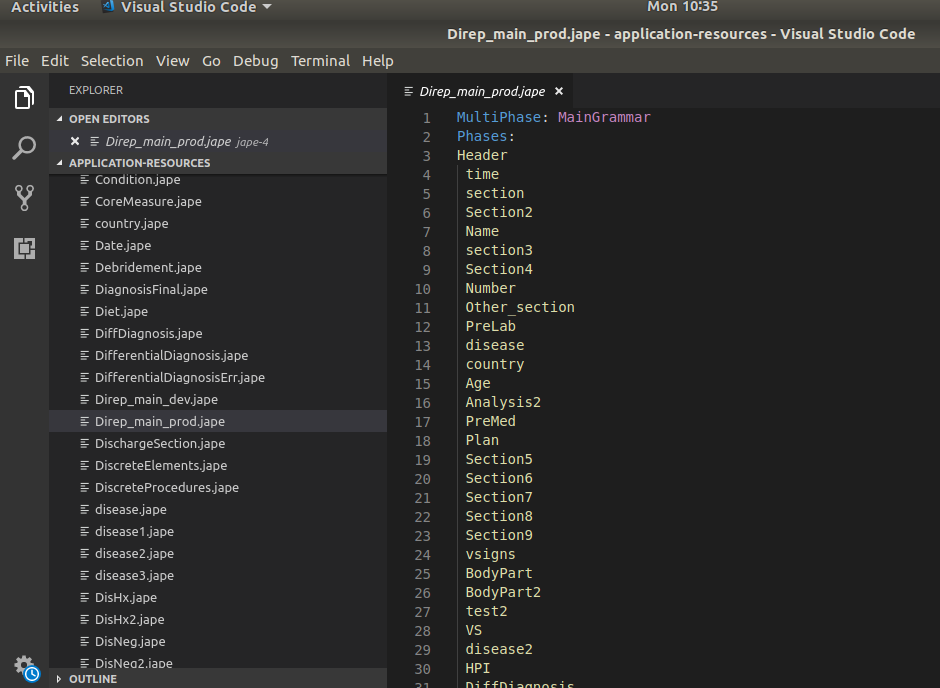
these main_japes are loaded into the application using jape-plus Transducer.
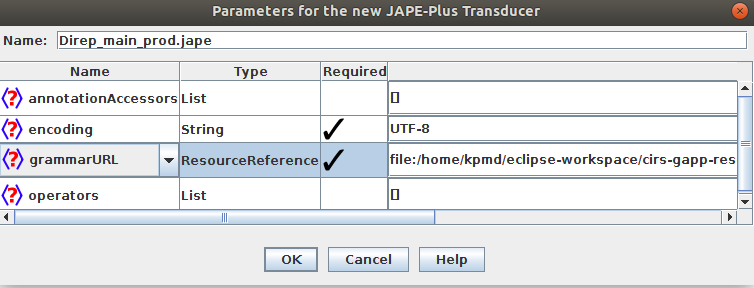
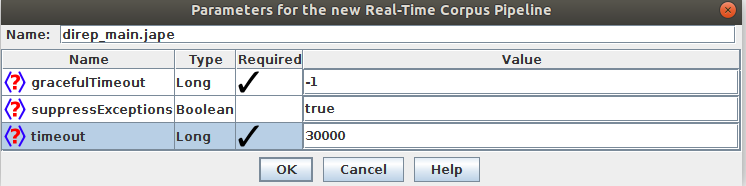
Each main_jape is created as new application using Real-time corpus pipeline to restrict the processing time of a document based on a particular time slot
like def files, japes files are also specific to certain features which are specified in the java application as jape running features.Gate documents are appended with these features based on the type of the document.
 1
 2
 3
 4
 5
 6
 7
 8
 9
10
11
12
13
14
15
16
17
18
19
20
21
22
23
24
25
26
27
28
29
30
31
32
33
34
35
36
37
38
39
40
41
42
43
44
45
46
47
48
49
50
51 | public void setJapeRunningFeatures(FeatureMap featureMap, int internalDocumentTypeId) {
log.info("internalDocumentTypeId :"+ internalDocumentTypeId);
ArrayList<Integer> list= new ArrayList<Integer>();
list.add(1);
list.add(2);
list.add(3);
list.add(5);
list.add(6);
list.add(8);
list.add(99);
if (internalDocumentTypeId==7) {
featureMap.put("Direp","yes");
}
else {
if (list.contains(internalDocumentTypeId)) {
featureMap.put("HandResqry","yes");
} else if (internalDocumentTypeId==4) {
featureMap.put("O","yes");
}
if (internalDocumentTypeId==8) {
featureMap.put("Resqry","yes");
}
if (internalDocumentTypeId==4 && runPcs10.equals("yes")) {
featureMap.put("OandrunPcs10","yes");
}
if (internalDocumentTypeId!=4 && runPcs10.equals("yes")) {
featureMap.put("NotOandrunPcs10","yes");
}
if (runEmcode.equals("yes")) {
featureMap.put("runEmcode","yes");
}
if (runSnomed.equals("yes")) {
featureMap.put("runSnomed","yes");
}
if (runQueryAlert.equals("yes")) {
featureMap.put("runQueryAlert","yes");
}
if (runCompliance.equals("yes")) {
featureMap.put("runCompliance","yes");
}
if (runInterqual.equals("yes")) {
featureMap.put("runInterqual","yes");
}
if (runMilliman.equals("yes")) {
featureMap.put("runMilliman","yes");
}
if (runCleanJape.equals("yes")) {
featureMap.put("runCleanJape","yes");
}
}
|
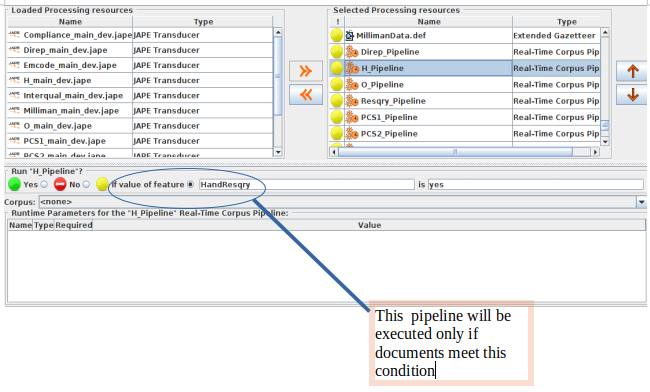
with this all the required processing resources are added to the application
Later right click on the annie and click on the "Export for Gate -cloud",then it asks for a file to export gate-cloud into a zipfile format
After extracting the file we will get three folders
application-resources
maven-cache.gate
application.xgapp
application-resources consists of all dictionary files and jape files,which we have loaded into the application
application.xgapp, this is the main file with which we create the document processor and process all our documents.
we can directly save the application state without exporting its as gate-cloud export by clicking on the "save application state" option
###Problems in creating xgapp
while doing the whole above process, we come up with a problem ,that is
Few of our JAPE files have our application JAVA file dependency, mean in some japes RHS is reading information from database using custom java files.
which prevents us from loading japes into the application because of those dependency classes.
####How to overcome this problem
so to over come this we are maintaining two main_jape files(Multiphase) for each main_jape that is one for dev and one for prod
1.prod main japes will be as it is with all the japes required in our application.
2.In dev main japes , we remove dependency required JAPE files from main.jape
while working with Gate developer we use dev_main_japes and export our gate cloud export zip and save our application state as xgapp file.In our application it is saved as CirsApplication_Absolute.xgapp.
Once we done with the GATE cloud export we just rename dev with prod in the xgapp file created in that folder and use this in the Production server to analyze documents.
####Expected Probelms in future
1)If we want to include new resource to XGAPP file other than existing JAPE changes or adding new jape to existing main jape. That is when user really want to add new module JAPES with main JAPE and want to run them based on specific document properties. So at this scenario we should rebuild XGAPP from GATE DEVELOPER using all remaining JAPES and new JAPE or Dictionary files
2)Building entire GAPP in GATE developer is again hectic task, we need to load around 80 DEF, and need to put run time conditions and 13 JAPE Mains and with again runtime conditions .
####Proposed Solution
When ever we need to rebuild new cloud export that is if we want to add new controller or change the conditions in the previous version then we load our CirsApplicationAbsolute.xgapp. which we created using our dev_main japes into the Gate developer and do changes as per our requirement
####What we Achieve
We will maintain one project with our resources which is under SVN with project intended naming space.
We can easily rebuild new export file.