Admit Orders 
An admit order is part of a medical record containing Patient's status, reason for admission , type of facility(In-Patient , OutPatient,ICU,DOU...etc),and initial instructions for that patient's care.Documenting Admit-Order is one of the physician's responsibility to mention it in H&P or Consultation report.
Functionalities:
Following are different functionalities that user can perform in AdmitOrders module.
- We can cross check Admit orders information between Facility and KPAI on the same account number.
- We need to reconcile admit order information whether it will be collected from Facility or KPAI or by user.
- We can easily select admit order information from document and add it to result table for reconciliation with their user name.
- We can simply delete it if it is not correct one and recheck by reference which is provided through hyperlink.
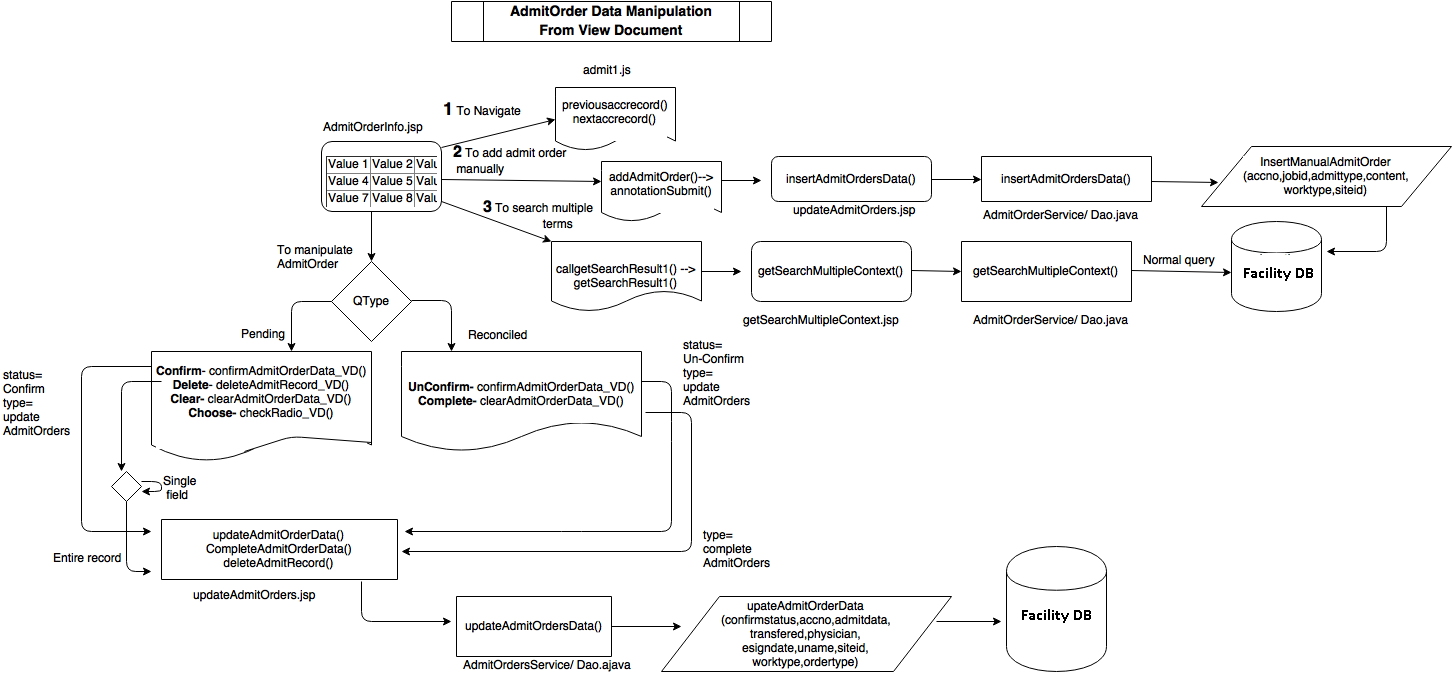
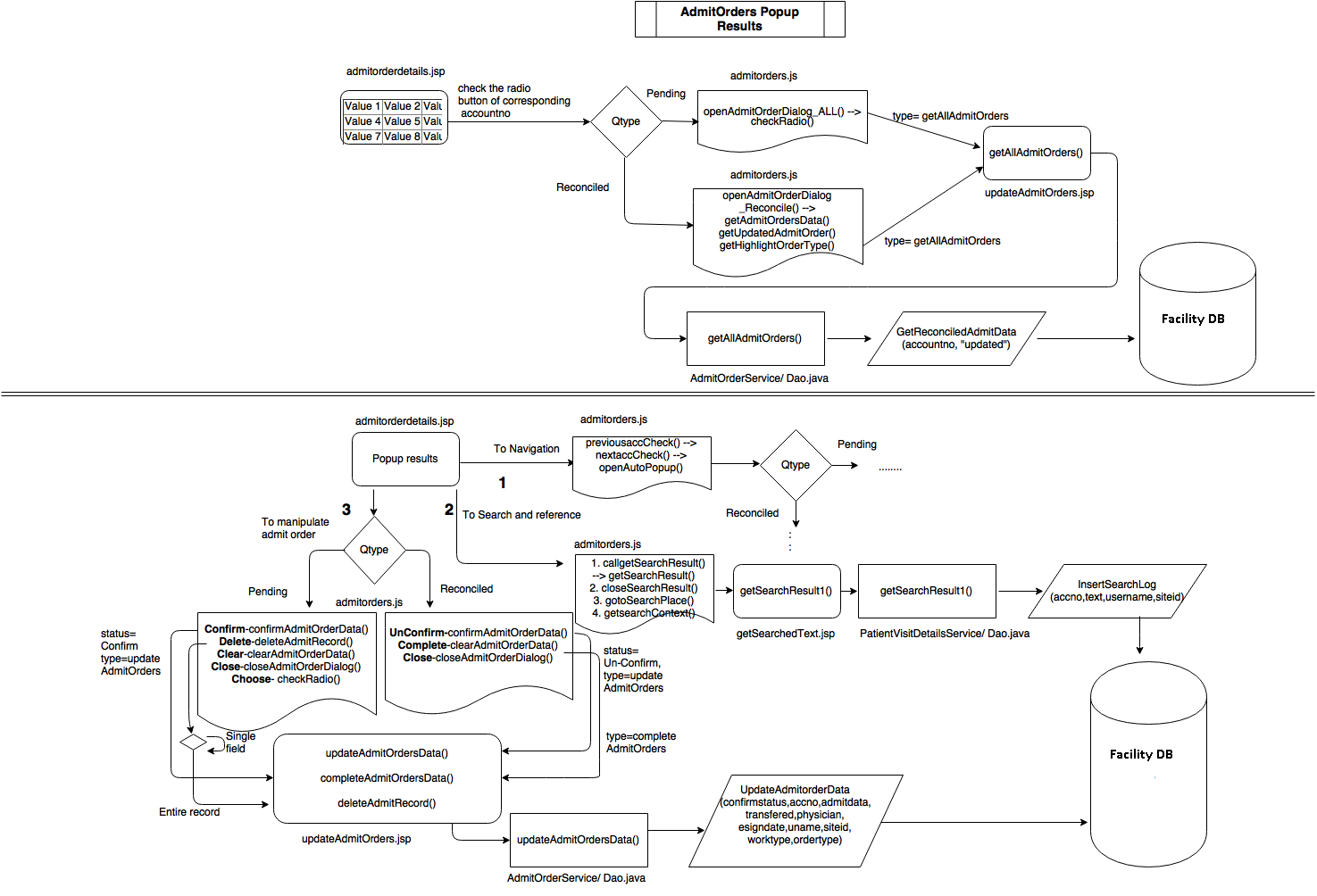
- We can search for multiple words to see its context inside popup box or view document interface.
- We can add multiple terms under Admit Data and Transferred but not under E-sign physician and E-sign date sections
- We can navigate accounts inside popup box as well as view document interface.
- We can't modify data inside Reconciled Queue except un confirm and complete but we can modify the data present at pending queue.
Facility Admit Orders:
KPAI reads data from Admit Order reports sent from MEDITECH as per scheduled manual program and displays Admit Orders in this section.
Facility Admit order consists of :
- MT AdmitData/ Admit Status
- MT Transfered/Level Of Care
- MT Esign Physician Name
- MT Esign Date
- Order Sign
- H&P Dictated By
- Room No
- Admit Order Date
- Admit Date
- Patient Name
KPAI Admit Orders:
KPAI admit orders are fetched from analysed patient documents by using GATE tool.
- KPAI AdmitData
- KPAI Transfered/Level Of Care
- KPAI Esign Physician Name
- KPAI Esign Date
- JobId
- Work-Type
- Account No
Admit Orders Table status:
- By default - MeditechAdmitOrders(rstatus=0) & Admitorders(rstatus=0)
- Reconciled - MeditechAdmitOrders(rstatus=1) & Admitorders(rstatus=2)
- Entire record deletion - Admitorders(rstatus=1) & AdmitOrdersLog(rstatus=1)
- Single Column deletion - Admitorders(rstatus=3) & AdmitOrdersLog(rstatus=3)
- Complete - MeditechAdmitOrders(rstatus=2) & Admitorders(rstatus=2)
- Unconfirm - MeditechAdmitOrders(rstatus=0) & Admitorders(rstatus=0)
- Reviewed - AdmitOrdersLog(rstatus=4)
Admit Orders Color status inside reconciliation table:
- MT AdmitOrders - light blue
- KPAI AdmitOrders - yellow
- User AdmitOrders – orange
Project Coding Files
Tables
Facility DB
- admitorders
- MeditechAdmitOrders
MedmineMaster
- AdmitOrdersLog
- Stored Procedures
- getAdmitordersCount
- GetAdmitOrdersByQueue
- GetAdmitOrders
- GetReconciledAdmitData
- insertManualAdmitOrder
- updateadmitorderData
- insertSearchLog
JSP / Js
- admitorders/admitorderdetails.jsp
- admitorders/AllAdmitOrders.jsp
- admitorders/ReconciledAdmitOrders.jsp
- admitorders/getSearchMultipleContext.jsp
- admitorders/updateAdmitOrders.jsp
- IcdIssueTracking/AdmitOrderInfo.jsp
- admitorders/admitorders.js
- admitorders/admit1.js
- admitorders/admit2.js
Java
- biz.codeextract.documentsummary.service.AdmitOrderService.java
- biz.codeextract.documentsummary.dao.AdmitOrderDao.java
- biz.codeextract.documentsummary.servlet.AdmitOrdersJson.java
- biz.codeextract.documentsummary.servlet.AdmitOrderDataTable
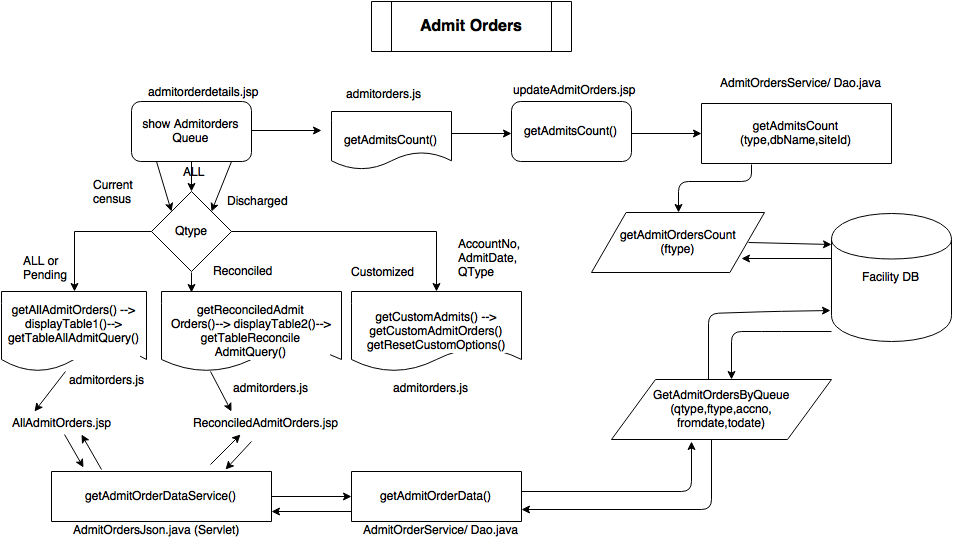
Work Flow for Admit Orders Queue 
Work Flow for Admit Orders Pop up Box Manipulation 
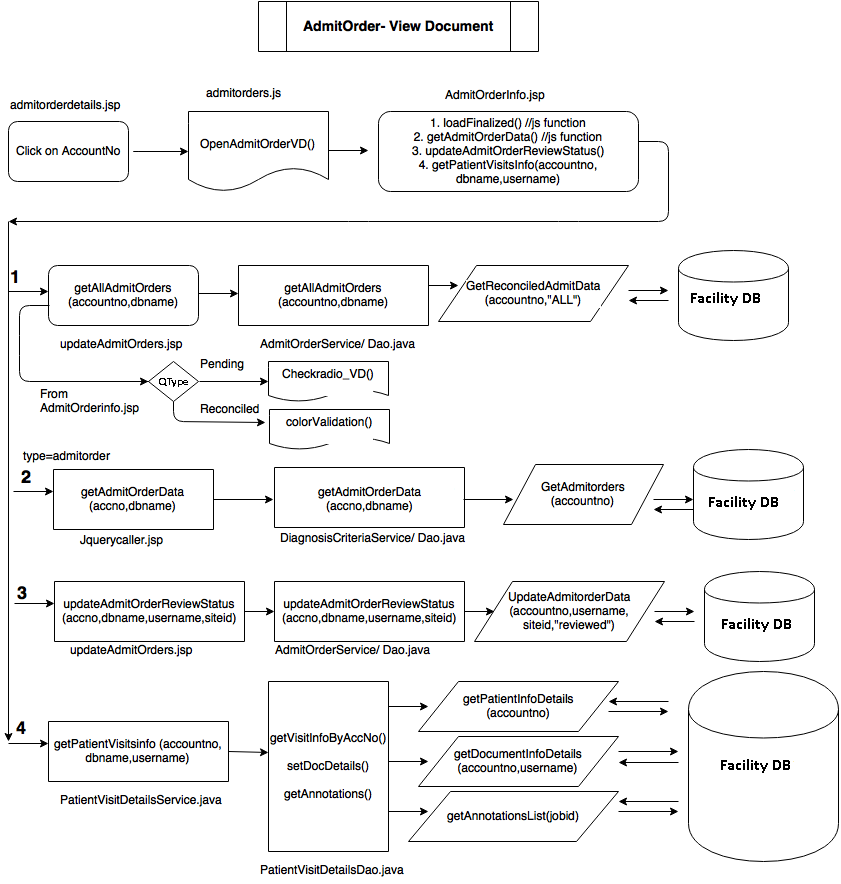
Work Flow for Admit Orders in VD 
Work Flow for Admit Orders VD Manipulation