Clinical Report Insertion
Motive
CRI application is designed for storing the customized reports data like Labs,Medications,Vitals,Reimbursement and Physician Documents into Database from HIM system.
Key tasks in CRI Application are:
- Creating Folder structure to store reports from Hospital system.
- Configure properties for Report paths and Database connections for multiple Hospitals.
- Formatting Documents if required.
- Process reports for bulk insertion into tables and backup original reports.
CRI work flow :
Data Transfer using FTP protocol
In some facilities they don't have HL7 specific message implementations for all patient related data segments. In general for Laboratory, Medicine, Vital signs and coding related information will be generated using vendor level scripts instead of generating through HL7 which is cost effective. To receive such reports to KPAI application, we implemented FTP protocol enabled channel between KPAI and Facility.
Following is the work flow diagram for HIM to KPAI data transfer through FTP
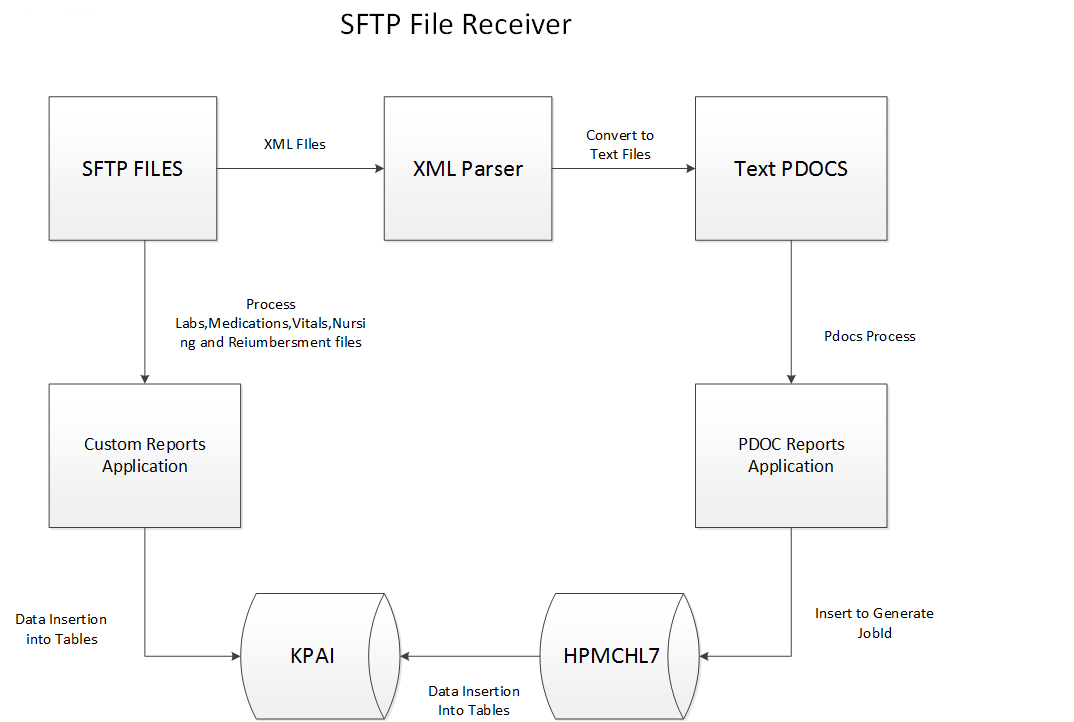
All Information will be saved in Microsoft SQL server 2008 R2 database server.
Technologies used in Data integration project
- HL7 interface Tool: Mirt Software
- FTP protocol: FTP, SFTP implemented softwares
- Database: Microsoft SQL server 2008 R2