HL7 Description
Transcribed Report MessageType(MDM):
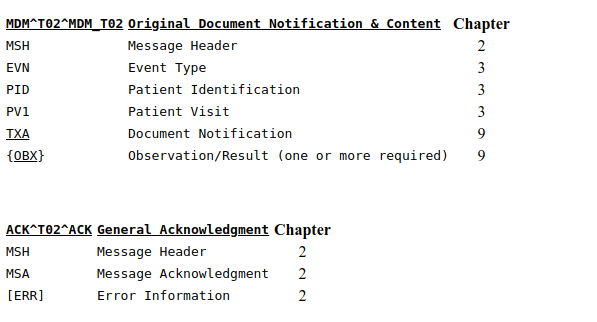
MDM/ACK - original document notification and content (Event T02):
This is a notification of the creation of a document with the accompanying content. Scenario A: Dictation is transcribed and the chart tracking system is notified that the document exists and requires authentication. The content of the document is transmitted along with the notification. Scenario B: A provider orders a series of three X-rays. The radiologist's dictation is transcribed in a single document, which covers all three orders. Multiple placer numbers are used to identify each of the orders within the single document message. The notification and document content are transmitted.
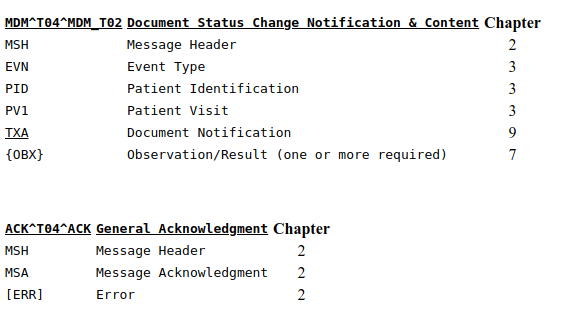
MDM/ACK - document status change notification and content (Event T04):
This is a notification of a change in a status of a document with the accompanying content. Scenario: A document is authenticated. Notification is sent to the chart tracking system and is used to update the document status from pre-authenticated to authenticated or legally authenticated. The document content is also transmitted.
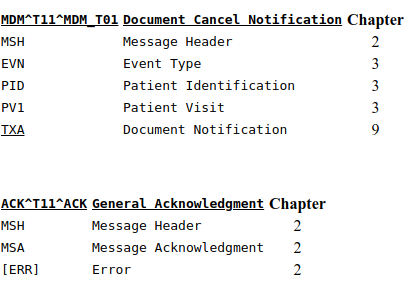
MDM/ACK - document cancel notification (Event T11):
This is a notification of a cancellation of a document. This trigger event should be used only for an original document with an availability status of "Unavailable." When a document has been made available for patient care, the process should be to replace the original document, which then becomes obsolete. The replacement document describes why the erroneous information exists. Scenario: When the author dictated a document, the wrong patient identification was given, and the document was transcribed and sent to the wrong patient's record. When the error is discovered, a cancellation notice is sent to remove the document from general access in the wrong patient's record. In these cases, a reason should be supplied in the cancellation message. To protect patient privacy, the correct patient's identifying information should not be placed on the erroneous document that is retained in the wrong patient's record for historical reference. A new document notification and content will be created using a T02 (original document notification and content) event and sent for association with the correct patient's record.
Coded Information MessageType(BAR):
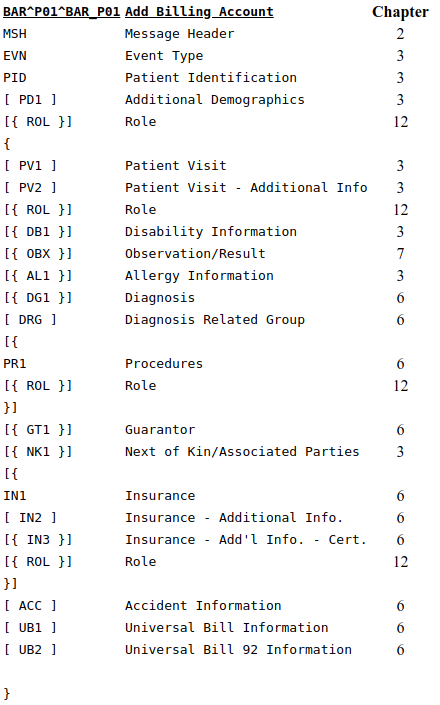
BAR/ACK Add Patient Account (Event P01):
Data are sent from some application (usually a Registration or an ADT system) for example, to the patient accounting or financial system to establish an account for a patient's billing/accounts receivable record. Many of the segments associated with this event are optional. This optionality allows those systems needing these fields to set up transactions that fulfill their requirements and yet satisfy the HL7 requirements. When an account's start and end dates span a period greater than any particular visit, the P01 (add account) event should be used to transmit the opening of an account. The A01 (admit/visit notification) event can notify systems of the creation of an account as well as notify them of a patient's arrival in the healthcare facility. In order to create a new account without notifying systems of a patient's arrival, use the P01 trigger event. From Standard Version 2.3 onward, the P01 event should only be used to add a new account that did not exist before, not to update an existing account. The new P05 (update account) event should be used to update an existing account. The new P06 (end account) event should be used to close an account. With the P01 event, EVN-2 - recorded date/time should contain the account start date.
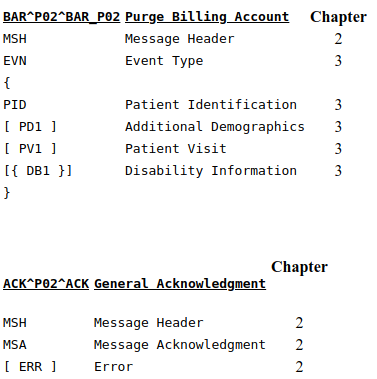
BAR/ACK Purge Patient Accounts (Event P02):
Generally, the elimination of all billing/accounts receivable records will be an internal function controlled, for example, by the patient accounting or financial system. However, on occasion, there will be a need to correct an account, or a series of accounts, that may require that a notice of account deletion be sent from another sub-system and processed, for example, by the patient accounting or financial system. Although a series of accounts may be purged within this one event, we recommend that only one PID segment be sent per event.
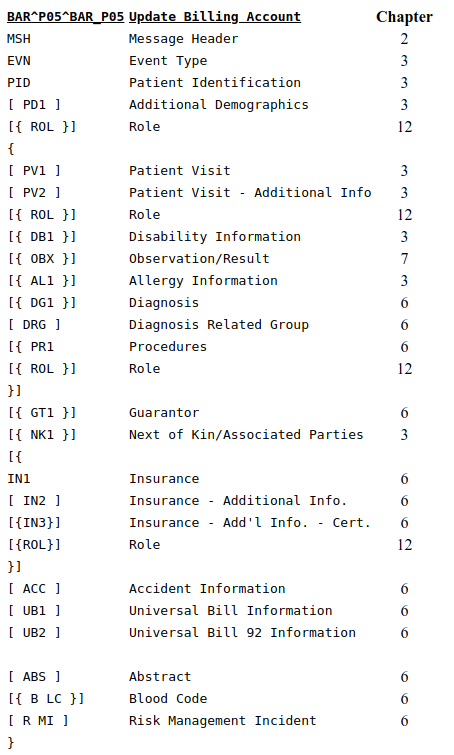
BAR/ACK Update Account (Event P05):
The P05 event is sent when an existing account is being updated. From Standard Version 2.3 onward, the P01 (add account) event should no longer be used for updating an existing account, but only for creating a new account. With the addition of P10 (transmit ambulatory payment classification [APC] groups) in Version 2.4, it is expected that the P05 (update account) will be used to send inpatient coding information and the P10 (transmit ambulatory payment classification [APC] groups) will be used to send outpatient coding information.
NutritionalData MessageType(OMD):
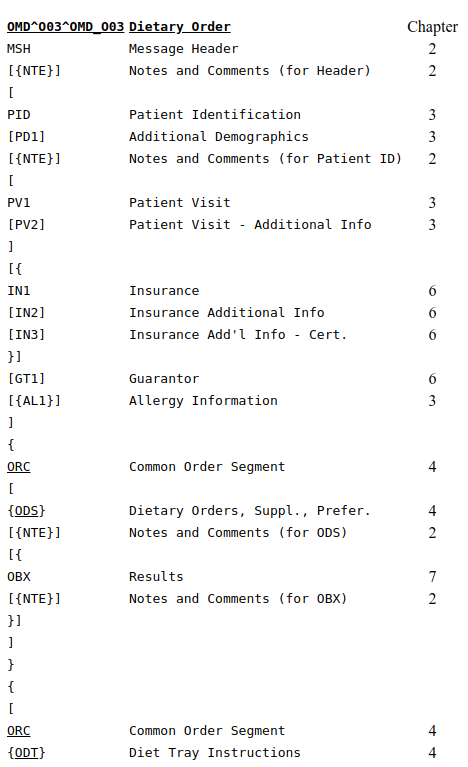
OMD Dietary order (Event O03):
A diet office needs to receive specific information, the most important being the diet order itself. Diet restrictions (often called diet codes) are the basic building blocks of a diet order. The diet order segments may be sent as part of the ORM and ORR message structure to support backwards compatibility, or may be sent as part of the following dedicated message structures.
Medications MessageType(OMP,RDS,RGVRAS):
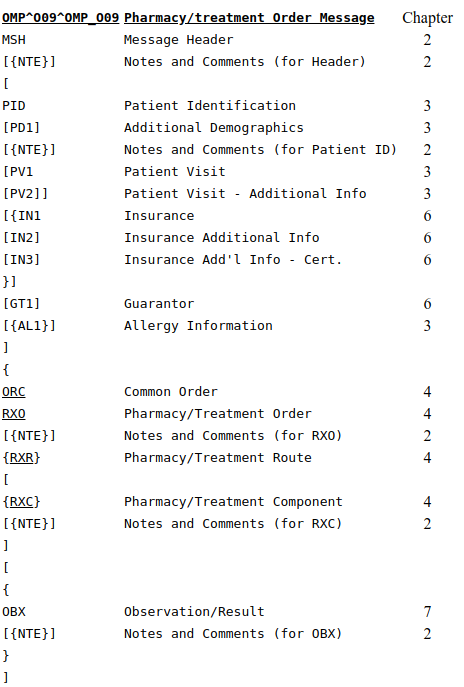
OMP Pharmacy/Treatment order message (Event O09):
Pharmacy/Treatment Orders can use the ORM message with the RXO, RXC, and RXR segments for the detail segment, or use the OMP and ORP messages as described below.

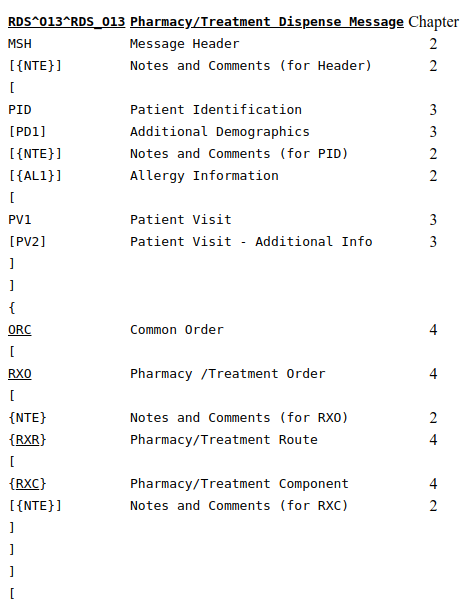
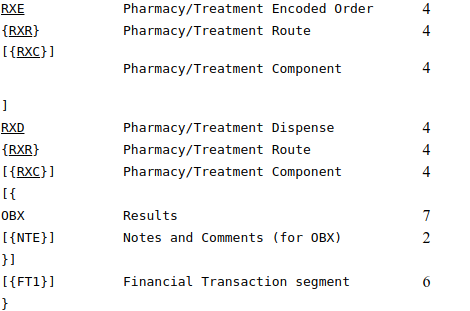
RDS Pharmacy/treatment dispense message (Event O13):
The RDS message may be created by the pharmacy/treatment application for each instance of dispensing a drug or treatment to fill an existing order or orders. In the most common case, the RDS messages would be routed to a Nursing application or to some clinical application, which needs the data about drugs dispensed or treatments given. As a site-specific variant, the original order segments (RXO, RXE and their associated RXR/RXCs) may be sent optionally (for comparison).
The ORC must have the filler order number and the order control code RE. The RXE and associated RXCs may be present if the receiving application needs any of their data. The RXD carries the dispense data for a given issuance of medication: thus it may describe a single dose, a half-day dose, a daily dose, a refill of a prescription, etc. The RXD is not a complete record of an order. Use the RXO and RXE segments if a complete order is needed. It is a record from the pharmacy or treatment supplier to the Nursing application (or other) with drug/treatment dispense and administration instructions.
The FT1 segment is optional and repeating in order to accommodate multiple charge, benefit and pricing situations. Example use cases demonstrating zero, one and two FT1 segments follow:
In the case where the RDS message represents a dispense event that is in process (i.e., has not been received by the patient), the financial transactions associated with the dispense do not yet exist. Until the financial transactions associated with the dispense event have been completed, no FT1 segment may exist in the message.
In the case where the RDS message represents a dispense event that has been received by the patient, and thus all financial transactions have been completed, the RDS message may contain one or more FT1 segments. Examples of single and multiple FT1 segments follow.
Payment for the dispense event completed by a single payor:
MSH|^&~|Pharm|GenHosp|CIS|GenHosp|1998052911150700||RDS^O13^RDS_O13|...
The use of RDS with the trigger of O01 and RRD with the trigger O02 is maintained for backward compatibility.
RGV pharmacy/treatment give message (Event O15):
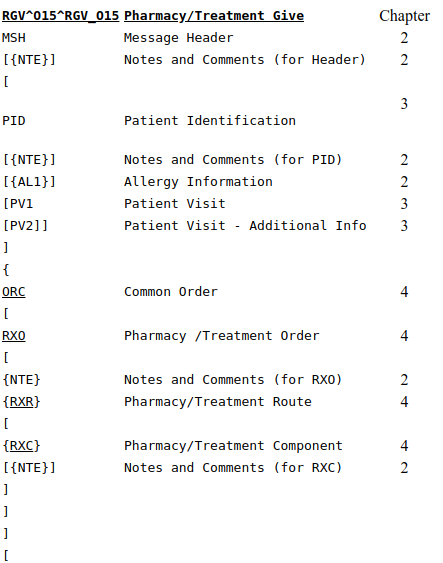
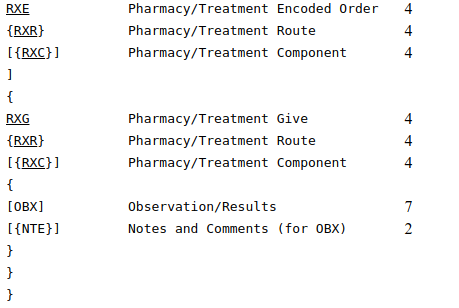
The RDS message's RXD segment carries the dispense data for a given issuance of medication: thus it may describe a single dose, a half-day dose, a daily dose, a refill of a prescription, etc. It does not contain the given instructions or scheduling information. When this "give" (i.e., administration) information needs to be transmitted from the pharmacy or treatment application to another application, it is done with the RGV message.
The RGV message uses the RXG segment to record drug or treatment administration instructions. It may carry information about a single scheduled administration on a drug or treatment, or it may carry information about multiple administrations. If the pharmacy or treatment application (or some other application) needs to create a non ambiguous MAR report where each administration is matched to a particular give date/time instruction, it may use the RGV message as described in the following way:
For each scheduled administration of the medication, the pharmacy/treatment issues either a single RGV message or a single RGV message with multiple RXG segments, one for each scheduled administration. The actual administrations (transmitted by one or more RAS messages) are matched against the scheduled ones by recording in each RXA segment the Give Sub-ID of the corresponding RXG segment. If more than one administration needs to be matched (as in the case of recording a change or rate of an IV solution) the administering application issues additional RXA segment(s) (corresponding to the same RXG segment). If no matching is needed, the Give Sub-ID of the RXA segments has the value zero (0). The ORC must have the filler order number and the order control code RE. The RXE and associated RXCs may be present if the receiving application needs any of their data. The RXG carries the scheduled administration data for either a single "give instruction" (single dose) of medication or for multiple "give instructions." The RXG is not a complete record of an order. Use the RXO and RXE segments if a complete order is needed. It is a record from the pharmacy or treatment application to the Nursing application (or other) with drug/treatment administration instructions.
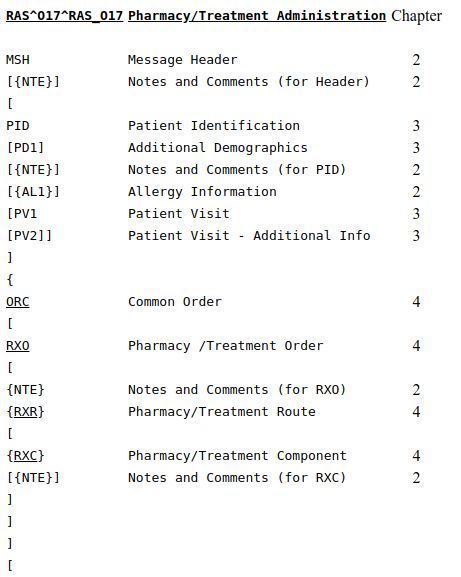
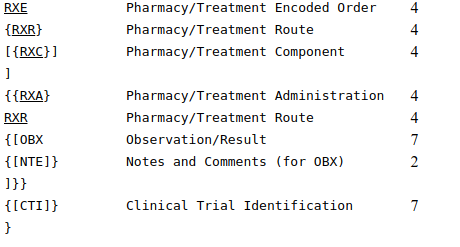
RAS Pharmacy/treatment Administration Message (event O17):
The RAS message may be created by the administering application (e.g., nursing application) for each instance of administration for an existing order. If the administering application wants to report several administrations of medication/treatment for a given order with a single RAS message, each instance is reported by a separate (repeating) RXA segment. In addition, the administration records for a group of orders may be sent in a single message by creating repeating groups of segments at the ORC level.
In the most common case, the RAS messages would be sent from a nursing application to the pharmacy or treatment application (or to the ordering application or another clinical application), which could use the data to generate the medication administration reports. Multiple RXA segments, each corresponding to a separate administration instance for a given order, may be sent with a single ORC.
MessageType ADT:
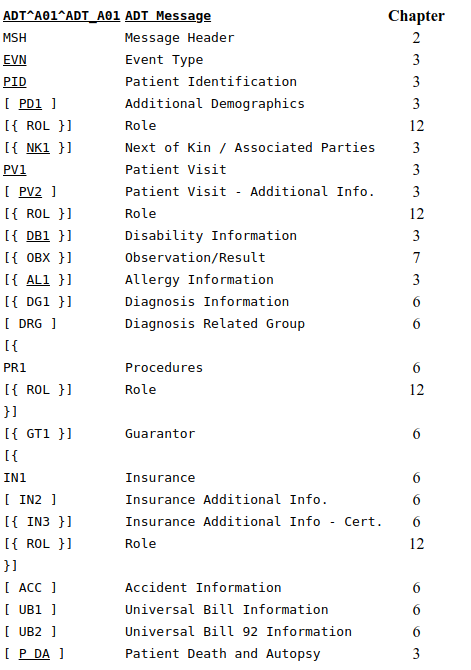
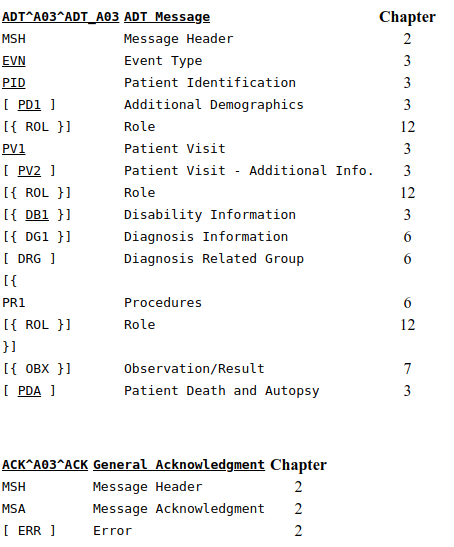
ADT/ACK - admit/visit notification (event A01):
An A01 event is intended to be used for "Admitted" patients only. An A01 event is sent as a result of a patient undergoing the admission process which assigns the patient to a bed. It signals the beginning of a patient's stay in a healthcare facility. Normally, this information is entered in the primary Patient Administration system and broadcast to the nursing units and ancillary systems. It includes short stay and "John Doe" (e.g. patient name is unknown) admissions. For example, an A01 event can be used to notify: the pharmacy system that a patient has been admitted and may be legitimately prescribed drugs; the nursing system that the patient has been admitted and needs a care plan prepared; the finance system of the start of the billing period; the dietary system that a new patient has been installed and requires dietary services; the laboratory, pathology, and radiology systems that a patient has been admitted and is entitled to receive services; the clinical repository that an admission has taken place for the EMR (electronic medical record).
When an account's start and end dates span a period greater than any particular visit, the P01 (add patient account) event should be used to transmit the opening of an account. The A01 event can notify systems of the creation of an account as well as notify them of a patient's arrival in the healthcare facility. In order to create a new account without notifying of patient's arrival, use the P01 event. The ROL - Role Segment is used in this message to communicate providers not specified elsewhere. Person level providers with an ongoing relationship are reported in the ROL segment following the PID/PD1 segments. Providers corresponding to the PV1 data are reported in the ROL segment following the PV1/PV2 segments. Providers related to a specific procedure are reported in the ROL segment following the PR1 segment. Providers related to a specific insurance are reported in the ROL segment following the IN1/IN2/IN3 segments. To communicate the begin and end date of the provider, use the ROL-5 - Role Begin Date/Time and the ROL-6 - Role End Date/Time in the ROL segment, with the applicable ROL-3 - Role Code. Refer to section 12.3.3 for the definition of the ROL segment.
ADT/ACK - transfer a patient (event A02):
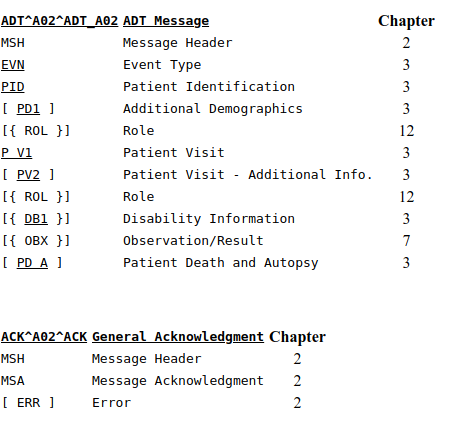
An A02 event is issued as a result of the patient changing his or her assigned physical location. The fields included when this message is sent should be the fields pertinent to communicate this event. When other important fields change, it is recommended that the A08 (update patient information) event be used in addition. If the transfer function of your Patient Administration system allows demographics to change at the same time as the transfer (for example an address change), we recommend (but do not require) sending two messages (an A02 followed by an A08). This A02 event can be used with admitted and non-admitted patients.
The new patient location should appear in PV1-3 - Assigned Patient Location while the old patient location should appear in PV1-6 - Prior Patient Location. For example, an A02 event can be used to notify: laboratory, radiology, pathology that the patient has changed location and test results should be redirected; pharmacy that drugs should be redirected for the patient; dietary that the meals should be delivered to a different location; the clinical repository that a transfer has taken place for the Electronic Medical Record.
If the patient is going to a temporary location (such as the O/R, X-RAY, LIMBO, the HALLWAY) it is recommended that the A09 (patient departing-tracking) and A10 (patient arriving-tracking) events be used instead of A02. It is recommended that A02 be used only for a real change in the census bed in the Patient Administration system.
The ROL - Role Segment is used in this message to communicate providers not specified elsewhere. Person level providers with an ongoing relationship are reported in the ROL segment following the PID/PD1 segments. Providers corresponding to the PV1 data are reported in the ROL segment following the PV1/PV2 segments. Providers related to a specific procedure are reported in the ROL segment following the PR1 segment. Providers related to a specific insurance are reported in the ROL segment following the IN1/IN2/IN3 segments. To communicate the begin and end date of the provider, use the ROL-5 - Role Begin Date/Time and the ROL-6 - Role End Date/Time in the ROL segment, with the applicable ROL-3 - Role Code. Refer to section 12.3.3 for the definition of the ROL segment.
ADT/ACK - discharge/end visit (event A03):
An A03 event signals the end of a patient's stay in a healthcare facility. It signals that the patient's status has changed to "discharged" and that a discharge date has been recorded. The patient is no longer in the facility. The patient's location prior to discharge should be entered in PV1-3 - Assigned Patient Location.
An A03 event can be sent to notify: the pharmacy that the patient's stay has ended and that entitlement to drugs has changed accordingly; the nursing system that the patient has been discharged and that the care plan can be completed; the finance system that the patient billing period has ended; and/or the clinical repository that discharge has taken place for the EMR.
For non-admitted patients, an A03 event signals the end of a patient's visit to a healthcare facility. It could be used to signal the end of a visit for a one-time or recurring outpatient who is not assigned to a bed. It could also be used to signal the end of a visit to the Emergency Room. PV1-45 - Discharge Date/Time can be used for the visit end date/time.
When an account's start and end dates span a period greater than any particular visit, the P06 (end account) event should be used to transmit information about the closing of an account. To indicate that a patient has expired, use an A03 event with the PID-29 - Patient Death Date and Time and PID-30 - Patient Death Indicator filled in.
The fields included when this message is sent should be the fields pertinent to communicate this event. When other important fields change, it is recommended that the A08 (update patient information) event be used in addition.
The ROL - Role Segment is used in this message to communicate providers not specified elsewhere. Person level providers with an ongoing relationship are reported in the ROL segment following the PID/PD1 segments. Providers corresponding to the PV1 data are reported in the ROL segment following the PV1/PV2 segments. Providers related to a specific procedure are reported in the ROL segment following the PR1 segment. Providers related to a specific insurance are reported in the ROL segment following the IN1/IN2/IN3 segments. To communicate the begin and end date of the provider, use the ROL-5 - Role Begin Date/Time and the ROL-6 - Role End Date/Time in the ROL segment, with the applicable ROL-3 - Role Code. Refer to section 12.3.3 for the definition of the ROL segment.
ADT/ACK - register a patient (event A04):
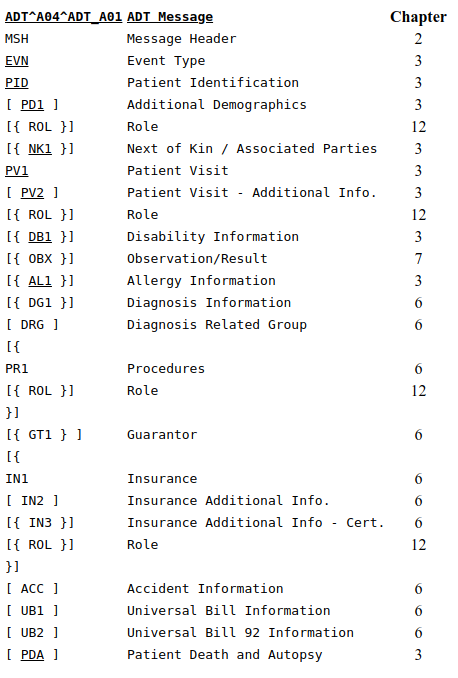
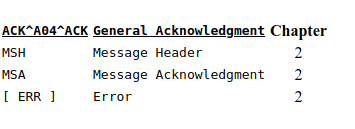
An A04 event signals that the patient has arrived or checked in as a one-time, or recurring outpatient, and is not assigned to a bed. One example might be its use to signal the beginning of a visit to the Emergency Room (= Casualty, etc.). Note that some systems refer to these events as outpatient registrations or emergency admissions. PV1-44 - Admit Date/Time is used for the visit start date/time.
The ROL - Role Segment is used in this message to communicate providers not specified elsewhere. Person level providers with an ongoing relationship are reported in the ROL segment following the PID/PD1 segments. Providers corresponding to the PV1 data are reported in the ROL segment following the PV1/PV2 segments. Providers related to a specific procedure are reported in the ROL segment following the PR1 segment. Providers related to a specific insurance are reported in the ROL segment following the IN1/IN2/IN3 segments. To communicate the begin and end date of the provider, use the ROL-5 - Role Begin Date/Time and the ROL-6 - Role End Date/Time in the ROL segment, with the applicable ROL-3 - Role Code. Refer to section 12.3.3 for the definition of the ROL segment.
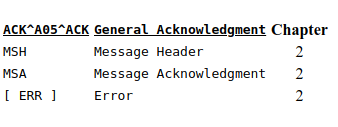
ADT/ACK - pre-admit a patient (event A05):
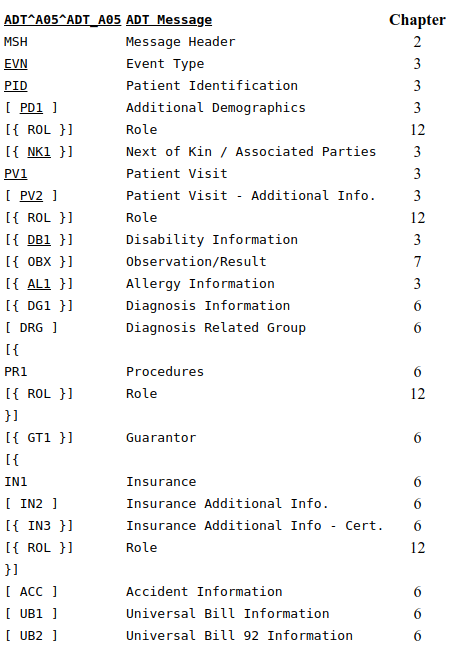
An A05 event is sent when a patient undergoes the pre-admission process. During this process, episode-related data is collected in preparation for a patient's visit or stay in a healthcare facility. For example, a pre-admit may be performed prior to inpatient or outpatient surgery so that lab tests can be performed prior to the surgery. This event can also be used to pre-register a non-admitted patient.
The ROL - Role Segment is used in this message to communicate providers not specified elsewhere. Person level providers with an ongoing relationship are reported in the ROL segment following the PID/PD1 segments. Visit level providers (corresponding to the PV1 data) are reported in the ROL segment following the PV1/PV2 segments. Providers related to a specific procedure are reported in the ROL segment following the PR1 segment. Providers related to a specific insurance are reported in the ROL segment following the IN1/IN2/IN3 segments. To communicate the begin and end date of the provider, use the ROL-5 - Role Begin Date/Time and the ROL-6 - Role End Date/Time in the ROL segment, with the applicable ROL-3 - Role Code. Refer to section 12.3.3 for the definition of the ROL segment.
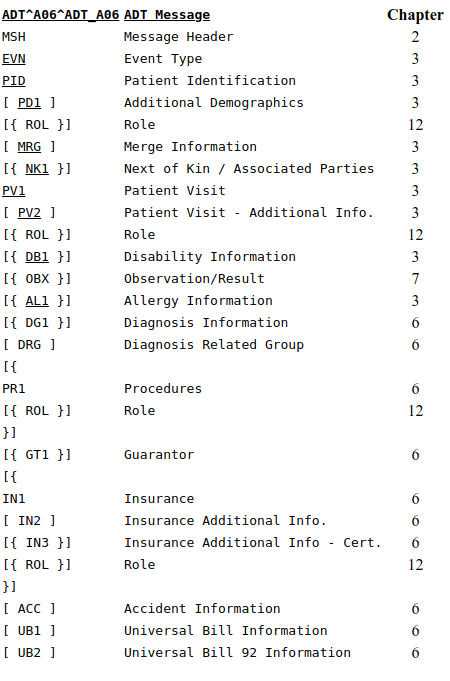
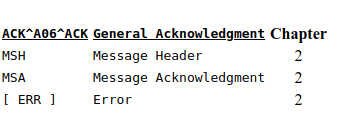
ADT/ACK - change an outpatient to an inpatient (event A06):
An A06 event is sent when a patient who was present for a non-admitted visit is being admitted after an evaluation of the seriousness of the patient's condition. This event changes a patient's status from non-admitted to admitted. The new patient location should appear in PV1-3 - Assigned patient location, while the old patient location (if different) should appear in PV1-6 - Prior patient location. The new patient class should appear in PV1-2 - Patient class.
It will be left to implementation negotiation to determine whether disparate systems merely change the patient class, or close and open a new account. The current active account number should appear in PID-18 - Patient account number; the prior account number can be included optionally in MRG-3 - Prior patient account number. This arrangement is not intended to be a type of merge, but the MRG segment is used here for MRG-3 - Prior patient account number.
The fields included when this message is sent should be the fields pertinent to communicate this event. When other important fields change, it is recommended that the A08 (update patient information) event be used in addition.
The ROL - Role Segment is used in this message to communicate providers not specified elsewhere. Person level providers with an ongoing relationship are reported in the ROL segment following the PID/PD1 segments. Visit level providers (corresponding to the PV1 data) are reported in the ROL segment following the PV1/PV2 segments. Providers related to a specific procedure are reported in the ROL segment following the PR1 segment. Providers related to a specific insurance are reported in the ROL segment following the IN1/IN2/IN3 segments. To communicate the begin and end date of the provider, use the ROL-5 -Role begin date/time and the ROL-6 - Role end date/time in the ROL segment, with the applicable ROL-3 - Role code. Refer to section 12.3.3 for the definition of the ROL segment.
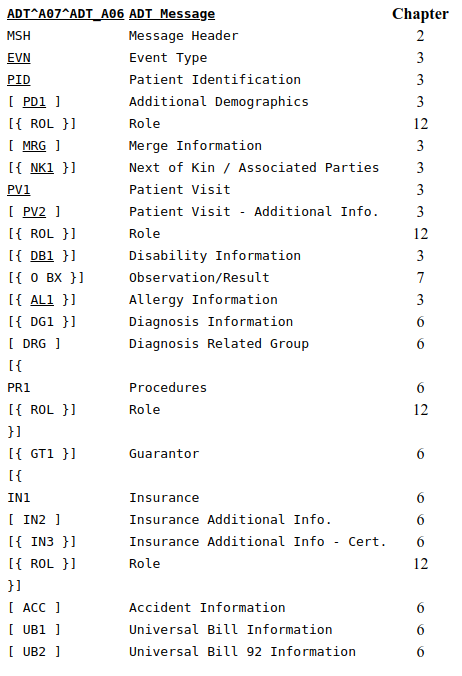
ADT/ACK - change an inpatient to an outpatient (event A07):
An A07 event is sent when a patient who was admitted changes his/her status to "no longer admitted" but is still being seen for this episode of care. This event changes a patient from an "admitted" to a "non-admitted" status. The new patient location should appear in PV1-3 - Assigned patient location, while the old patient location (if different) should appear in PV1-6 - Prior patient location.
We leave it to implementation negotiation to determine whether disparate systems merely change the patient class, or close and open a new account. The current active account number should appear in field PID-18 - Patient account number; the prior account number can be included optionally in MRG-3 - Prior patient account number. This arrangement is not intended to be a type of merge. The MRG segment is only used here for MRG-3 - Prior patient account number. PV1-19 - Visit number can also be changed during this event.
The fields included when this message is sent should be the fields pertinent to communicate this event. When other important fields change, it is recommended that the A08 (update patient information) event be used in addition.
The ROL - Role Segment is used in this message to communicate providers not specified elsewhere. Person level providers with an ongoing relationship are reported in the ROL segment following the PID/PD1 segments. Providers corresponding to the PV1 data are reported in the ROL segment following the PV1/PV2 segments. Providers related to a specific procedure are reported in the ROL segment following the PR1 segment. Providers related to a specific insurance are reported in the ROL segment following the IN1/IN2/IN3 segments. To communicate the begin and end date of the provider, use the ROL-5 - Role begin date/time and the ROL-6 - Role end date/time in the ROL segment, with the applicable ROL-3 - Role code. Refer to section 12.3.3 for the definition of the ROL segment.
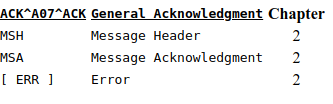
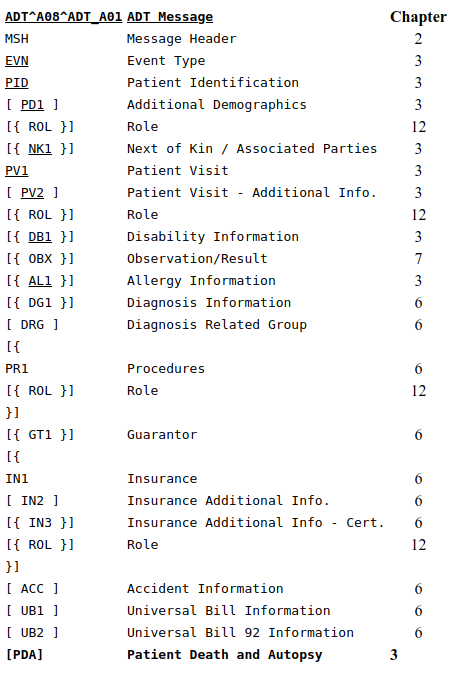
ADT/ACK - update patient information (event A08):
This trigger event is used when any patient information has changed but when no other trigger event has occurred. For example, an A08 event can be used to notify the receiving systems of a change of address or a name change. We recommend that the A08 transaction be used to update fields that are not related to any of the other trigger events. The A08 event can include information specific to an episode of care, but it can also be used for demographic information only.
The ROL - Role Segment is used in this message to communicate providers not specified elsewhere. Person level providers with an ongoing relationship are reported in the ROL segment following the PID/PD1 segments. Providers corresponding to the PV1 data are reported in the ROL segment following the PV1/PV2 segments. Providers related to a specific procedure are reported in the ROL segment following the PR1 segment. Providers related to a specific insurance are reported in the ROL segment following the IN1/IN2/IN3 segments. To communicate the begin and end date of the provider, use the ROL-5 - Role begin date/time and the ROL-6 - Role end date/time in the ROL, with the applicable ROL-3 - Role code. Refer to section 12.3.3 for the definition of the ROL segment.
ADT/ACK - cancel admit / visit notification (event A11):
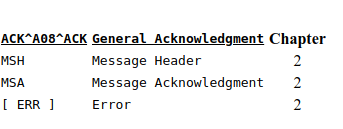
For "admitted" patients, the A11 event is sent when an A01 (admit/visit notification) event is cancelled, either because of an erroneous entry of the A01 event, or because of a decision not to admit the patient after all.
For "non-admitted" patients, the A11 event is sent when an A04 (register a patient) event is cancelled, either because of an erroneous entry of the A04 event, or because of a decision not to check the patient in for the visit after all. To cancel an A05 (pre-admit a patient) event, use the A38 (cancel pre-admit), which is new for Version 2.3 of this Standard.
The fields included when this message is sent should be the fields pertinent to communicate this event. When other important fields change, it is recommended that the A08 (update patient information) event be used in addition. The DG1 segment remains in this message for backward compatibility only.
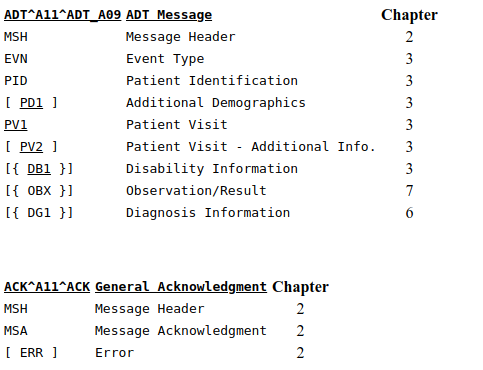
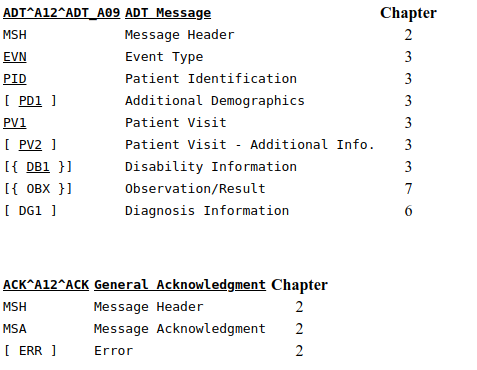
ADT/ACK - cancel transfer (event A12):
The A12 event is sent when an A02 (transfer a patient) event is cancelled, either because of erroneous entry of the A02 event or because of a decision not to transfer the patient after all. PV1-3 - assigned patient location must show the location of the patient prior to the original transfer.
The fields included when this message is sent should be the fields pertinent to communicate this event. When other important fields change, it is recommended that the A08 (update patient information) even be used in addition. The DG1 segment remains in this message for backward compatibility only.
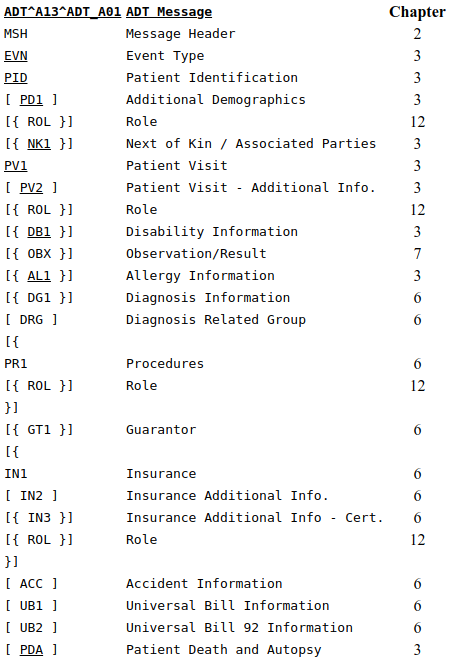
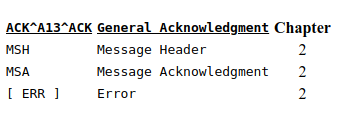
ADT/ACK - cancel discharge / end visit (event A13):
The A13 event is sent when an A03 (discharge/end visit) event is cancelled, either because of erroneous entry of the A03 event or because of a decision not to discharge or end the visit of the patient after all. PV1-3 - assigned patient location should reflect the location of the patient after the cancellation has been processed. Note that this location may be different from the patient's location prior to the erroneous discharge. Prior Location could be used to show the location of the patient prior to the erroneous discharge.
The fields included when this message is sent should be the fields pertinent to communicate this event. When other important fields change, it is recommended that the A08 (update patient information) event be used in addition.
The ROL - Role Segment is used in this message to communicate providers not specified elsewhere. Person level providers with an ongoing relationship are reported in the ROL segment following the PID/PD1 segments. Providers corresponding to the PV1 data are reported in the ROL segment following the PV1/PV2 segments. Providers related to a specific procedure are reported in the ROL segment following the PR1 segment. Providers related to a specific insurance are reported in the ROL segment following the IN1/IN2/IN3 segments. To communicate the begin and end date of the provider, use the ROL-5 - Role begin date/time and the ROL-6 - Role end date/time in the ROL, with the applicable ROL-3 - Role code. Refer to section 12.3.3 for the definition of the ROL segment.
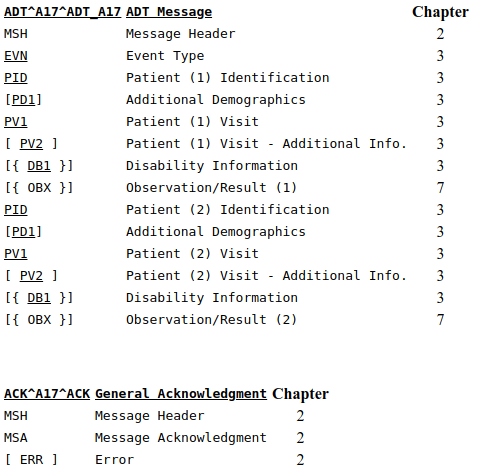
ADT/ACK - swap patients (event A17):
The A17 is used when it is decided that two patients will exchange beds. The patient ID and visit data are repeated for the two patients changing places. See Section 3.6.1, "Swapping a patient," for a discussion of issues related to implementing this trigger event. When other important fields change, it is recommended that the A08 (update patient information) event be used in addition.
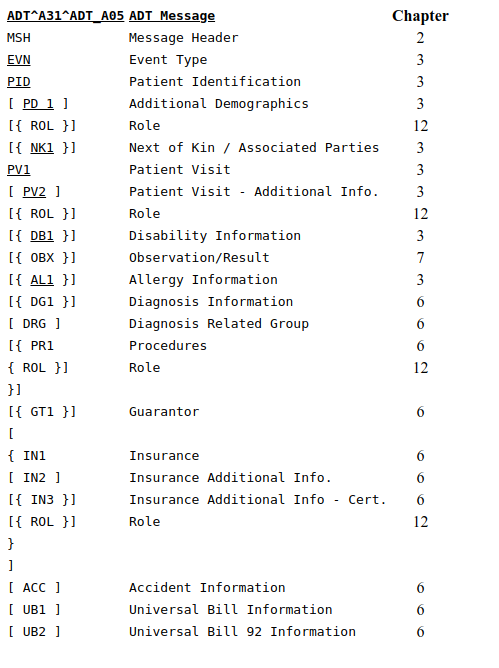
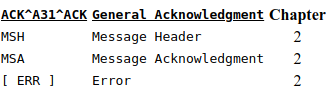
ADT/ACK - update person information (event A31):
An A31 event can be used to update person information on an MPI. It is similar to an A08 (update patient information) event, but an A08 (update patient information) event should be used to update patient information for a current episode. An A28 (add person information) or A31 can also be used for backloading MPI information for the person, or for backloading person and historical information.
To maintain backward compatibility with previous releases, the PV1 segment is required. However, a "pseudo-optional" PV1 can be achieved by valuing PV1-2 - patient class to N - not applicable.
The ROL - Role Segment is used in this message to communicate providers not specified elsewhere. Person level providers with an ongoing relationship are reported in the ROL segment following the PID/PD1 segments. Providers corresponding to the PV1 data are reported in the ROL segment following the PV1/PV2 segments. Providers related to a specific procedure are reported in the ROL segment following the PR1 segment. Providers related to a specific insurance are reported in the ROL segment following the IN1/IN2/IN3 segments. To communicate the begin and end date of the provider, use the ROL-5 - Role Begin Date/Time and the ROL-6 - Role End Date/Time in the ROL segment, with the applicable ROL-3 - Role Code. Refer to section 12.3.3 for the definition of the ROL segment.
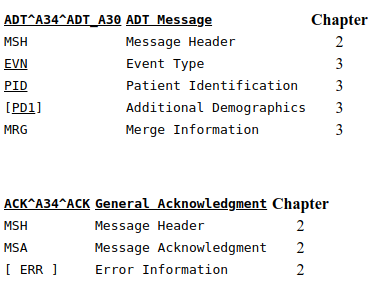
ACK/ADT - merge patient information - patient ID only (event A34):
Event A34 has been retained for backward compatibility only. From V2.3.1 onwards, event A40 (Merge patient - patient identifier list) should be used instead. Only the patient identifier list has changed as a result of the merge. See Section 3.6.2, "Merging patient/person information," for a discussion of issues related to the implementation of merge messages.
An A34 (merge patient information-patient ID only) event was intended for merging or changing patient identifiers. It was used to change patient identifiers on all of this patient's existing accounts.
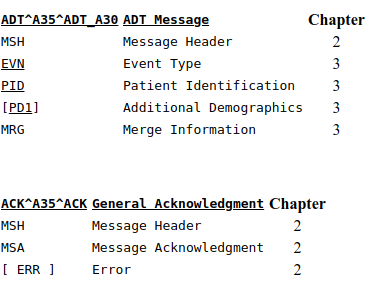
ADT/ACK - merge patient information - account number only (event A35):
Event A35 has been retained for backward compatibility only. From V2.3.1 onwards, event A41 (Merge patient - patient account number) should be used instead. Only the patient account number has changed as a result of the merge. See Section 3.6.2, "Merging patient/person information," for a discussion of issues related to the implementation of merge messages.
An A35 (merge patient information-account number only) event was intended for merging or changing an account number only.
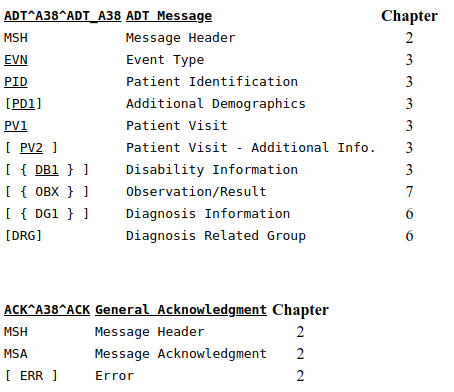
ADT/ACK - cancel pre-admit (event A38):
The A38 event is sent when an A05 (pre-admit a patient) event is cancelled, either because of erroneous entry of the A05 event or because of a decision not to pre-admit the patient after all.
The fields included when this message is sent should be the fields pertinent to communicate this event. When other fields change, it is recommended that the A08 (update patient information) event be used in addition.
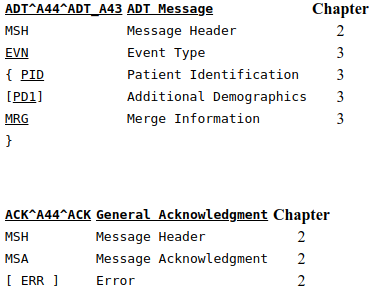
ADT/ACK - move account information - patient account number (event A44):
A move has been done at the account identifier level. That is, a PID-18 - patient account number associated with one PID-3 - patient identifier list has been moved to another patient identifier list.
An A44 event is used to signal a move of records identified by the MRG-3 - prior patient account number from the "incorrect source patient identifier list" identified in the MRG segment (MRG-1 - prior patient identifier list) to the "correct target patient identifier list" identified in the PID segment (PID-3 - patient identifier list).
The account number involved in identifying the account to be moved (MRG-3 - prior patient account number) may or may not have visits. In any case, all subordinate data sets associated with the account number in MRG-3 - prior patient account number are moved along with the account number, from the "incorrect source" ID (MRG-1 - prior patient identifier list) to the "correct target" ID (PID-3 - patient identifier list). No identifiers subordinate to the account number (visit number, alternate visit ID) are valued in this message. This event and the message syntax do, however, allow for the specification of a "new identifier" (PID-18 - patient account number), which may be application and/or implementation-specific and therefore require site negotiation.
All of the identifiers superior to the account number should be valued in both the MRG segment and the PID segment. In this message, the PID-3 - patient identifier list is superior to the account number.
See Sections 3.5.2 "Merging patient/person information" and 3.5.2.1.3 "Move" for a discussion of issues related to the implementation of move messages.
The fields included when this message is sent should be the fields pertinent to communicate this event. When demographic data in other fields change, it is recommended that the A08 (update patient information) event be used in conjunction with this message. However, all PID data associated with the "account number" are treated as updated information.
MessageType ORU Related to Radiology,Pathology,Lab,BloodTransFusion,MicrobiologyData and VitalReports:
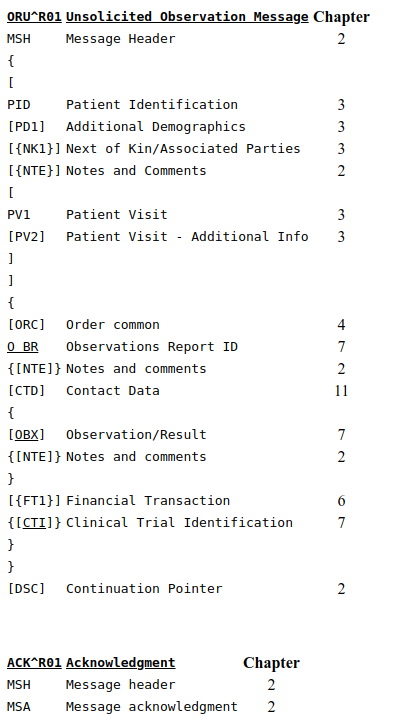
ORU - unsolicited observation message (event R01):
The OUL message is designed to accommodate the laboratory processes of laboratory automation systems. The ORU message is still fully supported by HL7 for transmitting laboratory results to other systems.
With the type (OBX) defined in this chapter, and the OBR defined in Chapter 4, one can construct almost any clinical report as a three-level hierarchy, with the PID segment defined in Chapter 3 at the upper level, an order record (OBR) at the next level and one or more observation records (OBX) at the bottom.
One result segment (OBX) is transmitted for each component of a diagnostic report, such as an EKG or obstetrical ultrasound or electrolyte battery.
The CTD segment in this trigger is used to transmit temporary patient contact details specific to this order.
Note
The ORC is permitted but not required in this message. Any information that could be included in either the ORC or the OBR must be included in the OBR on reporting. Notice also that the ORU (and the QRY) messages accommodate reports about many patients.Many report headers (OBR) may be sent beneath each patient segment, with many separate observation segments (OBX) beneath each OBR. Note segments (NTE) may be inserted after any of the above segments. The note segment applies to the entity that immediately precedes it, i.e., the patient if it follows the PID segment, the observation if it follows the OBR segment, and the individual result if it follows the OBX segment.
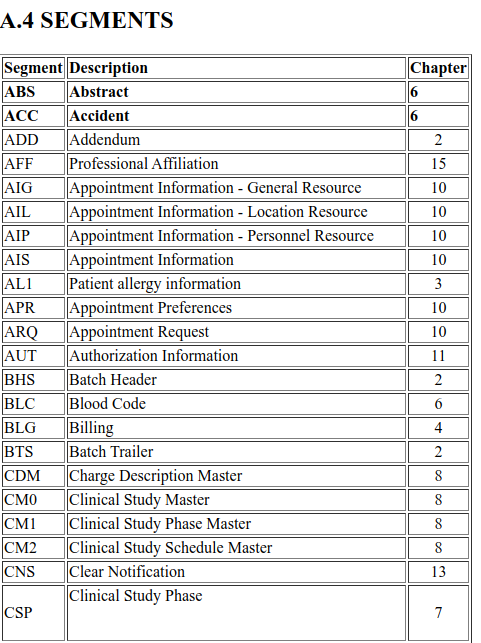
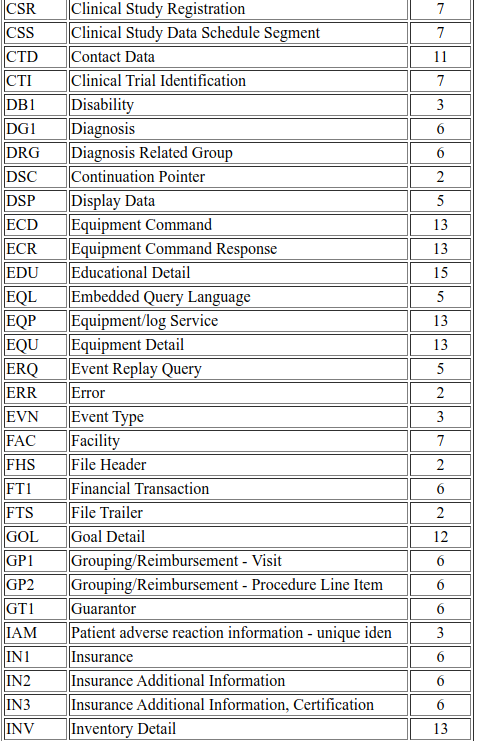
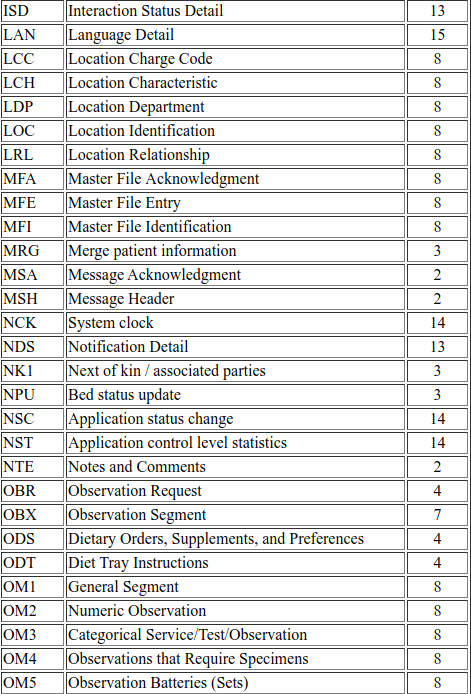
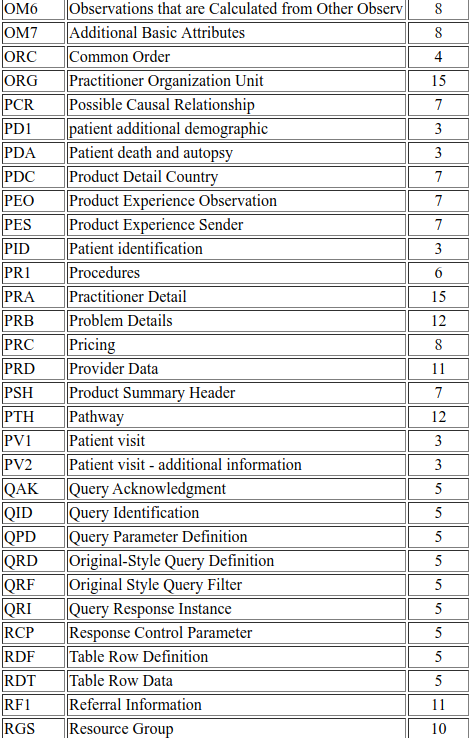
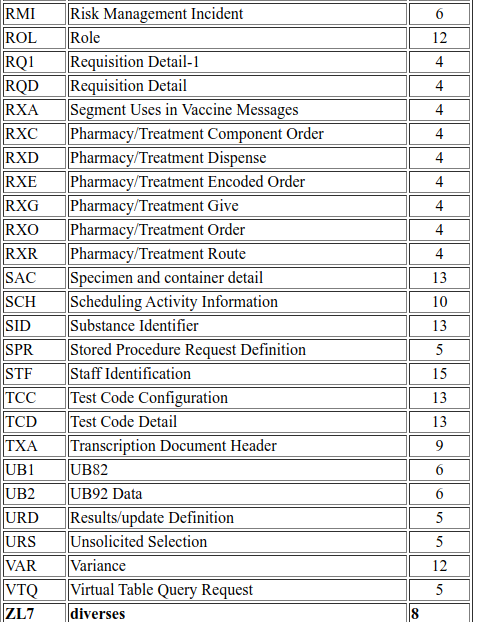
Message Segments:
The following information describes complete list of MessageSegments and its descriptions.
Note
InDepth knowledge on each and every segments should be using URL "http://hl7-definition.caristix.com:9010/HL7%20v2.4/segment".