Annotating and Normalizing Dates:
Many information extraction tasks benefit from or require the extraction of accurate date information.
While ANNIE does produce Date annotations no attempt is made to normalize these dates, i.e. to firmly fix all dates, even partial or relative ones, to a timeline using a common date representation.
The PR in the Tagger_DateNormalizer plugin attempts to fill this gap by normalizing dates against the date of the document in order to tie each Date annotation to a specific date.
This includes normalizing dates such as April 1st, today, yesterday, and next Tuesday, as well as converting fully specified dates (ones in which the day, month and year are specified) into a common format.
Init parameters:
Different cultures/countries have different conventions for writing dates, as well as different languages using different words for the days of the week and the months of the year.
So for example, to specify British English (which means the day usually comes before the month in a date) use en_GB, or for American English (where the month usually appears before the day in a date) specify en_US.
If you need to override the locale on a document basis then you can do this by setting a document feature called locale to a string encoded as above. If neither the initialization parameter or document feature are present or do not represent a valid locale then the default locale of the JVM running GATE will be used.
locale:It is used for parsing dates, in the form lang (_country(_variant)?)?. If left blank the system locale will be used.
Once initialized and added to a pipeline the Date Normalizer has the following runtime parameters that can be used to control it’s behaviour.
Run time parameters
● annotationName: the annotation type created by this PR, defaults to Date.
● dateFormat: the format that dates should be normalized to. The format of this parameter is the same as that use by the Java SimpleDateFormat whose documentation describes the full range of possible formats (note you must use MM for month and not mm). This defaults to dd/MM/yyyy. Note that this parameter is only required if the numericOuput parameter is set to false.
● failOnMissingInputAnnotations: if the input annotations (Tokens) are missing should this PR fail or just not do anything, defaults to true to allow obvious mistakes in pipeline configuration to be captured at an early stage.
● inputASName: the annotation set used as input to this PR.
● normalizedDocumentFeature: if set then the normalized version of the document date will be stored in a document feature with this name. This parameter defaults to normalized-date although it can be left blank to suppress storage of the document date.
● numericOutput: if true then instead of formatting the normalized dates as String features of the Date annotations they are instead converted into a numeric representation. Specifically the first converted to the form yyyyMMdd and then cast to a Double. This is useful as dates can then be sorted numerical (which is fast) into order. If false then the formatting string in the dateFormat parameter is used instead to create a string representation. This defaults to false.
● outputASName: the annotation set to which new annotations will be added.
● sourceOfDocumentDate:this parameter is a list of the names of annotations, annotation features (encoded as Annotation.feature), and document features to inspect when trying to determine the date of the document. The PR works through the list getting the text of feature or under the annotation (if no feature is specified) and then parsing this to find a fully specified date, i.e. one where the day, month and year are all present. Once a date is found processing of the list stops and the date is used as the date of the document.
If you specify an annotation that can occur multiple times in a document then they are sorted based on a numeric priority feature (which defaults to 0) or their order within the document. The idea here is that there are multiple ways in which to determine the date of a document but most are domain specific and this allows previous PRs in an application to determine the document date.
This defaults to an empty list which is taken to assume that the document was written on the day it is being processed. The same assumption applies if no fully-specified date can be found once the whole list has been processed.
Note
Note that a common mistake is to think you can use a date annotated by this PR as the document date. The document date is determined before the document is processed, so any annotation you wish to use to represent the document date must exist before this PR executes.
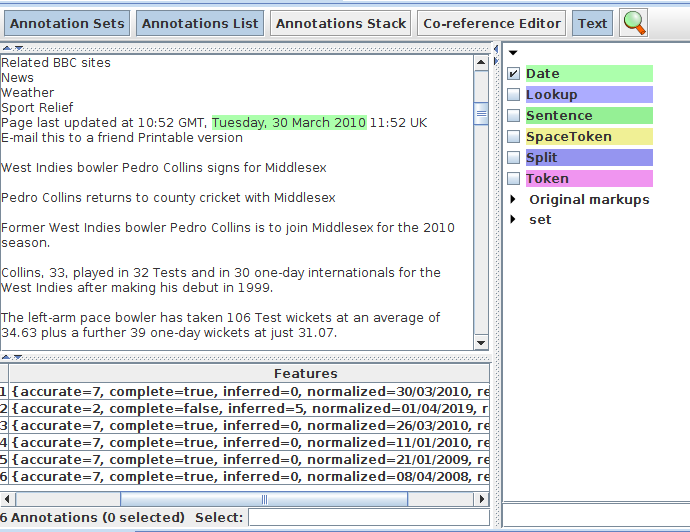
The annotations created by this PR have the following features:
● normalize: the normalized date in the format specified through the relevant runtime parameters of the PR.
● inferred: an integer which specifies which parts of the date had to be inferred. The value is actually a bit mask created from the following flagd: day = 1, month = 2, and year = 4. You can find which (if any) flags are set by using the code (inferred & FLAG) == FLAG, i.e. to see if the day of the month had to be inferred you would do (inferred & 1) == 1.
● complete: if no part of the date had to be inferred (i.e. inferred = 0) then this will be true, false otherwise.
● relative: can take the values past, present or future to show how this specific date relates to the document date.
Infer the Results: