JAPE: Java Annotation Patterns Engine
What is JAPE?
JAPE is specially developed pattern matching language for GATE.It provides finite state transduction over annotations based on regular expressions.
• Each JAPE rule consists of
- – LHS which contains patterns to match
- – RHS which details the annotations to be created
• Rule priority based on pattern length, rule status and rule ordering
• Phases combine to create a grammar
Limitations of gazetteers
• Gazetteer lists are designed for annotating simple, regular features
• Some flexibility is provided, but this is not enough for most tasks
• Recognising e-mail addresses using just a gazetteer would be impossible
• But combined with other linguistic pre-processing results, we have lots of annotations and features.
• POS tags, capitalisation, punctuation, lookup features, etc can all be combined to form patterns suggesting more complex information.
• This is where JAPE comes in.
JAPE example
• A typical JAPE rule might match all university names in the UK, e.g. “University of Sheffield”.
• The gazetteer might contain the word “Sheffield” in the list of cities.
• The rule looks for specific words such as “University of” followed by the name of a city.
• This wouldn't be enough to match all university names, but it's a start.
• Later, we'll see how we can extend this kind of rule to cover other variations.
Simple JAPE Rule
1 2 3 4 5 6 7 8 | |
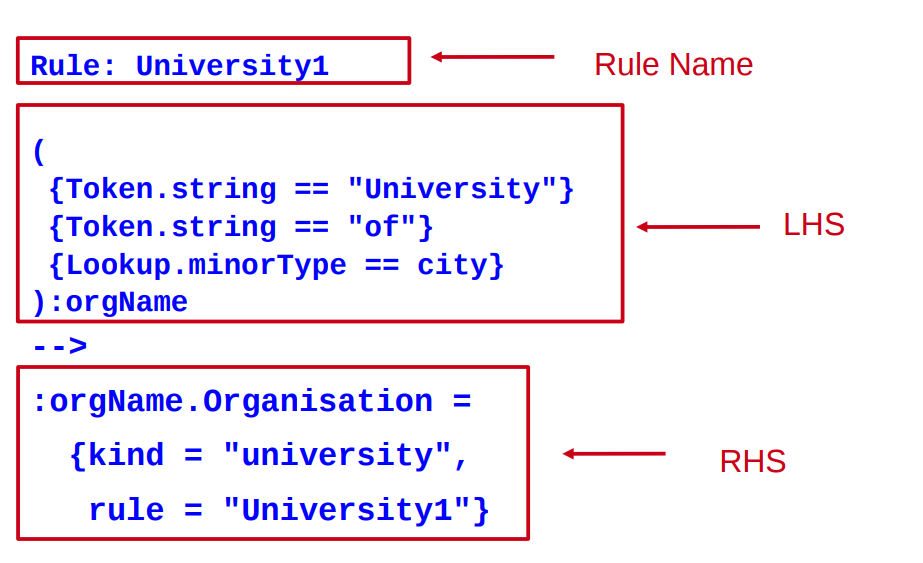
Parts of the rule
LHS of the rule
1 2 3 4 5 6 | |
• LHS is everything before the arrow
• It describes the pattern to be matched, in terms of annotations and (optionally) their features
• Each annotation is enclosed in a curly brace
Matching a text string
• Everything to be matched must be specified in terms of annotations
• To match a string of text, use the “Token” annotation and the “string” feature
{Token.string == "University"}
• Note that case is important in the value of the string
• You can combine sequences of annotations in a pattern
{Token.string == "University"} {Token.string == "of"} {Lookup.minorType == city}
Labels on the LHS
• For every combination of patterns that you want to create an annotation for, you need a label • The pattern combination that you want to label is enclosed in round brackets, followed by a colon and the label • The label name can be any legal name you want: it's only used within the rule itself
( {Token.string == "University"} {Token.string == "of"} {Lookup.minorType == city} ) :orgName Here in this rule the label is orgName
Operators on the LHS
Traditional Kleene and other operators can be used
| OR
* zero or more occurrences
? zero or one occurrence
+ one or more occurrences
1 2 | |
Delimiting operator range
Use round brackets to delimit the range of the operators
({Lookup.minorType == city}|
{Lookup.minorType == country}
)+
One or more cities or countries in any order and combination which is not same as
({Lookup.minorType == city}|
({Lookup.minorType == country})+
)
One city OR one or more countries
Jape RHS
Rule: University1
(
{Token.string == "University"}
{Token.string == "of"}
{Lookup.minorType == city}
):orgName
-->
:orgName.Organisation = {kind = "university", rule = "University1"}
Breaking down the RHS
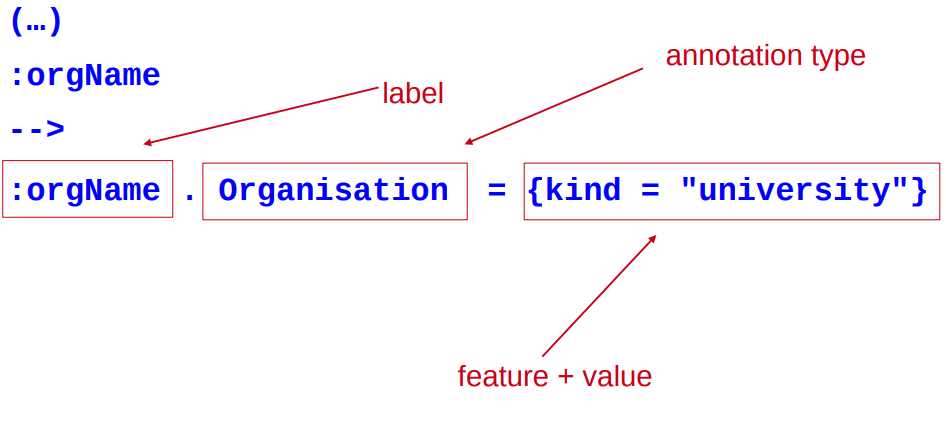
Labels
The label on the RHS must match a label on the LHS
1 2 3 4 5 6 7 | |
This is so we know which part of the pattern to attach the new annotation to
Multiple patterns and labels
• You can have as many patterns and actions as you want
• Patterns can be consecutive, nested, or both!
• Patterns cannot overlap
• We can have several actions on the RHS corresponding to different labels.
• Separate the actions with a comma
1 2 3 4 5 6 7 8 | |
Patterns and actions
• A pattern does not have to have a corresponding action.
• If there's no action, you don't need to label it.
• Here, we want to add a special annotation for university towns
1 2 3 4 5 6 7 | |
Annotations and Features
• The annotation type and features created can be anything you want(as long as they are legal names)
• They don't need to currently exist anywhere
• Features and values are optional, and you can have as many as you like
• All the following are valid:
:orgName.Organization = {}
:orgName.Organization = {kind=university}
:orgName.Organization ={kind=university, rule=University1}
:fishLabel.InterestingFishAnnotation = {scales=yes}
You can also use any Java on the RHS instead, or as well. This is useful for doing more complex things, such as
• Iterating through a list of annotations of unknown number
• Checking a word has a certain suffix before creating an annotation
• Getting information about one annotation from inside another annotation
JAPE Headers
• Each JAPE file must contain a set of headers at the top
Phase: University
Input: Token Lookup
Options: control = appelt
• These headers apply to all rules within that grammar phase
• They contain Phase name, set of Input annotations and other Options.
JAPE Phases
• A typical JAPE grammar will contain lots of different rules, divided into phases
• The set of phases run sequentially over the document
• You might have some pre-processing, then some main annotation phases, then some cleanup phases
• Each phase needs a name, e.g Phase: University
• The phase name makes up part of the Java class name for the compiled RHS actions, so it must contain alphanumeric characters and underscores only, and cannot start with a number
• Rules in the same phase compete for input
• Rules in separate phases run independently
• One phase can use annotations created by previous phases
• Instead of loading each JAPE grammar as a separate transducer in GATE, you can combine them in a multiphase transducer
• A multiphase transducer chains a set of JAPE grammars sequentially
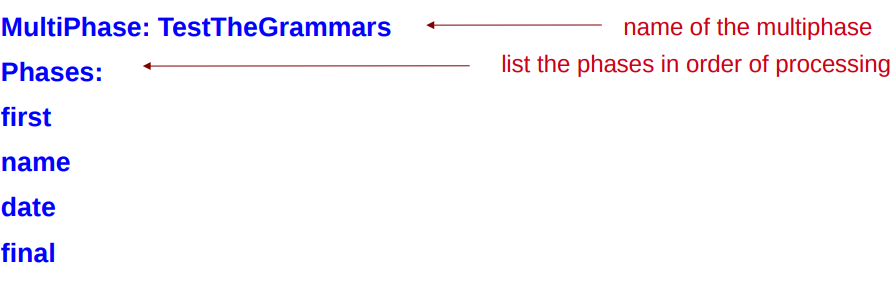
Multiphase transducer
• The multiphase transducer lists the other grammars to be loaded: all you need to load is this file
• In ANNIE this is called main.jape - by default we usually label multiphase transducers with “main” in the filename
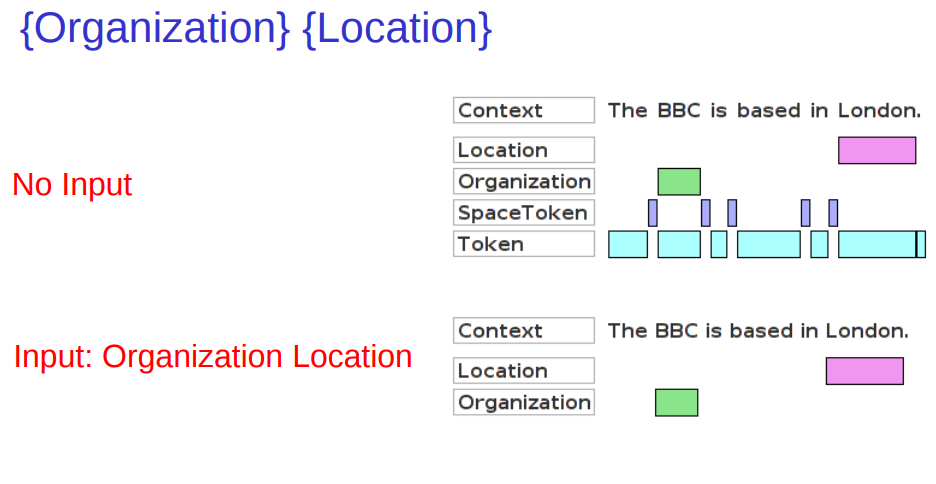
Input Annotations
• The Input Annotations list contains a list of all the annotation types you want to use for matching on the LHS of rules in that grammar phase, e.g.
Input: Token Lookup
• If an annotation type is used in a rule but not mentioned in the list, a warning will be generated when the grammar is compiled in GATE
• If an annotation is listed in Input but not used in the rules, it can block the matching (e.g Split)
• If no input is included, then all annotations are used
Matching styles
Options: control = appelt
• “Rules in the same phase compete for input”
• What happens when 2 rules can match the same input?
• What happens when the same rule can match different lengths of input (e.g. +,* operators)?
• The matching style controls
– Which rule gets applied
– How much document content is ‘consumed’
– Which location to attempt matching next
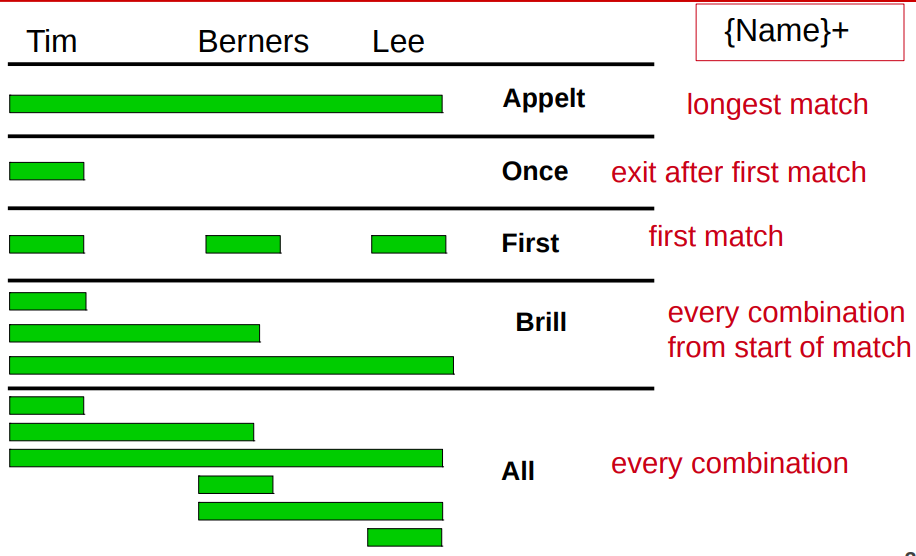
5 different control styles possible:
• appelt (longest match, plus explicit priorities)
• first (shortest match fires)
• once (shortest match fires, and all matching stops)
• brill (fire every match that applies) (this is the default)
• all (all possible matches, starting from each offset in turn)
Appelt style
• In the appelt style, which rule to apply is selected in the following order:
- • longest match
- • explicit priority
- • rule defined first
• Each rule has an optional priority parameter, whose value is an integer
• Higher numbers have greater priority
• If no explicit priority parameter, default value is -1
• Once a match has fired, matching continues from the next offset following the end of the match
Rule: Location1
Priority: 25
Difference between first and once
• With both styles, the first match is fired
• This means they're inappropriate for rules ending in the operators + ? or *
• The difference between the two styles is what happens after a match has been found
• With the once style, the whole grammar phase is exited and no more matches are attempted
• With the first style, matching continues from the offset following the end of the existing match
Difference between brill and all
• Both Brill and all match every possible combination from a given starting position
• When a match has been found, brill starts looking for the next match from the offset at the end of the longest match
• All starts looking for the next match by advancing one offset from the beginning of the previous match
LHS Macros
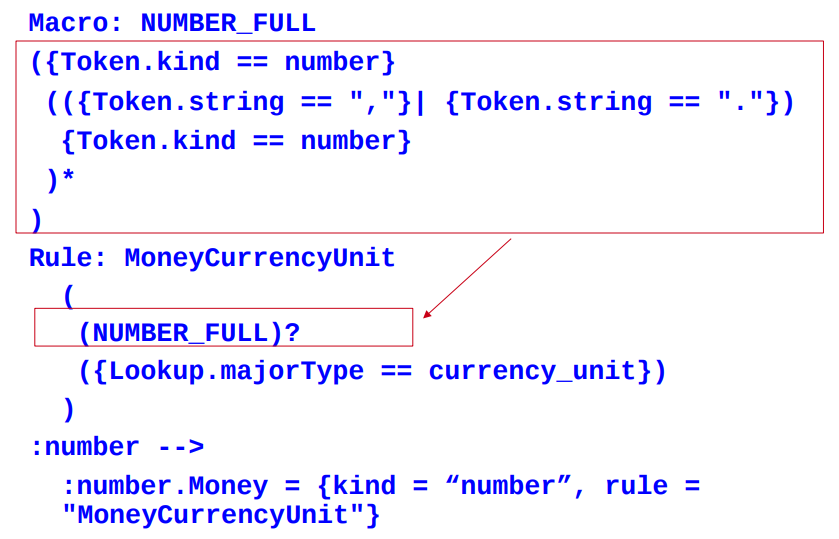
• Macros provide an easy way to reuse long or complex patterns
• The macro is specified once at the beginning of the grammar, and can then be reused by simply referring to its name, in all future rules
• Macros hold for ALL subsequent grammar files
• If a new macro is given later with the same name, it will override the previous one for that grammar
• Macro names are by convention written in capitals, and can only contain alphanumeric characters and underscores
• A macro looks like the LHS of a rule but without a label
Using a macro in a rule
Multi-constraint statements
• You can have more than one constraint on a pattern
• Just separate the constraints with a comma
• Make sure that all constraints are enclosed within a single curly brace
{Lookup.majorType == loc_key,
Lookup.minorType == post}
Is not the same as
{Lookup.majorType == loc_key}
{Lookup.minorType == post}
Negative constraints on annotations (!)
• You can use the ! operator to indicate negation
• Negative constraints are generally used in combination with positive ones to constrain the locations at which the positive constraint can match.
1 2 3 4 5 6 | |
• Matches any uppercase-initial Token, where there is no Lookup annotation starting at the same location
Negative constraints on features (!=)
• The previous example showed a negative constraint on an annotation {!Lookup}
• You can also constrain the features of an annotation
• {Lookup.majorType != stop} would match any Lookup except those with majorType “stop” (stopwords)
• Be careful about the difference between this and {!Lookup.majorType == stop}
• This matches ANY annotation except a Lookup whose majorType is “stop”, rather than any Lookup where the majorType is not “stop”
Comparison operators
• So far, we have compared features with the equality operators == and !=
• We can also use the comparison operators >, >=. < and <=
• {Token.length > 3} matches a Token annotation whose length is an integer greater than 3
Kleene operator for ranges
• You can specify ranges when you don't know the exact number of occurrences of something
• ({Token})[2,5] will find between 2 and 5 consecutive Tokens
• In most cases you do NOT want to use unbounded Kleene operators (*, +) because they are not very efficient
Copying Feature Values to the RHS
• JAPE provides simple support for copying feature values from the LHS to the RHS
(
{Lookup.majorType == location}
):loc
-->
:loc.Location = { type = :loc.Lookup.minorType}
• This copies the value of the Lookup minorType feature from the LHS to the new Location annotation
• Note that if more than one Lookup annotation is covered by the label, then one of them is chosen at random to copy the feature value from
• It's best not to use this facility unless you know there is only one matching annotation
Example Scenario
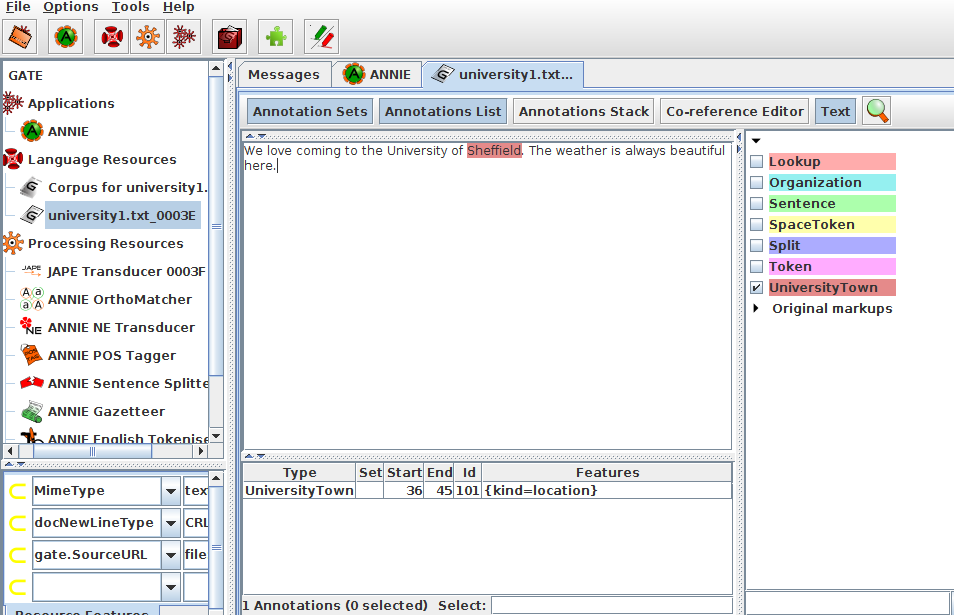
Now we will take the previous example that is to annotate city which is followed by "University Of" as UniversityTown and also we will copy the value of the majorType of the city to a new feature of this annotation, called “kind”
1 2 3 4 5 6 7 8 9 10 11 12 | |
Load this Japegrammar into Gate(Right click on the processing Resources button from the resource pane and add your concerned grammar stored in a file with .jape extension) ,then add that resource to your current application and run it on the specific corpus which contains the document regarding the university and view result.