FAQ
1. How to assign or edit units, roles or skills to staff ?
check this link Employees Settings
2. How to add shift to a position, which is not released in release schedules ?
check this link Add Position
3. How to float a shift in balance or Multi unit pages ?
In Multi unit View: check this link Float Shift
In Balance View: check this link Float Shift
4. How to see complete Schedules/calendar of a staff ?
check this link Staff Calendar
5. How to print all 6 weeks schedules of a Unit ?
check this link Print Schedules
6. Whom I report about any bugs or suggestions ?
For any support related queries please mail us at kpai.support@crmc.health
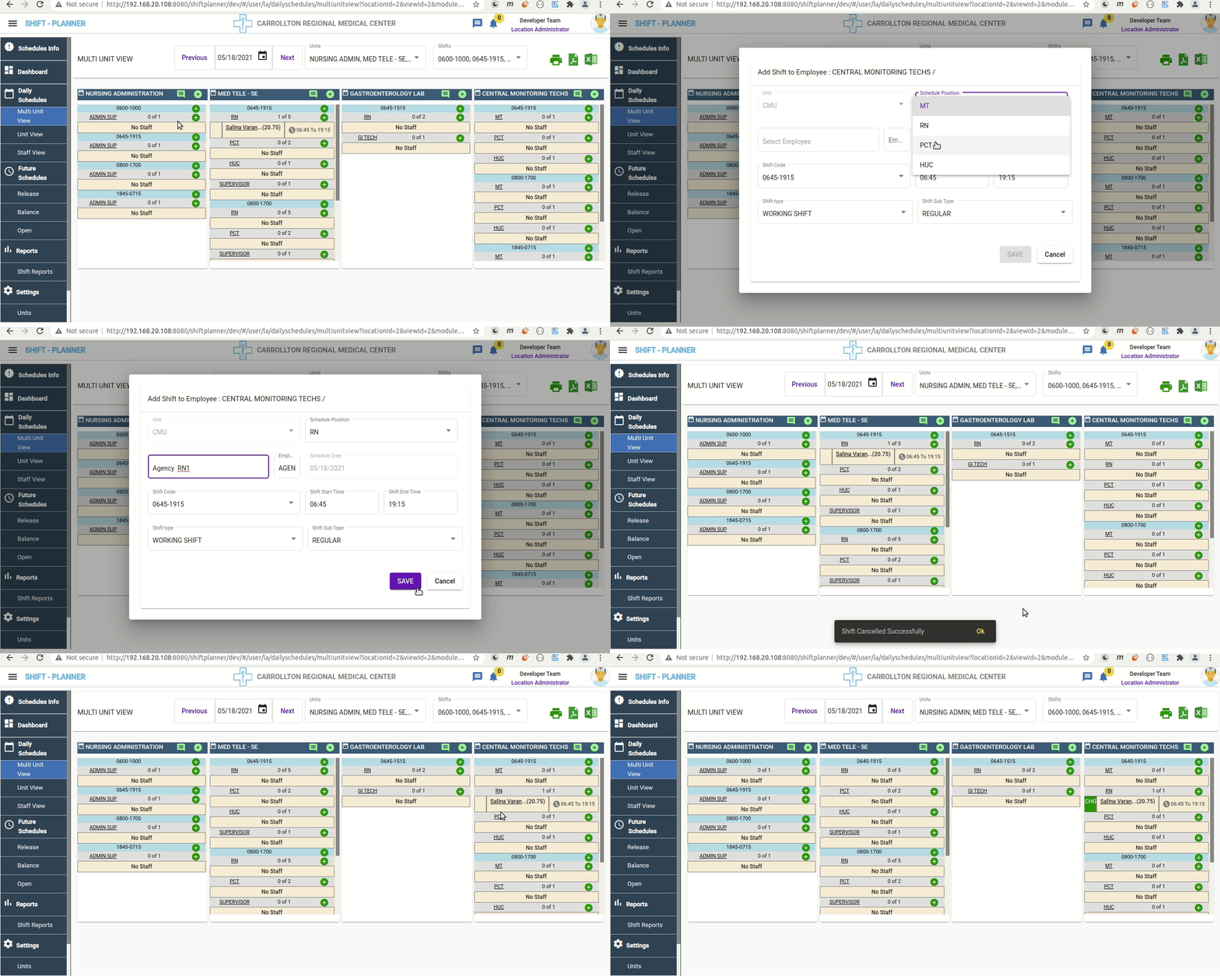
7. How can I float staff from one unit to another unit, but target unit don't have/released required position ?
- First you need to add required position and shift from top + button beside Unit name in Multi Unit View
- While adding above we need to add place holder staff name (Ex: Agency RN1, we created few dummy staff names like this for all positions, to use for multiple purposes)
- So now you can able to see required position and Shift in target Unit with Place holder staff added.
- Now Delete the place holder staff which is not required.
-
Now you can float required staff from other unit to target unit under new position.
A. Click on Up/Down Arrow icon beside staff name in source unit
B. Click on required position name (under required Shift) , then staff will be moved from Source unit to target unit