Nurse Connect Workflow Documentation
The main objective of Nurse Connect application is to fill the gap between freelance nureses and Hospitals. Hospital required nurse services on demand based on census. And at other end nurses are looking for Shift openings in different hospitals based on their availability.
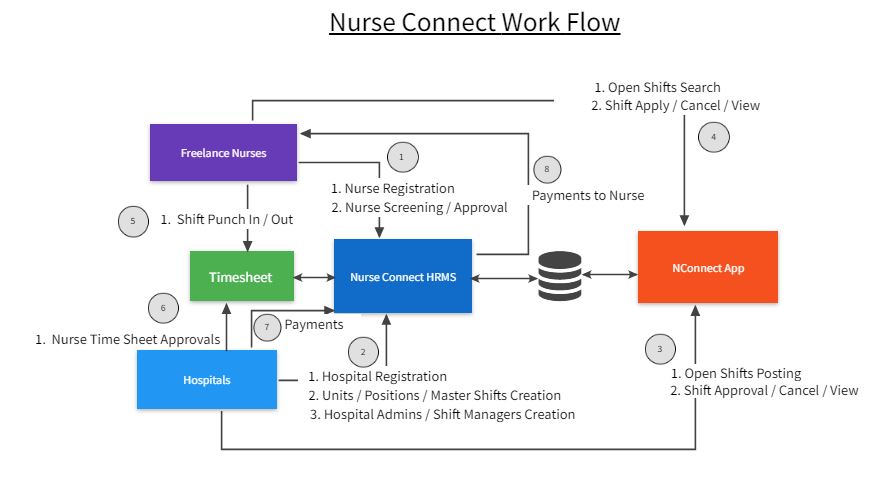
Workflow steps
- Staff / Nurse Registration
- Staff Registration Approval Process
- Hospitals Registration
- Hospital Shift Admin Users Creation
- Open Shifts posting to Nurse Connect
- Shift Request Process by Nurses
- Shift Approval Process by Shift Admins
- Shift Reports (Open Shift, Pending Approval, Approved Shifts etc)
Staff /Nurse Registration:
Nurses who need to request open shifts in hospitals need to be register with nurse connect first. Then the nurse connect administration check registration details and documents and approve.
Following are the basic requirements need to be filled by urse while registration
HR DOCUMENTS
- License/Certification
- Skills Checklist
- ACLS
- BLS
- PALS
- Criminal Background (within last 12 months)
- OIG Search (within last 12 months)
- GSA Search (within last 12 months)
- References
- Resume
- Signed Job Description
- OSHA Packet
EH DOCUMENTS
- UDS 10 Panel (within last 12 months)
- MMR
- VARICELLA
- TB PPD (within last 12 months)
- Flu (within last 12 months required for start from Nov to Mar)
- Tdap (within last 10 years)
- Fit testing (within last 12 months)
ONSITE ORIENTATION DOCUMENTS
- POC glucometer
- Unit orientation
- Facility orientation including EKG
Personal Details
EmailId, Phone etc.
Staff Registration Approval Process
After uploading above documents by nurse, Nurse Connect Administrator will check and approve the staff. Once approval process, Nurse Connect credentials will be sent to Staff/Nurse through personal Email Id. EMail Id will be considered as unique for users registration in Nurse Connect Application. So no two users should not have same email id.
Hospitals Registration
Hospital who required nurse services and on demand base need to register basic hospital details with Nurse Connect. These details includes Hospital location, nurse units, Positions etc.
Hospital Shift Admin Users Creation
Once after Hospital registration, there will be option for creating Hospital shift management admins in Nurse Connect applications. These users can get access for Nurse Connect to manage all shift details of the hospital in Nurse Connect.
Open Shifts posting to Nurse Connect
Hospital Shift Admins can post their hospital open shifts in Nurse Connect. We are planning to provide following three options to post shifts in Nurse Connect.
- From the Nurse Connect interface can create open slots by Unit Name, Position, Date and required open slots.
- Admins can import Standard Excel template into Nurse Connect
- If Hospital have internal Shift Management Software (Like Shift Planner in CRMC) can directly communicate with Nurse Connect through API. So Both Applications will communicate through standard API.
Shift Request Process by Nurses
Nurses can apply for open shifts posted by Hospitals. There will be a check conditions before applying for the post. Like qualifications and skill set required by open shift from the Hospitals. For the same open slot any number of nurses can apply.
Shift Approval Process by Shift Admins
Hospital Admins can check and approve requests from nurses for the open slots. They can choose selected nurses based on their Skill set and rate carrds etc. Approved Slots information will be view from Nurse Connect interface by both Admins and Nurses. Nurse Connect Can also push this information directly to Hospital internal Shift Management softwares through API.
Shift Reports (Open Shift, Pending Approval, Approved Shifts etc)
Nurse Connect will provide interface for different reports like Open Shifts, Pending Approval, Approved shifts etc.
ABOVE ARE THE PRELIMINARY THOUGHTS ABOUT WORKFLOW IN NURSE CONNECT APPLICATION. IN UPCOMING DISCUSSIONS WILL UPDATE THIS DOCUMENT CONTINUOUSLY.