Nurse Connect UI Design Flow
1. Global Layout
1.1 Top Navigation Bar
- Components:
- Application Logo (Left-Aligned).
- Search Bar (Optional).
- Notifications Icon.
- User Profile (Right-Aligned) with:
- Profile Picture.
- Dropdown Menu (Settings, Logout).
1.2 Side Navigation Bar
- Collapsible Sidebar with Role-Specific Menu Options.
- Primary Menu Items (e.g., Dashboard, Shifts, Compliance, Reports).
- Expandable Submenus for Secondary Items.
2. Nurse Module UI Flow
2.1 Nurse Dashboard
- Purpose: Provide a quick overview of key metrics and actions.
- Components:
- Upcoming Shifts (List of next 3 shifts with date, time, and location).
- Compliance Status Summary (Valid, Pending, Expiring Soon).
- Monthly Earnings Overview (Graph or total amount).
2.2 Shifts Page
- Purpose: Allow nurses to view and apply for shifts.
- Components:
- Filter Options (Date, Department, Rate Range).
- Shift Cards/List:
- Shift Details (Department, Date, Time, Rate).
- Apply Button for Available Shifts.
2.3 Compliance Page
- Purpose: Track and manage compliance items.
- Components:
- List of Compliance Items:
- Item Name, Status (Valid, Pending, Expiring), Expiration Date.
- Upload Button for Missing or Expired Documents.
- Notifications for Pending Items.
2.4 Time Slips
- Purpose: Submit and track time slips for completed shifts.
- Components:
- List of Submitted Time Slips:
- Shift Date, Hours Worked, Status (Pending, Approved, Rejected).
- Form for New Time Slip Submission:
- Shift ID, Clock-In, Clock-Out, Notes.
3. Hospital Module UI Flow
3.1 Hospital Dashboard
- Purpose: Provide an overview of staffing metrics and compliance.
- Components:
- Active Shifts Summary (Number of shifts, Filled/Unfilled).
- Vendor Performance Overview.
- Compliance Alerts for Staff (Pending or Expiring Items).
3.2 Shift Management
- Purpose: Post and manage shift requirements.
- Pages:
- Post New Shift:
- Form with fields for Department, Date, Time, Rate, and Positions.
- Manage Shifts:
- List of Posted Shifts:
- Filled, Open, or Closed Status.
- Action Buttons (Edit, Close).
3.3 Compliance Tracking
- Purpose: Monitor staff compliance for hospital units.
- Components:
- List of Staff Members with Compliance Status.
- Filter by Unit, Compliance Status (Valid, Pending, Expired).
- Drill-Down Details for Individual Compliance Items.
3.4 Reports
- Purpose: Generate and view hospital-level reports.
- Components:
- Financial Reports (Monthly Costs, Shift Expenditures).
- Shift Reports (Filled/Unfilled Shifts, Fulfillment Rate).
- Compliance Reports (Pending, Expired Items).
4. Vendor Module UI Flow
4.1 Vendor Dashboard
- Purpose: Provide an overview of nurse staffing and compliance.
- Components:
- Shifts Fulfilled Summary.
- Nurse Compliance Summary (Valid, Pending, Expired).
- Financial Overview (Earnings, Pending Payments).
4.2 Manage Nurses
- Purpose: Add and monitor vendor-employed nurses.
- Pages:
- Add Nurse: Form to register a new nurse.
- Compliance Page: List of Nurses with Compliance Status.
4.3 Shift Applications
- Purpose: Apply for shifts on behalf of nurses.
- Components:
- Available Shifts List (Similar to Nurse Shifts Page).
- Apply Button:
- Assign a Vendor-Employed Nurse to the Shift.
4.4 Invoices
- Purpose: Monitor payments for fulfilled shifts.
- Components:
- List of Invoices with Status (Pending, Paid, Disputed).
- Downloadable Line Items for Detailed Costs.
5. Compliance Team Module UI Flow
5.1 Compliance Dashboard
- Purpose: Provide an overview of compliance tasks.
- Components:
- Pending Compliance Items Summary.
- Notifications for Expiring Compliance.
5.2 Validate Compliance Items
- Purpose: Review and approve/reject compliance documents.
- Components:
- List of Pending Items:
- Item Name, Uploaded Document Link, Nurse Name.
- Approve/Reject Buttons with Comments Section.
5.3 Compliance Reports
- Purpose: Generate reports on compliance status.
- Components:
- Drill-Down Filters by Nurse, Vendor, Hospital.
- Export Options (PDF, Excel).
6. General Features
6.1 Notifications
- Purpose: Notify users about system updates, shifts, or compliance issues.
- Placement: Icon on Top Navigation Bar.
- Details:
- Alerts for Expiring Compliance Items.
- Shift Application Status Updates.
6.2 Settings
- Purpose: Manage user preferences and account details.
- Components:
- Update Profile Information.
- Change Password.
- Notification Preferences.
7. UI Wireframe Flow Diagram (Mermaid)
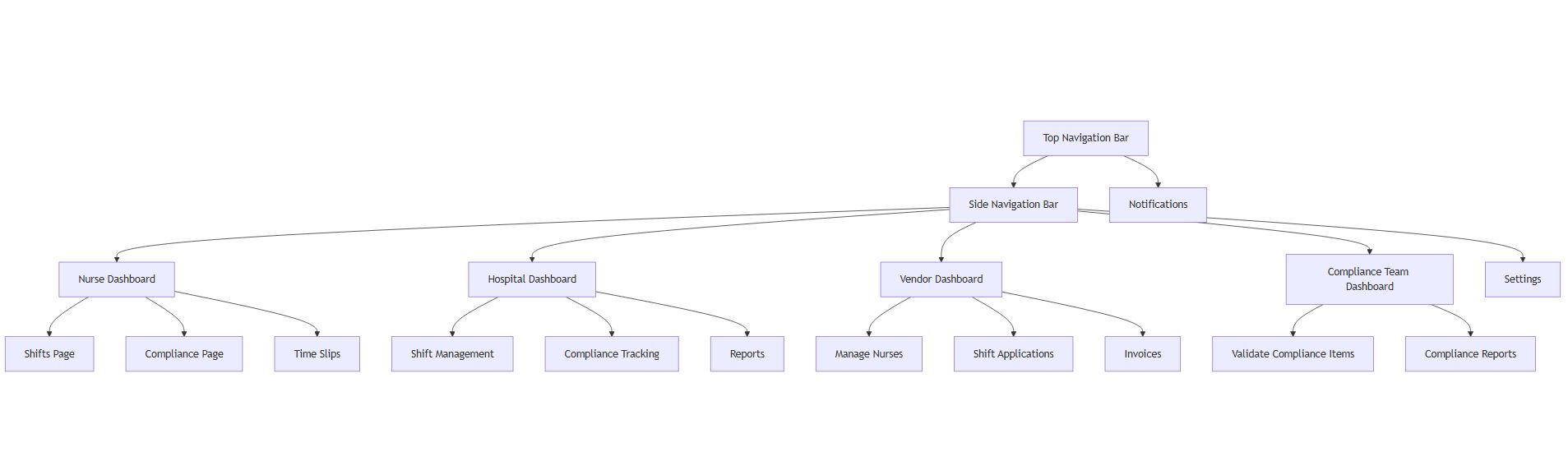
graph TD
    A[Top Navigation Bar] --> B[Side Navigation Bar]
    B --> C[Nurse Dashboard]
    C --> D[Shifts Page]
    C --> E[Compliance Page]
    C --> F[Time Slips]
    B --> G[Hospital Dashboard]
    G --> H[Shift Management]
    G --> I[Compliance Tracking]
    G --> J[Reports]
    B --> K[Vendor Dashboard]
    K --> L[Manage Nurses]
    K --> M[Shift Applications]
    K --> N[Invoices]
    B --> O[Compliance Team Dashboard]
    O --> P[Validate Compliance Items]
    O --> Q[Compliance Reports]
    B --> R[Settings]
    A --> S[Notifications]