Laboratory Staffing and Routine Workflow Overview
1. Staffing Overview (Total Staff: 23)
| Role | Count | Responsibilities |
|---|---|---|
| Lab Director | 1 | Oversees all operations, ensures regulatory compliance (CAP/CLIA), strategic planning, budgeting, quality assurance, and accreditation. |
| Lab Supervisor | 1 | Manages day-to-day operations, ensures adherence to SOPs, coordinates staffing schedules, monitors KPIs. |
| Lead Technologists | 3 | Provide subject-matter expertise (Chemistry, Hematology, Microbiology), support training, method validation, shift leads. |
| Phlebotomists | 9 | Patient identification, sample collection, labeling, and transport. |
| Medical Technologists | 9 | Analytical testing, instrument maintenance, result review, quality control. |
2. Routine Laboratory Workflow
2.1 Pre-Analytical Phase
-
Step 1: Patient Registration
-
Trigger: Initiated via EMR
- Exception: Reference lab patients manually entered into LIS
-
Outcome: Correct demographic linkage
-
Step 2: In-Patient Admission
-
Captured in EMR (room, physician, contact)
-
Enables location-based tracking and linkage
-
Step 3: Lab Order Entry
-
Types:
STAT,Timed,Routine,Urgent - Orders flow from EMR to LIS via interface
- Prioritization tags and alerts are auto-assigned
📋 2.2 Order Tracking & Sample Collection
-
Step 4: Dashboard Visibility
-
Nursing: Track active/pending orders
-
Phlebotomy: Test type, patient location, status
-
Step 5: Handheld Device Sync
-
Sync to barcode scanners & label printers
-
Fallback: Manual collection log if sync fails
-
Step 6: Sample Collection Protocol
-
Go to location → scan armband → print label → draw & label specimen
- Prioritize urgent specimens
🔬 2.3 Analytical Phase
-
Step 7: Specimen Receipt
-
Logged into LIS by Phleb/Med Tech
-
Includes condition, time, accessioning, custody
-
Step 8: Specimen Processing & Testing
-
Centrifugation → Aliquoting → Instrument loading
- Performed by Med Techs; results auto-feed into LIS
✅ 2.4 Post-Analytical Phase
-
Step 9: Auto-Verification
-
Criteria: No QC flags, no criticals, within delta range
-
Exceptions: Hemolysis, Lipemia, Icterus, Criticals, Non-linear
-
Step 10: Manual Verification
-
Med Tech checks flags, graphs, and adds comments (e.g., "Hemolyzed specimen")
3. Glitches and Exceptions
a. Analyzer Push Errors / Non-linear Results
Occasionally, analyzer sends results beyond measurable linear range to LIS.
LIS may truncate or reject values unless appropriately configured.
Requires rerun with dilution or reporting as “>x” or “<x” with comment.
b. Critical / Abnormal Result Workflow
System triggers alert on Resulting Worklist.
Tech verifies results and selects appropriate “Canned Comments” (e.g., “Repeat test confirmed”, “Provider notified verbally”).
Policy-based critical call documentation (e.g., nurse/MD name, time, callback number).
4. Recommendations (Based on Observed Workflow Gaps)
Improve LIS Logic: Ensure analyzer interface accounts for pushout of non-linear values (prevent loss of numeric result).
Enhance Device Redundancy: Include backup handheld device or offline mode for downtime scenarios.
Phlebotomy Audits: Periodic audits to validate ID confirmation and bedside labeling accuracy.
Comment Standardization: Expand and standardize canned comment library with medical director review.
TAT Monitoring: Introduce automated alerts for delayed STAT orders or sample receipt mismatch.
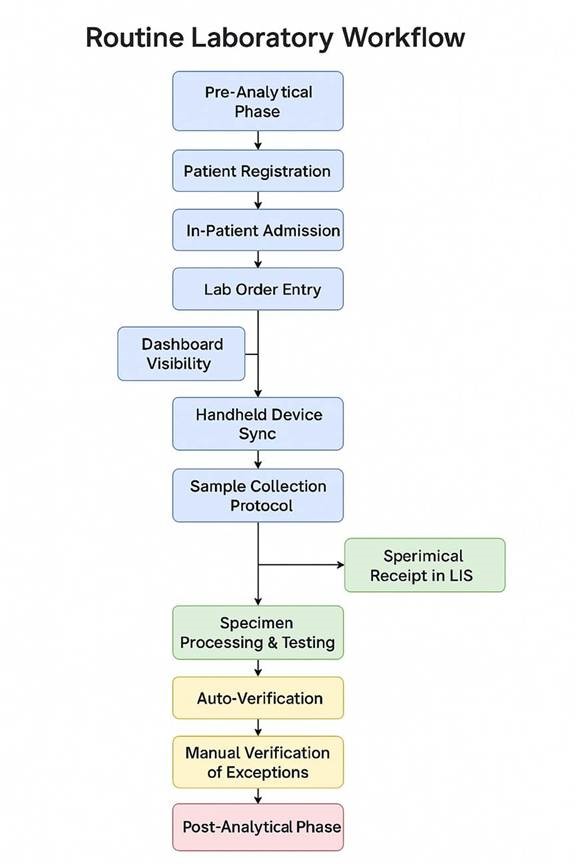 

📌 Software Development Rules for Routine Laboratory Workflow
These rules are categorized for clarity and cover various aspects of the software development lifecycle.
I. Requirements and Design
Traceability of Requirements: Every software feature and module must be directly traceable back to a specific step, trigger, exception, outcome, detail, purpose, or system action described in the routine laboratory workflow. Use a requirements management tool to maintain this traceability.
User-Centric Design: The user interface (UI) and user experience (UX) for all modules (Patient Registration, Order Entry, Dashboards, Specimen Tracking, Result Verification, etc.) must be designed with the end-users (front desk staff, nurses, phlebotomists, medical technologists) in mind. Conduct user research and usability testing.
Role-Based Access Control (RBAC): Implement a robust RBAC system to ensure that users can only access the features and data relevant to their roles (e.g., phlebotomists can view their collection list but not verify results). This should align with the personnel mentioned in the workflow (Phleb, Med Tech).
Data Integrity and Validation: Implement comprehensive data validation rules at every entry point to ensure data accuracy and consistency. This includes format checks, range checks, mandatory fields, and cross-field validations (e.g., ensuring the ordered tests are appropriate for the patient's demographics).
Error Handling and Logging: Implement robust error handling mechanisms to gracefully manage unexpected situations. All errors, warnings, and significant system events must be logged with sufficient detail for debugging and auditing purposes. Include timestamps, user actions, and relevant data.
Interface Engine Integration: The integration with the Electronic Medical Record (EMR) via the interface engine must be reliable and fault-tolerant. Implement mechanisms for monitoring the interface, handling data transformation and mapping, and alerting administrators of any integration issues.
Prioritization Logic: The automatic prioritization of orders (STAT, Timed, Routine, Urgent) must be implemented accurately based on the order type received from the EMR. The system should visually differentiate these priorities in the dashboards and worklists.
Alerting and Notifications: Implement a flexible alerting system to notify relevant users about critical events, such as STAT orders, failed sample collection attempts, critical results, and exceptions requiring manual review. Allow for configurable alert rules and delivery methods.
Audit Logging: Maintain a comprehensive audit log of all system activities, including user logins, data modifications, order status changes, result verifications, and system configuration changes. This log should be secure and tamper-proof.
Scalability and Performance: Design the system architecture to be scalable to handle increasing volumes of data and user load. Ensure optimal performance for critical operations like order entry, dashboard loading, and result retrieval.
Security and Privacy: Adhere to all relevant security and privacy regulations (e.g., HIPAA, GDPR) to protect patient data. Implement strong authentication, authorization, and encryption mechanisms. Conduct regular security audits and vulnerability assessments.
Internationalization and Localization (Consideration): If the system might be used in multiple locations or countries, consider designing it with internationalization (i18n) and localization (l10n) in mind to support different languages, date formats, and units of measure.
II. Development and Coding Standards
Coding Standards and Style Guides: Adhere to well-defined coding standards and style guides for the chosen programming languages and frameworks. Ensure consistency across the codebase. Use code linters and formatters to enforce these standards.
Modularity and Reusability: Design the software in a modular fashion with reusable components to promote maintainability, testability, and reduce code duplication.
Version Control: Use a robust version control system (e.g., Git) for all source code. Follow a clear branching strategy for development, testing, and release management.
Code Reviews: Conduct thorough code reviews by multiple developers to identify potential bugs, security vulnerabilities, and areas for improvement.
Documentation: Write clear and comprehensive documentation for all aspects of the software, including architecture, design, APIs, and user manuals. Use inline comments to explain complex code sections.
Dependency Management: Use a reliable dependency management tool to manage external libraries and dependencies. Regularly update dependencies to address security vulnerabilities and benefit from new features.
Secure Coding Practices: Follow secure coding practices to prevent common vulnerabilities such as SQL injection, cross-site scripting 1 (XSS), and insecure data handling. Conduct static and dynamic code analysis for security.
Performance Optimization: Write efficient code and optimize database queries to ensure good performance. Identify and address performance bottlenecks through profiling and testing.
Accessibility: Design the user interface to be accessible to users with disabilities, adhering to accessibility standards (e.g., WCAG).
III. Testing and Quality Assurance
Comprehensive Test Strategy: Develop a comprehensive test strategy that includes unit tests, integration tests, system tests, and user acceptance testing (UAT).
Unit Testing: Write unit tests to verify the functionality of individual components and modules in isolation. Aim for high test coverage.
Integration Testing: Write integration tests to verify the interactions between different modules and systems, including the EMR interface and handheld device synchronization.
System Testing: Perform end-to-end testing of the entire system to ensure that all components work together correctly and meet the specified requirements.
User Acceptance Testing (UAT): Involve end-users (nurses, phlebotomists, med techs) in UAT to ensure that the system meets their needs and is user-friendly. Gather feedback and iterate on the design based on UAT results.
Performance Testing: Conduct load testing and stress testing to evaluate the system's performance under different load conditions and identify potential performance issues.
Security Testing: Perform security testing, including penetration testing and vulnerability scanning, to identify and address security vulnerabilities.
Regression Testing: Perform regression testing after any code changes or bug fixes to ensure that existing functionality remains unaffected.
Test Data Management: Establish a well-managed test data environment that reflects realistic scenarios and edge cases.
Bug Tracking and Management: Use a bug tracking system to log, track, and manage defects throughout the testing process. Define clear bug severity and priority levels.
IV. Deployment and Maintenance
Automated Deployment: Implement automated deployment processes to ensure consistent and reliable deployments across different environments (development, testing, production).
Rollback Strategy: Define a clear rollback strategy to revert to a previous stable version of the software in case of deployment failures or critical issues.
Monitoring and Alerting: Implement comprehensive system monitoring to track key performance indicators (KPIs), resource utilization, and system health. Set up alerts for critical issues.
Regular Maintenance: Establish a schedule for regular maintenance tasks, such as database backups, log file management, and security patching.
Change Management: Implement a formal change management process to control and track all changes to the software and infrastructure.
Support and Training: Provide adequate support and training to end-users on how to use the system effectively. Develop comprehensive user documentation and training materials.
Disaster Recovery Plan: Develop and regularly test a disaster recovery plan to ensure business continuity in the event of a major system failure.
Data Archiving and Retention: Define policies for data archiving and retention in compliance with relevant regulations and organizational requirements.
V. Specific Rules Based on Workflow Steps
In addition to the general rules above, here are some specific rules related to the workflow steps:
Patient Registration (Step 1):
The system must accurately capture all required patient demographics as defined by the organization and regulatory bodies.
The manual entry process for reference lab patients in the LIS must have clear data validation and audit trails.
The system should prevent duplicate patient registrations based on defined matching criteria.
In-Patient Admission (Step 2):
The LIS must seamlessly integrate with the EMR to receive and store admission details.
Changes in patient location (room) and physician should be automatically updated in the LIS.
Lab Order Entry (Step 3):
The system must support the entry of different order types (STAT, Timed, Routine, Urgent) with appropriate indicators.
The interface engine must reliably transmit orders from the EMR to the LIS.
The automatic assignment of prioritization tags and alerts must be configurable.
Dashboard Visibility (Step 4):
Nursing and phlebotomy dashboards must provide real-time, accurate information on order status.
Dashboards should be customizable to allow users to view relevant information efficiently.
Performance of the dashboards should be optimized for quick loading times.
Handheld Device Sync (Step 5):
The synchronization process with handheld devices must be secure and reliable.
The system should provide clear feedback to the user about the sync status.
The fallback mechanism to a manual collection log must be well-documented and easily accessible.
Sample Collection Protocol (Step 6):
The system should support barcode scanning for patient identification and sample labeling.
The auto-printing of labels at the bedside must be reliable.
The system should provide visual cues or alerts for urgent specimens.
Specimen Receipt in LIS (Step 7):
The LIS must provide a clear interface for logging specimen receipt details (condition, time, accessioning).
The system must support chain of custody tracking for critical samples and send-outs.
Specimen Processing & Testing (Step 8):
The LIS should track the location and status of specimens throughout the analytical phase.
The automatic data feed from analyzers to the LIS must be accurate and timely.
Auto-Verification (Step 9):
The auto-verification rules must be configurable and based on established laboratory protocols (QC flags, critical values, delta checks).
The system must clearly flag exceptions requiring manual review.
Manual Verification of Exceptions (Step 10):
The Resulting Worklist for manual review should be user-friendly and provide all necessary information (instrument flags, graphs, sample details).
The system should allow for easy entry of standardized comments for common exceptions (e.g., "Hemolyzed specimen").
By adhering to these extensive software development rules, the development team can create a robust, efficient, and reliable Laboratory Information System that effectively supports the routine laboratory workflow. Remember that these rules should be reviewed and updated as the workflow evolves and new requirements emerge.